
Custom Skin Creator Minecraft
Blakzero
Installs
10M+
Developer
Blakzero
-
Category
Productivity
-
Content Rating
Rated for 3+
Developer Email
Privacy Policy
https://blakzero.com/privacy-policy/
Screenshots
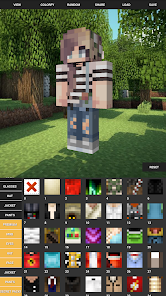
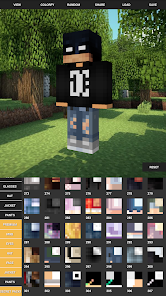
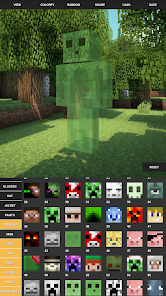
Expert Review
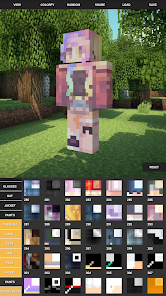
I've been using Custom Skin Creator for Minecraft for a while now, and it's become my go-to tool for personalizing my character. This app, as the name suggests, is all about creating and editing custom skins for Minecraft. It launched a few years back and you can easily find it and download it for free from the Google Play Store. It's had millions of installs, which shows how popular it is with the community. You don't need to register an account to start using it, which is super convenient. The app itself is free to install and use, though there are some ads that pop up. There are also optional in-app purchases if you want to remove those ads or unlock some extra premium content, but the core features are completely free.
Using the app is pretty straightforward. You start with a base skin template and then just tap to change colors, add details, or draw freehand. I like to browse the community gallery for inspiration first. A good tip is to use the zoom function for the finer details like faces or patterns on the arms. Once you're happy with your creation, you can export it directly to your Minecraft game. The process to install the new skin into Minecraft is explained step-by-step within the app, which is really helpful for newcomers.
Compared to other skin editors like 'Skin Seed' or 'Minecraft Skins', I keep coming back to this one. 'Skin Seed' has more of a block-by-block editor feel, which can be precise but slower. This app feels more intuitive for drawing and painting, which suits my style better. While 'Minecraft Skins' has a massive library of pre-made skins to download, I prefer making my own from scratch, and this app's tools are just more responsive and fun to use. For someone who wants control and a smooth creative process, this is the app I'd recommend downloading.
Key Functional Highlights
- 🎨 Intuitive Pixel Art Editor: The drawing tools feel natural, like a simple paint program scaled down for pixels. You have brushes, an eraser, a fill bucket, and a color picker, making it easy to bring any design to life without the complexity of some other editors.
- 📂 Seamless Minecraft Integration: Once your skin is done, the app provides clear instructions on how to get it into your game. You can save the PNG file directly to the right folder on your device, making the install process for Minecraft almost automatic.
- 👥 Vibrant Community Gallery: Need ideas? The in-app gallery is filled with thousands of skins made by other users. You can browse, download, and even edit any public skin, which is a fantastic resource for learning new techniques.
- 🆓 Truly Free Core Features: Unlike some similar apps that lock basic tools behind a paywall, you can download, install, and create a full skin here without spending a dime. The ads are a fair trade for such a fully-featured free app.
Advantages & Benefits
- ✅ User-Friendly Design: It's much easier to pick up and use than something like 'Skin Editor for Minecraft', which has a steeper learning curve. The interface is clean and doesn't overwhelm you.
- ✅ Offline Functionality: You can work on your skins anywhere, no internet needed. Some other apps in this genre require a constant connection just to use the editor.
- ✅ Regular Template Updates: The app adds new base templates (like characters from popular games or movies) more often than competitors, giving you fresh starting points.
Areas for Improvement
- ❌ Persistent Advertisements: The free version has frequent full-screen video ads. Apps like 'Skin Studio' have a less intrusive ad model, making the creative flow smoother.
- ❌ Limited Layer Support: For advanced users, the lack of a layer system (like in 'Skinseed') can make editing complex designs trickier, as you can't easily isolate parts of the skin.
- ❌ Basic Animation Tools: If you're looking to create animated skins, this app only offers very simple, frame-by-frame tools. Dedicated animation apps for Minecraft skins are more powerful for that specific task.
Recommended Apps
![]()
ZEPETO: Avatar, Connect & Play
Naver Z Corporation4.3
![]()
Reverse Voice: Flip Singing
NindaFuit0![]()
AI Chat Ask Assistant - NowAI
Now Tech4.3![]()
Lie Detector Test: Prank App
DkTech inc.4.3![]()
Peachy - AI Face & Body Editor
InShot Video Editor4.8
![]()
AI Video Art Creator - Livensa
FERASET4.5![]()
Google Voice
Google LLC4.3![]()
Horoscopes & Tarot
Astrolis Horoscopes4.7![]()
eBay online shopping & selling
eBay Mobile4.6![]()
JPay
Jpay Mobile4.1![]()
Stranger Things 5 Challenges
MVH Entertainment Team5![]()
Chat Master: Prank Story
ABI Game Studio4.8![]()
Google Maps
Google LLC4.2![]()
AI Chat・Ask Chatbot Assistant
AI Chat Studio4.5![]()
Name Meanings with Impact
Alif Innovative Solution3.7















You May Like
-
![]()
True Tarot Card Reading
KaApps4.2 -
![]()
LinkedIn: Jobs & Business News
LinkedIn4.2 -
![]()
iControl: Easy Widgets Themes
Fancy keyboard for theme apps4.6 -
![]()
Duolingo: Language & Chess
Duolingo4.7 -
![]()
Flipped:Chat with AI Character
First Group pte ltd4.1 -
![]()
Hearing Age
Mobile Solutions Tech0 -
![]()
TikTok
TikTok Pte. Ltd.4.4 -
![]()
Pretty Makeup - Beauty Camera
Photo Editor Perfect Corp.4.4 -
![]()
PhotoRoom AI Photo Editor
PhotoRoom Background Editor App4.7 -
![]()
Lightleap by Lightricks
Lightricks Ltd.4.3 -
![]()
Name Meaning
Dexati4.1 -
![]()
Truth Social
T Media Tech LLC3.3 -
![]()
Ace Hardware
Ace Hardware Corporation4.7 -
![]()
Kpop Fans Demon Hunter Wallpap
JHNStudio4.3 -
![]()
Artplay - AI Photo & Video
Hideaway Technology Limited4.5









































