

Tuya- Smart Life, Smart Living
Tuya Smart Inc.
Installs
10M+
Developer
Tuya Smart Inc.
-
Category
Lifestyle
-
Content Rating
Everyone
Developer Email
Privacy Policy
https://developerapp.tuyaus.com/protocol/1a81698945002037?lang=en
Screenshots
Expert Review
Smart home technology has become increasingly accessible, and Tuya Smart Inc.'s Tuya - Smart Life, Smart Living application serves as a central hub for controlling various compatible devices. Available for download on Google Play, this app acts as a unified interface for managing smart bulbs, plugs, sensors, and other connected products from your smartphone. The application itself is free to install, though it does include optional in-app purchases and some ad placements, which is fairly standard for apps in this category.
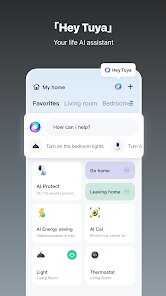
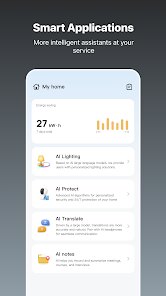
Navigating through the app, the core experience revolves around device pairing and routine creation. After installing it from Google Play, you add devices through the pairing process, which typically works smoothly with most compatible hardware. The main dashboard shows each device with its current status, and you can toggle lights, adjust thermostat settings, or check sensor readings without much hassle. Over a few weeks of use, I found the responsiveness reliable, though occasional network hiccups caused minor delays in command execution.
When placed alongside competitors like Google Home or Samsung SmartThings, this app offers a slightly different approach. The interface feels more utilitarian than Google Home's polished design, yet it provides deeper control over individual device settings. SmartThings excels in ecosystem integration, but Tuya's app covers a broader range of budget-friendly third-party devices, which makes it a practical choice for those experimenting with smart home setups without committing to a single brand ecosystem.
Key Functional Highlights
- The device discovery and pairing process stands out for its straightforwardness. It finds most devices quickly and guides you through Wi-Fi setup with clear prompts. This ease compared to some rivals saves noticeable time during initial setup.
- Automation routines allow you to create simple triggers, like turning on lights at sunset or notifying you when motion is detected. While not as comprehensive as IFTTT integration, these built-in scenarios handle everyday needs quite effectively.
- One area where it lags behind Home Assistant is in granular customization for advanced users. The preset scene options work well for basic scheduling but lack the depth power users might want, though the trade-off is a cleaner, more accessible interface.
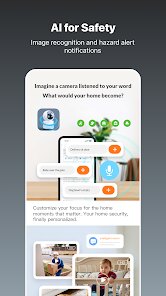
- The notification system provides timely updates when sensors detect events, but the frequency can be adjusted. Strangely, I found the default push settings a bit aggressive during the first few days, requiring a quick visit to settings to dial them down.
Advantages & Benefits
- Centralizing multiple smart devices into one app simplifies daily routines, as you can check or adjust everything from a single screen without switching between several applications.
- The remote access feature works reliably, letting me control home devices while traveling, which has proven useful for managing lights or checking door sensors from a different city.
- Voice assistant support for Google Assistant and Alexa adds hands-free convenience, particularly for quick commands like turning off all lights before leaving a room.
Areas for Improvement
- Occasional syncing delays after an internet outage sometimes require manual refreshing of the device list to restore full control, which disrupts the seamless experience.
- The in-app advertisements appear somewhat frequently for a free product, occasionally cluttering the interface between device controls.
- Third-party device compatibility is broad but not universal; a few older smart plugs I own refused to pair, necessitating additional troubleshooting steps or replacement.
Recommended Apps
![]()
ZEPETO: Avatar, Connect & Play
Naver Z Corporation4.3
![]()
Reverse Voice: Flip Singing
NindaFuit0![]()
AI Chat Ask Assistant - NowAI
Now Tech4.3![]()
Lie Detector Test: Prank App
DkTech inc.4.3![]()
Peachy - AI Face & Body Editor
InShot Video Editor4.8
![]()
AI Video Art Creator - Livensa
FERASET4.5![]()
Google Voice
Google LLC4.3![]()
Horoscopes & Tarot
Astrolis Horoscopes4.7![]()
eBay online shopping & selling
eBay Mobile4.6![]()
JPay
Jpay Mobile4.1![]()
Stranger Things 5 Challenges
MVH Entertainment Team5![]()
Chat Master: Prank Story
ABI Game Studio4.8![]()
Google Maps
Google LLC4.2![]()
AI Chat・Ask Chatbot Assistant
AI Chat Studio4.5![]()
Name Meanings with Impact
Alif Innovative Solution3.7















You May Like
-
![]()
True Tarot Card Reading
KaApps4.2 -
![]()
LinkedIn: Jobs & Business News
LinkedIn4.2 -
![]()
iControl: Easy Widgets Themes
Fancy keyboard for theme apps4.6 -
![]()
Duolingo: Language & Chess
Duolingo4.7 -
![]()
Flipped:Chat with AI Character
First Group pte ltd4.1 -
![]()
Hearing Age
Mobile Solutions Tech0 -
![]()
TikTok
TikTok Pte. Ltd.4.4 -
![]()
Pretty Makeup - Beauty Camera
Photo Editor Perfect Corp.4.4 -
![]()
PhotoRoom AI Photo Editor
PhotoRoom Background Editor App4.7 -
![]()
Lightleap by Lightricks
Lightricks Ltd.4.3 -
![]()
Name Meaning
Dexati4.1 -
![]()
Truth Social
T Media Tech LLC3.3 -
![]()
Ace Hardware
Ace Hardware Corporation4.7 -
![]()
Kpop Fans Demon Hunter Wallpap
JHNStudio4.3 -
![]()
Artplay - AI Photo & Video
Hideaway Technology Limited4.5











































