

PicsApp Photo Editor & Collage
Lyrebird Studio
Installs
50M+
Developer
Lyrebird Studio
-
Category
Video Players & Editors
-
Content Rating
Rated for 3+
Developer Email
Privacy Policy
https://lyrebirdstudio.net/privacy_policy.htm
Screenshots
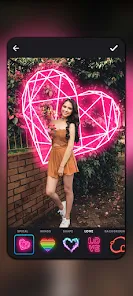
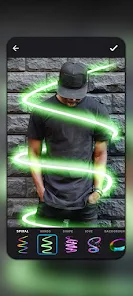

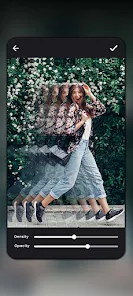
Expert Review
PicsApp Photo Editor & Collage is a versatile mobile application for editing photos and creating collages. It's designed for anyone who wants to quickly enhance their pictures, apply fun filters, or combine multiple photos into a single layout. The app was first launched a few years back and is available for download on the Google Play Store. It has garnered millions of installs, which shows its popularity. You can download and install the app for free. While you can use many features without an account, some advanced tools or cloud-saving options might require a simple registration. Like many free apps, it includes in-app advertisements and offers optional in-app purchases to unlock premium filters, remove ads, or access exclusive editing packs.
Using PicsApp is pretty straightforward. After you install it, you can either take a new photo or pick one from your gallery. The main editing screen has all the basic tools like crop, rotate, brightness, and contrast sliders right at your fingertips. A neat tip is to use the 'Auto-Enhance' button first; it often gives your photo a good starting point. For collages, you just select your photos, choose a template, and drag them into place. The app saves your creations directly to your phone's gallery, so sharing them on social media is a breeze.
I've tried a few other photo editors from the Google Play Store, like PhotoLab or another popular collage maker. What made me stick with PicsApp is its balance. It doesn't overwhelm you with too many complicated tools, but it has enough features to do a solid job. Some other apps in this genre either feel too basic or are packed with so many options that they become confusing. PicsApp sits right in the middle. It's reliable for everyday edits, and the collage templates are more modern and varied than what I found in some of the simpler alternatives. For quick, share-worthy results, this app gets the job done without fuss.
Key Functional Highlights
- 🎨 All-in-One Editor & Collage Maker: Unlike some apps that focus only on filters or only on collages, PicsApp combines both in one place. You can edit a single photo with advanced tools and then immediately use it in a multi-photo layout without switching apps.
- 📱 Lightweight and Fast: Compared to heavier editors like Adobe Lightroom Mobile, this app downloads and installs quickly. It runs smoothly even on older phones, making photo editing accessible without lag or storage headaches.
- ✨ Massive, Trendy Filter Library: The app boasts a huge collection of filters and effects that are updated regularly to match current social media trends. This sets it apart from similar apps whose filters can look dated.
- 🖼️ Intuitive Collage Creation: The drag-and-drop interface for making collages is super simple. It's more user-friendly than the process in some dedicated collage apps, allowing for quick rearrangements and adjustments.
Advantages & Benefits
- ✅ No Watermarks on Free Exports: Many free apps, like some from InShot, slap a watermark on your saved images. PicsApp lets you download your edited photos and collages without any branding, which is a huge plus.
- ✅ Frequent Content Updates: The developers add new frames, stickers, and templates often. Compared to other stagnant editors in the genre, this keeps the app feeling fresh and useful.
- ✅ Balanced Feature Set: It strikes a perfect balance between simplicity and capability, unlike overly complex apps (e.g., PicsArt) or overly simplistic ones, making it ideal for casual and semi-serious users.
Areas for Improvement
- ❌ Persistent Ads in Free Version: The in-app ads can be intrusive, popping up between edits. Apps like Snapseed offer a completely ad-free experience, which is less disruptive.
- ❌ Premium Features Are Locked: Key tools like certain artistic filters and advanced adjustment curves require a purchase. Some competitors offer a wider range of free professional tools.
- ❌ Limited Cloud Backup: Your projects are mostly stored locally. Unlike Google Photos or Lightroom, there's no robust, seamless cloud-syncing ecosystem for your edits across devices.
Recommended Apps
![]()
ZEPETO: Avatar, Connect & Play
Naver Z Corporation4.3
![]()
Reverse Voice: Flip Singing
NindaFuit0![]()
AI Chat Ask Assistant - NowAI
Now Tech4.3![]()
Lie Detector Test: Prank App
DkTech inc.4.3![]()
Peachy - AI Face & Body Editor
InShot Video Editor4.8
![]()
AI Video Art Creator - Livensa
FERASET4.5![]()
Google Voice
Google LLC4.3![]()
Horoscopes & Tarot
Astrolis Horoscopes4.7![]()
eBay online shopping & selling
eBay Mobile4.6![]()
JPay
Jpay Mobile4.1![]()
Stranger Things 5 Challenges
MVH Entertainment Team5![]()
Chat Master: Prank Story
ABI Game Studio4.8![]()
Google Maps
Google LLC4.2![]()
AI Chat・Ask Chatbot Assistant
AI Chat Studio4.5![]()
Name Meanings with Impact
Alif Innovative Solution3.7















You May Like
-
![]()
True Tarot Card Reading
KaApps4.2 -
![]()
LinkedIn: Jobs & Business News
LinkedIn4.2 -
![]()
iControl: Easy Widgets Themes
Fancy keyboard for theme apps4.6 -
![]()
Duolingo: Language & Chess
Duolingo4.7 -
![]()
Flipped:Chat with AI Character
First Group pte ltd4.1 -
![]()
Hearing Age
Mobile Solutions Tech0 -
![]()
TikTok
TikTok Pte. Ltd.4.4 -
![]()
Pretty Makeup - Beauty Camera
Photo Editor Perfect Corp.4.4 -
![]()
PhotoRoom AI Photo Editor
PhotoRoom Background Editor App4.7 -
![]()
Lightleap by Lightricks
Lightricks Ltd.4.3 -
![]()
Name Meaning
Dexati4.1 -
![]()
Truth Social
T Media Tech LLC3.3 -
![]()
Ace Hardware
Ace Hardware Corporation4.7 -
![]()
Kpop Fans Demon Hunter Wallpap
JHNStudio4.3 -
![]()
Artplay - AI Photo & Video
Hideaway Technology Limited4.5












































