

Toolwiz Photos - Pro Editor
Toolwiz.com
Installs
10M+
Developer
Toolwiz.com
-
Category
Video Players & Editors
-
Content Rating
Rated for 16+
Developer Email
Privacy Policy
http://www.toolwiz.com/lead/privacy_policy/
Screenshots
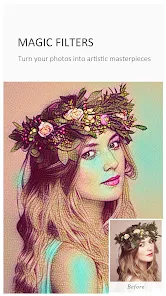
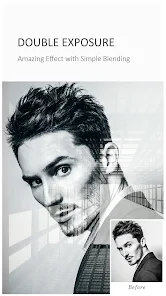

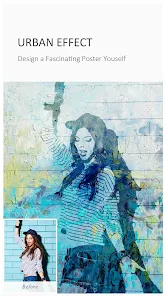
Expert Review
I've been using Toolwiz Photos for a few years now, and it's honestly one of the most underrated photo editors on the Google Play Store. This app is a full-featured photo editing suite that lets you do everything from basic touch-ups to complex graphic design. It first launched quite a while back, and you can download it for free from Google Play or the App Store. With millions of installs, it's a popular choice for people who want serious editing power without a subscription. You don't need to register to use most features, which is great. The app is free to install and use, though there are some in-app purchases for extra assets and tools, and you'll see occasional banner ads, but they're not too intrusive.
Using the app is pretty straightforward once you get the hang of it. I usually start by opening a photo and using the 'Enhance' tool for a quick fix. The real magic is in the 'Pro' section, which has layers, curves, and masking tools you'd normally find on a desktop. A good tip is to explore the 'Store' inside the app; it's packed with free filters, fonts, and stickers you can download to expand your toolkit. For social media, the built-in collage maker and the ability to create square or story-sized images right away saves a ton of time.
Compared to other apps like Snapseed or Adobe Lightroom, I keep coming back to Toolwiz Photos because it feels like a Swiss Army knife. Lightroom is fantastic for RAW edits and presets, and Snapseed has its unique control points, but Toolwiz bundles a bit of everything. It has features you just don't see in other free mobile apps, like object removal and a full layer system. For someone who tinkers with photos a lot but doesn't want to pay monthly fees, this app hits a sweet spot that others don't. It's the one I recommend to friends who want more than just filters.
Key Functional Highlights
- 🛠️ Pro-Level Layers & Curves: Unlike many mobile editors, Toolwiz Photos includes a full layer system with blend modes and adjustment layers. You can work with curves for precise color grading, which is a feature usually reserved for desktop software or premium apps like Photoshop Express.
- 🎨 All-in-One Toolkit: This app crams in utilities you'd need separate apps for. It has a powerful object removal tool (like TouchRetouch), a collage maker, a meme generator, and even basic video editing. Instead of jumping between five different apps, you can do most quick edits here.
- 📦 Massive Free Asset Library: Inside the app, there's a 'Store' with thousands of free filters (LUTs), fonts, stickers, and frames. You can download new packs regularly, which keeps the creative options fresh without needing an in-app purchase every time.
- ⚡ One-Tap Enhance & Magic Tools: For quick edits, the 'Enhance' button does a surprisingly good job. Then there are fun 'Magic' tools like creating a miniature tilt-shift effect or turning a photo into a sketch with a single tap, which is simpler and faster than configuring similar effects in PicsArt.
Advantages & Benefits
- ✅ Depth of Features: The sheer number of professional tools (layers, curves, masking) in a free app is unmatched. Apps like PicsArt or Canva might be easier for templates, but for hands-on pixel editing, Toolwiz is more powerful.
- ✅ Truly Free Core Tools: You can access the layer editor, curves, and object removal without a paywall. In contrast, many advanced features in apps like Adobe Photoshop Express require a subscription.
- ✅ Offline Functionality: Most core editing works completely offline once you've installed the app and downloaded any asset packs you want. This is a big plus over cloud-based editors that require a constant connection.
Areas for Improvement
- ⚠️ Steeper Learning Curve: The interface can feel cluttered and technical compared to streamlined apps like Google Photos' editor or Snapseed. It takes some time to learn where everything is.
- ⚠️ Occasional Ads & Stability: The free version shows banner ads, and I've had the app crash a few times when using very complex layer compositions. It's generally stable, but not as rock-solid as Lightroom.
- ⚠️ Asset Quality Varies: While the free asset library is huge, some of the filters and fonts can look a bit dated or cheesy compared to the curated, modern packs in apps like VSCO or Lightroom.
Recommended Apps
![]()
ZEPETO: Avatar, Connect & Play
Naver Z Corporation4.3
![]()
Reverse Voice: Flip Singing
NindaFuit0![]()
AI Chat Ask Assistant - NowAI
Now Tech4.3![]()
Lie Detector Test: Prank App
DkTech inc.4.3![]()
Peachy - AI Face & Body Editor
InShot Video Editor4.8
![]()
AI Video Art Creator - Livensa
FERASET4.5![]()
Google Voice
Google LLC4.3![]()
Horoscopes & Tarot
Astrolis Horoscopes4.7![]()
eBay online shopping & selling
eBay Mobile4.6![]()
JPay
Jpay Mobile4.1![]()
Stranger Things 5 Challenges
MVH Entertainment Team5![]()
Chat Master: Prank Story
ABI Game Studio4.8![]()
Google Maps
Google LLC4.2![]()
AI Chat・Ask Chatbot Assistant
AI Chat Studio4.5![]()
Name Meanings with Impact
Alif Innovative Solution3.7















You May Like
-
![]()
True Tarot Card Reading
KaApps4.2 -
![]()
LinkedIn: Jobs & Business News
LinkedIn4.2 -
![]()
iControl: Easy Widgets Themes
Fancy keyboard for theme apps4.6 -
![]()
Duolingo: Language & Chess
Duolingo4.7 -
![]()
Flipped:Chat with AI Character
First Group pte ltd4.1 -
![]()
Hearing Age
Mobile Solutions Tech0 -
![]()
TikTok
TikTok Pte. Ltd.4.4 -
![]()
Pretty Makeup - Beauty Camera
Photo Editor Perfect Corp.4.4 -
![]()
PhotoRoom AI Photo Editor
PhotoRoom Background Editor App4.7 -
![]()
Lightleap by Lightricks
Lightricks Ltd.4.3 -
![]()
Name Meaning
Dexati4.1 -
![]()
Truth Social
T Media Tech LLC3.3 -
![]()
Ace Hardware
Ace Hardware Corporation4.7 -
![]()
Kpop Fans Demon Hunter Wallpap
JHNStudio4.3 -
![]()
Artplay - AI Photo & Video
Hideaway Technology Limited4.5










































