
Photo Editor by BeFunky
BeFunky
Installs
10M+
Developer
BeFunky
-
Category
Video Players & Editors
-
Content Rating
Rated for 3+
Developer Email
Privacy Policy
http://www.befunky.com/privacy/
Screenshots
Expert Review
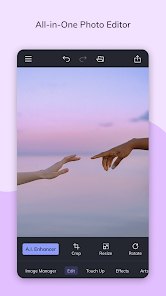
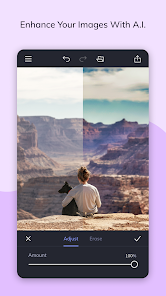
I've been using the Photo Editor by BeFunky app for a while now, and it's become my go-to tool for quick photo edits on my phone. Basically, it's a mobile photo editing app that lets you do everything from basic adjustments like cropping and filters to more advanced stuff like adding graphics and text. The app first launched quite a few years back, and you can easily download it from the Google Play Store or the Apple App Store. It's got millions of installs on Google Play alone, which shows how popular it is. The best part? You can install the core app for free and start editing right away without even needing to create an account. Of course, there are in-app purchases if you want to unlock all the premium features and tools, and you'll see some ads in the free version, but it's pretty generous for a no-cost download.
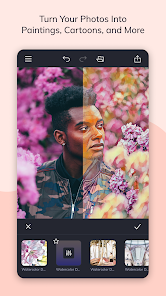
Using the app is super straightforward. I usually open a photo from my gallery, and the main editing menu pops up. I mostly play with the 'Edit' tab for lighting and color, then hop over to 'Effects' to try out different filters. One tip I've learned is to use the 'Beautify' tools subtly; a little goes a long way to smooth skin or brighten eyes without making the picture look fake. For social media posts, I love browsing their huge library of stickers and overlays in the 'Design' section to add some fun elements. It's really an all-in-one app that saves me from jumping between different ones.
When I was looking for a photo editor, I also tried apps like Adobe Lightroom and PicsArt. Lightroom is amazing for pro-level color grading, but it felt a bit complex for my everyday needs. PicsArt has tons of features too, but the interface can get cluttered. I chose Photo Editor by BeFunky because it strikes a perfect balance. It's powerful enough for creative projects but remains simple and intuitive. For someone who just wants to make their photos look great without a steep learning curve, this app is a fantastic choice. It handles most of what the other big names do, but in a more user-friendly package.
Key Functional Highlights
- 🎨 All-in-One Editing Suite: Unlike some apps that specialize in just filters or just collages, BeFunky packs everything into one place. Right after you install the app, you get access to classic photo editing tools, a massive filter library, and a design studio with templates, all without needing multiple downloads.
- 🤳 One-Tap Enhance & Beautify: For quick fixes, this feature is a lifesaver. Compared to more manual editors like Snapseed, BeFunky's 'Enhance' button and 'Beautify' sliders let you improve a photo's look instantly, which is perfect for editing on the go before sharing.
- ✂️ Creative Collage Maker Built-In: This is a standout. Many other photo editor apps make you download a separate collage app. Here, you can seamlessly switch from editing a single photo to creating a multi-photo collage within the same interface, which is incredibly convenient.
- 🛒 Freemium Model with Clear Value: While apps like Photoshop Express hide key features behind a paywall, BeFunky's free version on Google Play is very capable. The in-app purchases for premium features are presented as clear upgrades, so you know exactly what you're getting if you decide to buy.
Advantages & Benefits
- 👍 Incredibly User-Friendly Interface: Compared to more complex apps like PicsArt, BeFunky's layout is clean and easy to navigate. Everything is logically organized, so you're not lost hunting for tools.
- 👍 Huge, Diverse Asset Library: The collection of free stickers, overlays, and fonts you get just by downloading the app is massive. Other apps often have smaller free libraries or push subscriptions harder.
- 👍 Speed and Simplicity for Social Media: For quickly creating polished posts for Instagram or Facebook, this app is faster than firing up a desktop editor. The workflow from import to export is optimized for mobile.
Areas for Improvement
- 👎 Premium Features Can Get Pricey: While the free app is great, unlocking all the advanced tools and removing ads requires a subscription. Some one-time purchase apps, like certain filter packs in other editors, might offer more permanent value.
- 👎 Advanced Control Limitations: If you're coming from a pro app like Lightroom, you might find the granular control over settings like curves or selective adjustments to be more limited here.
- 👎 Occasional Ad Interruptions: In the free version, ads can pop up between actions. It's the trade-off for a free download, but it can interrupt your creative flow compared to completely ad-free competitors.
Recommended Apps
![]()
ZEPETO: Avatar, Connect & Play
Naver Z Corporation4.3
![]()
Reverse Voice: Flip Singing
NindaFuit0![]()
AI Chat Ask Assistant - NowAI
Now Tech4.3![]()
Lie Detector Test: Prank App
DkTech inc.4.3![]()
Peachy - AI Face & Body Editor
InShot Video Editor4.8
![]()
AI Video Art Creator - Livensa
FERASET4.5![]()
Google Voice
Google LLC4.3![]()
Horoscopes & Tarot
Astrolis Horoscopes4.7![]()
eBay online shopping & selling
eBay Mobile4.6![]()
JPay
Jpay Mobile4.1![]()
Stranger Things 5 Challenges
MVH Entertainment Team5![]()
Chat Master: Prank Story
ABI Game Studio4.8![]()
Google Maps
Google LLC4.2![]()
AI Chat・Ask Chatbot Assistant
AI Chat Studio4.5![]()
Name Meanings with Impact
Alif Innovative Solution3.7















You May Like
-
![]()
True Tarot Card Reading
KaApps4.2 -
![]()
LinkedIn: Jobs & Business News
LinkedIn4.2 -
![]()
iControl: Easy Widgets Themes
Fancy keyboard for theme apps4.6 -
![]()
Duolingo: Language & Chess
Duolingo4.7 -
![]()
Flipped:Chat with AI Character
First Group pte ltd4.1 -
![]()
Hearing Age
Mobile Solutions Tech0 -
![]()
TikTok
TikTok Pte. Ltd.4.4 -
![]()
Pretty Makeup - Beauty Camera
Photo Editor Perfect Corp.4.4 -
![]()
PhotoRoom AI Photo Editor
PhotoRoom Background Editor App4.7 -
![]()
Lightleap by Lightricks
Lightricks Ltd.4.3 -
![]()
Name Meaning
Dexati4.1 -
![]()
Truth Social
T Media Tech LLC3.3 -
![]()
Ace Hardware
Ace Hardware Corporation4.7 -
![]()
Kpop Fans Demon Hunter Wallpap
JHNStudio4.3 -
![]()
Artplay - AI Photo & Video
Hideaway Technology Limited4.5











































