

Planner 5D: Home Design, Decor
Planner 5D
Installs
10M+
Developer
Planner 5D
-
Category
Lifestyle
-
Content Rating
Everyone
Developer Email
Privacy Policy
https://planner5d.com/pages/privacy/
Screenshots


Expert Review
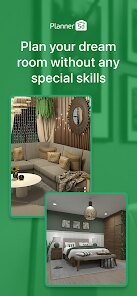
Planner 5D is a home design and interior decorating app that lets you create detailed floor plans and visualize your dream spaces in 2D and 3D. I've been using it for years to plan everything from small room makeovers to entire house layouts. The app first launched a while back and has become super popular, with millions of downloads on the Google Play store. You can download it for free, and you don't even need to register an account to start playing around with the basic tools, which is great for a quick test drive. Of course, there are in-app purchases to unlock more furniture and advanced features, and you'll see some ads in the free version, but the core design experience is solid.
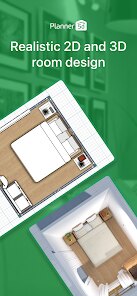
Using the app is pretty intuitive. You start by drawing walls to create your floor plan, then drop in doors, windows, and all your furniture. The drag-and-drop interface makes it easy. My biggest tip is to use the 'snap to grid' feature when drawing walls – it keeps everything aligned and saves you from wonky angles later. I also spend a lot of time in the 3D view, walking through my virtual rooms to get a real feel for the space. The catalog has tons of items, so I often search by style, like 'mid-century' or 'industrial,' to find the perfect pieces.
Compared to other apps in this genre, like Room Planner or MagicPlan, I keep coming back to Planner 5D. For me, it strikes the best balance between being powerful enough for serious planning and still being accessible for a regular user. Some similar apps feel too technical, like they're made for architects, while others are too simple and cartoonish. Planner 5D's 3D visuals are clean and realistic enough to make good decisions, and the fact that I can use it on my phone, tablet, or computer is a huge plus. It's the one app I recommend to friends who are thinking about redecorating.
Key Functional Highlights
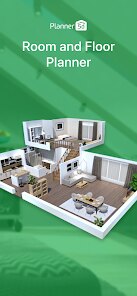
- 🏠 Versatile Design Platform: Unlike some apps that focus only on interiors, Planner 5D lets you design the entire structure, from the foundation and walls to the final decor. You have control over architectural elements in a way that apps like Houzz don't offer, as those are more for product discovery.
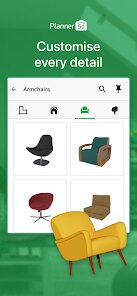
- 🛋️ Massive, Searchable Catalog: The furniture and decor library is enormous and well-organized. You can filter items by room, style, or color, making it much faster to furnish a space compared to scrolling through endless generic options in other free design apps.
- 👁️ Immersive 3D & AR Modes: The 3D walkthrough is fantastic, but the AR (Augmented Reality) feature is a standout. You can place your virtual furniture in your actual room through your phone's camera. This 'see it in your space' function is more polished here than in many competing apps.
- 💻 Cross-Platform Sync: I can start a project on my laptop via their website and then tweak it on my Android phone from the Google Play install. This seamless sync between devices is a game-changer for productivity that not all similar apps get right.
Advantages & Benefits
- ✅ User-Friendly for Beginners: The learning curve is gentler than professional software like SketchUp. The intuitive drag-and-drop makes it easy for anyone to install and start designing immediately.
- ✅ High-Quality Visuals: The renderings and 3D graphics are consistently better and more realistic than those in many free alternatives, making presentations and personal visualizations more effective.
- ✅ Strong Free Core: You can accomplish a lot before hitting paywalls, unlike some apps that severely limit tools or save functions. The free download from Google Play offers genuine utility.
Areas for Improvement
- ⚠️ Premium Model Can Get Pricey: To access the full catalog of items and advanced features, the subscription or one-time purchases add up. Apps like Roomle or IKEA Place offer more limited but completely free experiences for specific needs.
- ⚠️ Performance on Older Devices: The app can be sluggish and crash on older phones or tablets, especially when working on complex projects with lots of 3D objects. It demands decent hardware.
- ⚠️ Limited Custom Object Import: While you can create custom colors/textures, importing your own 3D models is a premium feature and not as straightforward as in dedicated CAD apps.
Recommended Apps
![]()
ZEPETO: Avatar, Connect & Play
Naver Z Corporation4.3
![]()
Reverse Voice: Flip Singing
NindaFuit0![]()
AI Chat Ask Assistant - NowAI
Now Tech4.3![]()
Lie Detector Test: Prank App
DkTech inc.4.3![]()
Peachy - AI Face & Body Editor
InShot Video Editor4.8
![]()
AI Video Art Creator - Livensa
FERASET4.5![]()
Google Voice
Google LLC4.3![]()
Horoscopes & Tarot
Astrolis Horoscopes4.7![]()
eBay online shopping & selling
eBay Mobile4.6![]()
JPay
Jpay Mobile4.1![]()
Stranger Things 5 Challenges
MVH Entertainment Team5![]()
Chat Master: Prank Story
ABI Game Studio4.8![]()
Google Maps
Google LLC4.2![]()
AI Chat・Ask Chatbot Assistant
AI Chat Studio4.5![]()
Name Meanings with Impact
Alif Innovative Solution3.7















You May Like
-
![]()
True Tarot Card Reading
KaApps4.2 -
![]()
LinkedIn: Jobs & Business News
LinkedIn4.2 -
![]()
iControl: Easy Widgets Themes
Fancy keyboard for theme apps4.6 -
![]()
Duolingo: Language & Chess
Duolingo4.7 -
![]()
Flipped:Chat with AI Character
First Group pte ltd4.1 -
![]()
Hearing Age
Mobile Solutions Tech0 -
![]()
TikTok
TikTok Pte. Ltd.4.4 -
![]()
Pretty Makeup - Beauty Camera
Photo Editor Perfect Corp.4.4 -
![]()
PhotoRoom AI Photo Editor
PhotoRoom Background Editor App4.7 -
![]()
Lightleap by Lightricks
Lightricks Ltd.4.3 -
![]()
Name Meaning
Dexati4.1 -
![]()
Truth Social
T Media Tech LLC3.3 -
![]()
Ace Hardware
Ace Hardware Corporation4.7 -
![]()
Kpop Fans Demon Hunter Wallpap
JHNStudio4.3 -
![]()
Artplay - AI Photo & Video
Hideaway Technology Limited4.5












































