

NewProfilePic: Profile Picture
Linerock Investments LTD
Installs
5M+
Developer
Linerock Investments LTD
-
Category
Video Players & Editors
-
Content Rating
Rated for 3+
Developer Email
Privacy Policy
https://pho.to/privacy
Screenshots


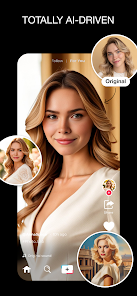
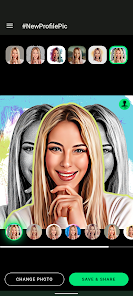
Expert Review
NewProfilePic is a fun photo editing app that lets you create cool profile pictures for social media. It's basically a tool to turn your regular selfies into artistic portraits, cartoons, or paintings. The app first launched a few years back and you can find it on Google Play and the App Store. It's got millions of downloads, which shows how popular it is. You can download and install it for free, and you don't even need to register to start playing around with it. That's a big plus for trying it out quickly. Of course, like many free apps, it has in-app purchases to unlock more styles and features, and you'll also see some ads while using it.
Using the app is super straightforward. You just pick a photo from your gallery or take a new one, and then you swipe through tons of different filters and art styles. My tip is to try the 'AI Artist' styles first—they often give the most dramatic and fun results. You can adjust the intensity of the effect and add frames or text before saving your new masterpiece. It's perfect for when you're bored and want to give your online profiles a fresh look without any hassle.
I've tried a few similar apps like FaceApp and ToonMe, but I keep coming back to NewProfilePic. Why? For one, the variety of artistic filters feels more unique and less generic. While FaceApp is great for realistic edits, NewProfilePic is more about creative transformation. ToonMe is similar, but I find NewProfilePic's interface faster and the results are often more shareable and eye-catching for a profile picture. It just seems to get the balance right between being easy to use and offering genuinely cool effects.
Key Functional Highlights
- 🎨 Massive Style Library: Right after you install the app, you get access to a huge collection of filters. We're talking oil painting, pop art, pencil sketch, mosaic, and even fantasy themes. It has way more genre variety upfront compared to something like Gradient, which focuses more on color filters.
- 🤖 AI-Powered Transformations: This is the app's standout feature. The AI doesn't just slap a filter on; it reinterprets your photo. It can change your hairstyle, add dramatic makeup, or place you in a classic painting setting. The results are often surprising and much more detailed than basic photo editors.
- ✂️ One-Tap Background Change: A killer feature for profile pics is the ability to instantly remove or replace your background. Other apps make you manually cut out the subject, but here, the AI handles it in seconds, letting you drop yourself onto cool gradients or patterns.
- 📱 Optimized for Social Media: The app automatically formats your creations into perfect squares or circles for platforms like Instagram, Facebook, and Twitter. You don't have to crop or resize anything after saving, which is a small but super convenient touch.
Advantages & Benefits
- 🚀 Speed and Simplicity: From download to finished pic, the process is incredibly fast. Apps like PicsArt can do similar things but feel clunky. NewProfilePic is designed for one job and does it very quickly.
- 🎭 Focus on 'Profile' Art: Unlike all-purpose editors, every filter in this app is tailored to make a person's face look good as a small, circular avatar. The effects are bold and work well at that size.
- 💸 Truly Free to Try: You can download, install, and use a solid set of features without paying. Other apps, like some face swap tools, lock core features behind a paywall immediately.
Areas for Improvement
- ⚠️ Aggressive Monetization: The free version pushes its in-app purchases and ads pretty hard. You'll hit paywalls for the best styles, which can be frustrating. An app like Canva is ad-supported but feels less intrusive.
- 🔒 Privacy Questions: The developer info has been unclear at times ('null' in some listings), which raises eyebrows about data use. More established apps like Adobe Lightroom have clearer privacy policies.
- 🔄 Inconsistent AI: Sometimes the AI transformation is amazing, other times it's just weird or unflattering. It's less reliable for a predictable 'good' result compared to the more controlled edits in Snapseed.
Recommended Apps
![]()
ZEPETO: Avatar, Connect & Play
Naver Z Corporation4.3
![]()
Reverse Voice: Flip Singing
NindaFuit0![]()
AI Chat Ask Assistant - NowAI
Now Tech4.3![]()
Lie Detector Test: Prank App
DkTech inc.4.3![]()
Peachy - AI Face & Body Editor
InShot Video Editor4.8
![]()
AI Video Art Creator - Livensa
FERASET4.5![]()
Google Voice
Google LLC4.3![]()
Horoscopes & Tarot
Astrolis Horoscopes4.7![]()
eBay online shopping & selling
eBay Mobile4.6![]()
JPay
Jpay Mobile4.1![]()
Stranger Things 5 Challenges
MVH Entertainment Team5![]()
Chat Master: Prank Story
ABI Game Studio4.8![]()
Google Maps
Google LLC4.2![]()
AI Chat・Ask Chatbot Assistant
AI Chat Studio4.5![]()
Name Meanings with Impact
Alif Innovative Solution3.7















You May Like
-
![]()
True Tarot Card Reading
KaApps4.2 -
![]()
LinkedIn: Jobs & Business News
LinkedIn4.2 -
![]()
iControl: Easy Widgets Themes
Fancy keyboard for theme apps4.6 -
![]()
Duolingo: Language & Chess
Duolingo4.7 -
![]()
Flipped:Chat with AI Character
First Group pte ltd4.1 -
![]()
Hearing Age
Mobile Solutions Tech0 -
![]()
TikTok
TikTok Pte. Ltd.4.4 -
![]()
Pretty Makeup - Beauty Camera
Photo Editor Perfect Corp.4.4 -
![]()
PhotoRoom AI Photo Editor
PhotoRoom Background Editor App4.7 -
![]()
Lightleap by Lightricks
Lightricks Ltd.4.3 -
![]()
Name Meaning
Dexati4.1 -
![]()
Truth Social
T Media Tech LLC3.3 -
![]()
Ace Hardware
Ace Hardware Corporation4.7 -
![]()
Kpop Fans Demon Hunter Wallpap
JHNStudio4.3 -
![]()
Artplay - AI Photo & Video
Hideaway Technology Limited4.5









































