

Photo Collage Editor
MeiHillMan
Installs
10M+
Developer
MeiHillMan
-
Category
Video Players & Editors
-
Content Rating
Rated for 3+
Developer Email
Privacy Policy
http://privacypolicy-meihillman.blogspot.com
Screenshots
Expert Review
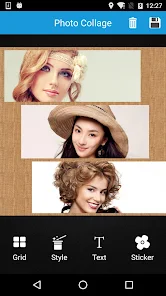
I've been using the Photo Collage Editor app by MeiHillMan for a while now, and it's become my go-to for putting together quick, stylish collages. It's a straightforward photo editing and collage-making app that lets you combine multiple pictures into one frame with tons of layouts, stickers, and backgrounds. I first downloaded it from the Google Play Store a couple of years ago, and it's been consistently updated since. The app has a massive number of installs, which gave me some confidence in trying it out. Best of all, it's completely free to download and install. You don't even need to register or create an account to start using it, which I really appreciate for simplicity's sake. While the core app is free, there are optional in-app purchases to unlock premium content packs, and you do see some banner ads, but they're not overly intrusive.
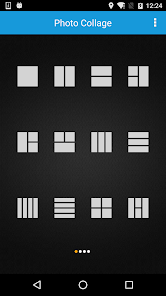
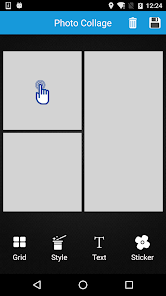
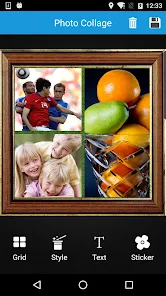
Using the app is super intuitive. After you install it, you just pick a collage grid, tap to add photos from your gallery, and then the fun begins. You can pinch and zoom to adjust each photo within its slot, change the border color and thickness, and add a shadow effect for some depth. My personal tip is to explore the 'Background' section – they have these cool patterned and gradient options that can really make your collage pop instead of just using a plain color. The text and sticker libraries are huge, so I often spend a few minutes browsing to find the perfect decorative element for a birthday post or a travel recap.
When I was looking for a collage app, I tried a few others like PicCollage and Canva. While those are great, I stuck with Photo Collage Editor because it feels more lightweight and focused. It doesn't try to do everything; it just does collages really well and quickly. Some other apps felt bloated with features I didn't need, making the interface cluttered. This app launches fast, the editing tools are right where you expect them, and I can finish a nice-looking collage in under a minute. For someone who just wants to merge a few vacation photos or create a simple announcement without a steep learning curve, this app from MeiHillMan is a perfect choice.
Key Functional Highlights
- 🎨 Vast Template Library: Right after you install the app, you get access to hundreds of grid layouts, from simple 2-photo splits to intricate multi-photo mosaics. Compared to a popular app like Layout from Instagram, which offers limited, fixed formats, Photo Collage Editor provides way more creative freedom for free.
- ✂️ Precise, Easy Editing: The pinch-to-zoom and drag controls for each photo slot are incredibly responsive. You can fine-tune the crop for every single image in your collage individually, which is a step up from some apps that apply automatic, awkward crops.
- 🆓 Truly Free Core Features: Unlike many similar apps that lock basic stickers or fonts behind a paywall immediately, this app lets you download and use a substantial collection for free. The ads are manageable, and the in-app purchases are only for extra, fancy content packs.
- 📤 One-Tap Social Sharing: Once your collage is done, the app optimizes it for various platforms. The share menu is integrated seamlessly, making it faster to post to Instagram, WhatsApp, or save to your gallery compared to the sometimes clunky export process in other editors.
Advantages & Benefits
- 🚀 Speed and Simplicity: It's just faster to go from idea to finished product than with more complex apps like Canva. The interface is clean and purpose-built for collages.
- 🎭 Creative Flexibility: The sheer number of backgrounds, borders, and overlay options allows for more personalized designs than the relatively basic templates in Google Photos' collage maker.
- 📁 No Account Needed: You can download, install, and use the full app immediately without any sign-up, which is a huge plus for privacy and convenience over apps requiring registration.
Areas for Improvement
- ⚠️ Ad Interruptions: While the core app is free, banner ads are present, and occasional full-screen ads can pop up, which is a bit more intrusive than in ad-free alternatives you have to pay for upfront.
- 🛠️ Limited Advanced Editing: If you need to adjust brightness, contrast, or apply filters to individual photos before placing them in the collage, you might need to edit them in another app first. It lacks the built-in photo correction tools that an app like PicCollage has.
- 📶 Occasional Glitches: With a very high number of installs, the app is generally stable, but I've had it crash once or twice when working with many high-resolution images, which isn't an issue I've faced with more lightweight apps.
Recommended Apps
![]()
ZEPETO: Avatar, Connect & Play
Naver Z Corporation4.3
![]()
Reverse Voice: Flip Singing
NindaFuit0![]()
AI Chat Ask Assistant - NowAI
Now Tech4.3![]()
Lie Detector Test: Prank App
DkTech inc.4.3![]()
Peachy - AI Face & Body Editor
InShot Video Editor4.8
![]()
AI Video Art Creator - Livensa
FERASET4.5![]()
Google Voice
Google LLC4.3![]()
Horoscopes & Tarot
Astrolis Horoscopes4.7![]()
eBay online shopping & selling
eBay Mobile4.6![]()
JPay
Jpay Mobile4.1![]()
Stranger Things 5 Challenges
MVH Entertainment Team5![]()
Chat Master: Prank Story
ABI Game Studio4.8![]()
Google Maps
Google LLC4.2![]()
AI Chat・Ask Chatbot Assistant
AI Chat Studio4.5![]()
Name Meanings with Impact
Alif Innovative Solution3.7















You May Like
-
![]()
True Tarot Card Reading
KaApps4.2 -
![]()
LinkedIn: Jobs & Business News
LinkedIn4.2 -
![]()
iControl: Easy Widgets Themes
Fancy keyboard for theme apps4.6 -
![]()
Duolingo: Language & Chess
Duolingo4.7 -
![]()
Flipped:Chat with AI Character
First Group pte ltd4.1 -
![]()
Hearing Age
Mobile Solutions Tech0 -
![]()
TikTok
TikTok Pte. Ltd.4.4 -
![]()
Pretty Makeup - Beauty Camera
Photo Editor Perfect Corp.4.4 -
![]()
PhotoRoom AI Photo Editor
PhotoRoom Background Editor App4.7 -
![]()
Lightleap by Lightricks
Lightricks Ltd.4.3 -
![]()
Name Meaning
Dexati4.1 -
![]()
Truth Social
T Media Tech LLC3.3 -
![]()
Ace Hardware
Ace Hardware Corporation4.7 -
![]()
Kpop Fans Demon Hunter Wallpap
JHNStudio4.3 -
![]()
Artplay - AI Photo & Video
Hideaway Technology Limited4.5










































