
Facetune AI Photo/Video Editor
Lightricks Ltd.
Installs
50M+
Developer
Lightricks Ltd.
-
Category
Video Players & Editors
-
Content Rating
Rated for 3+
Developer Email
Privacy Policy
https://static.lightricks.com/legal/privacy-policy.html
Screenshots
Expert Review
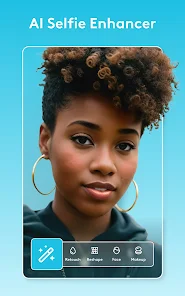
I've been using Facetune AI Photo/Video Editor for a while now, and it's become my go-to app for quick touch-ups. Developed by Lightricks Ltd., this app is a powerful photo and video editing tool that uses AI to make professional-looking edits super easy. It first launched a few years back, and you can download it on both the Google Play Store and the App Store. It's got millions of installs, which tells you how popular it is. The app itself is free to download and install, but you do need to create an account to use it. While you can start editing right away, you'll quickly notice there are in-app purchases to unlock all the premium features, and you might see some ads in the free version.
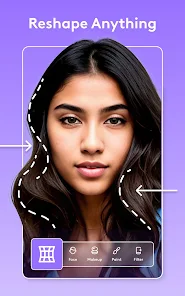
Using the app is pretty straightforward. You just pick a photo or video from your gallery, and the AI suggests edits automatically. I usually start with the 'AI Enhance' feature—it's like magic for fixing lighting and colors with one tap. For portraits, the 'Smooth' and 'Reshape' tools are lifesavers; you can subtly smooth skin or adjust features without making it look fake. My tip is to go easy on the sliders. A little adjustment goes a long way to keep things looking natural. The video editing part is also great for trimming clips and adding filters on the fly.
I've tried other similar apps like Adobe Lightroom and YouCam Perfect, but I keep coming back to Facetune. Lightroom is amazing for raw photo editing, but it can feel a bit complex for just polishing selfies. YouCam Perfect has fun filters, but I find Facetune's AI tools give me more control and a cleaner, more professional finish. For me, the choice comes down to how effortless Facetune makes the whole process. It feels less like hardcore editing software and more like a smart assistant that helps my photos look their best without a huge time investment.
Key Functional Highlights
- 🤖 AI-Powered Perfection: The core of this app is its smart AI. Features like 'AI Enhance' and 'AI Background' analyze your photo in seconds. It can fix bad lighting, blur out a messy background, or even suggest the best filter, all automatically. It takes the guesswork out of editing.
- 🎭 Pro Tools, Simple Interface: Despite offering professional-grade tools for detailed skin retouching, teeth whitening, and reshaping, the interface stays clean and intuitive. Sliders and brushes are responsive, making it easy to achieve subtle, magazine-quality edits without needing a tutorial.
- 🎬 All-in-One for Photos & Videos: Unlike some editors that focus only on photos, this app handles videos too. You can apply the same smoothing filters, color corrections, and effects to your video clips directly on your phone, which is a huge time-saver for social media content.
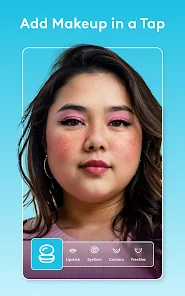
- 💎 Superior Detail Control: Compared to a popular app like YouCam Perfect, Facetune shines in its precision. You can selectively brighten eyes, add makeup, or reshape specific areas with a brush, giving you results that look edited by a pro, not just filtered by an app.
Advantages & Benefits
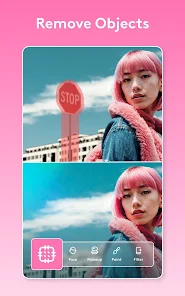
- ✨ Unmatched Skin Retouching: The 'Smooth' and 'Patch' tools are industry-leading. They remove blemishes and even out skin tone while preserving texture (like pores and hair), so faces don't end up looking like plastic, unlike the often over-smoothed results from apps like AirBrush.
- ⚡ Speed and Ease of Use: For quick, high-quality edits, it beats opening a desktop program like Photoshop. The AI suggestions get you 80% of the way there instantly, making it perfect for editing photos right before you post them.
- 📱 Optimized for Mobile: The entire experience is built for phone use. Tools are finger-friendly, and processing is fast. Compared to the sometimes clunky mobile version of Adobe Lightroom, Facetune feels native and effortless.
Areas for Improvement
- 💰 Costly Full Access: To unlock the best features (like most AI tools and advanced brushes), you need a subscription. The free version is quite limited, making it feel like a trial. Apps like Snapseed offer powerful editing completely for free.
- 🖼️ Can Look Over-Edited: It's easy to get carried away. Without a careful hand, photos can quickly lose their natural look, a trap that more restrained apps like VSCO help users avoid with their simpler toolset.
- 📶 Heavy on Resources: The app file size is large, and some AI features require a good internet connection or a newer phone to run smoothly. On older devices, it can lag or crash, unlike lighter apps like Google Photos' editor.
- 🎞️ Video Editing is Basic: While a great add-on, the video editing capabilities aren't as deep as dedicated apps like CapCut or InShot. You're mostly applying photo-style filters and trims, not doing complex multi-track editing.
Recommended Apps
![]()
ZEPETO: Avatar, Connect & Play
Naver Z Corporation4.3
![]()
Reverse Voice: Flip Singing
NindaFuit0![]()
AI Chat Ask Assistant - NowAI
Now Tech4.3![]()
Lie Detector Test: Prank App
DkTech inc.4.3![]()
Peachy - AI Face & Body Editor
InShot Video Editor4.8
![]()
AI Video Art Creator - Livensa
FERASET4.5![]()
Google Voice
Google LLC4.3![]()
Horoscopes & Tarot
Astrolis Horoscopes4.7![]()
eBay online shopping & selling
eBay Mobile4.6![]()
JPay
Jpay Mobile4.1![]()
Stranger Things 5 Challenges
MVH Entertainment Team5![]()
Chat Master: Prank Story
ABI Game Studio4.8![]()
Google Maps
Google LLC4.2![]()
AI Chat・Ask Chatbot Assistant
AI Chat Studio4.5![]()
Name Meanings with Impact
Alif Innovative Solution3.7















You May Like
-
![]()
True Tarot Card Reading
KaApps4.2 -
![]()
LinkedIn: Jobs & Business News
LinkedIn4.2 -
![]()
iControl: Easy Widgets Themes
Fancy keyboard for theme apps4.6 -
![]()
Duolingo: Language & Chess
Duolingo4.7 -
![]()
Flipped:Chat with AI Character
First Group pte ltd4.1 -
![]()
Hearing Age
Mobile Solutions Tech0 -
![]()
TikTok
TikTok Pte. Ltd.4.4 -
![]()
Pretty Makeup - Beauty Camera
Photo Editor Perfect Corp.4.4 -
![]()
PhotoRoom AI Photo Editor
PhotoRoom Background Editor App4.7 -
![]()
Lightleap by Lightricks
Lightricks Ltd.4.3 -
![]()
Name Meaning
Dexati4.1 -
![]()
Truth Social
T Media Tech LLC3.3 -
![]()
Ace Hardware
Ace Hardware Corporation4.7 -
![]()
Kpop Fans Demon Hunter Wallpap
JHNStudio4.3 -
![]()
Artplay - AI Photo & Video
Hideaway Technology Limited4.5











































