

NCAA March Madness Live
NCAA Digital
Installs
5M+
Developer
NCAA Digital
-
Category
Sports
-
Content Rating
Everyone
Developer Email
Privacy Policy
http://www.ncaa.com/privacy
Screenshots
Expert Review
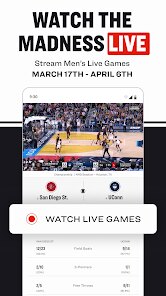
NCAA March Madness Live is the official streaming app for the NCAA men's and women's basketball tournaments. Available for free on both the Google Play Store and Apple App Store, it's the go-to destination for millions of fans each March. The app provides live game coverage, highlights, and bracket tracking without requiring a cable subscription, though some content may be geo-restricted or require authentication through a participating TV provider. It's ad-supported, which is how it remains free, and there are no in-app purchases for core live streaming functions.
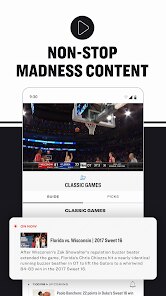
Opening the app during the tournament presents a clean, centralized hub. The main screen typically prioritizes the game currently in play, with easy tabs to switch to other live matchups, view the full schedule, or check scores. Tapping into a live game stream launches the video player, which offers standard controls for play/pause and, on supported devices, picture-in-picture mode. The experience is straightforward: you select a game and watch. During quieter moments, I often switch to the 'Bracket' section to see how my predictions are holding up, which integrates seamlessly without interrupting the stream.
Where this app stands apart from general sports streaming services is its singular, intense focus. Unlike ESPN or Fox Sports apps, which cover a broad spectrum, March Madness Live dedicates its entire interface and functionality to one event. This results in a less cluttered experience where everything from the scoreboard design to the notification settings is optimized for basketball tournament chaos. The difference is noticeable; it feels purpose-built for following multiple games simultaneously, whereas other apps can feel like you're navigating to a specific event within a much larger platform.
Key Functional Highlights
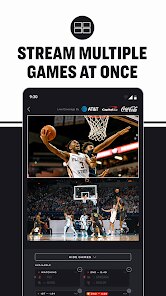
- The multi-game view, often called "Boss Button" or "Mosaic Mode," is a standout. It allows you to watch up to four games at once on a single screen. This is incredibly practical during the first-round frenzy when several close games overlap. The ability to quickly switch the primary audio feed between streams makes it easy to follow the commentary for the most exciting finish.
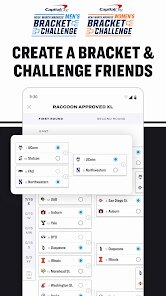
- Bracket integration is seamless and automatic. The app can import your bracket from various platforms or let you create one, then track its progress in real-time alongside the games. Seeing your picks get highlighted or crossed out as games conclude adds a personal, engaging layer to the viewing experience that you don't get with a standalone bracket website.
- For cord-cutters, the TV provider authentication, while sometimes a hurdle, unlocks a significant advantage: the ability to stream the main CBS, TBS, TNT, and truTV broadcasts directly. This is a clearer, more reliable feed than the NCAA's own streaming coverage for those games, and the app handles the switch between sources smoothly once you're logged in.
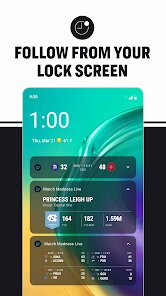
- The notification system is highly customizable. You can choose to be alerted for everything from game start times and halftime scores to specific events like overtime or when your tracked team is on a scoring run. Compared to other sports apps with more generic alerts, this granular control is perfect for managing the tournament's unpredictable schedule.
Advantages & Benefits
- It provides completely free, legal access to live streams of every tournament game, which is its primary and most valuable benefit.
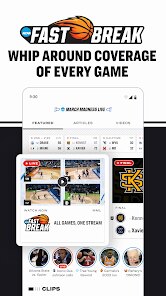
- The app organizes the tournament's chaos brilliantly, making it simple to jump between games, check scores, and watch key moments without missing a beat.
- Having your personal bracket update live within the same app eliminates the need to constantly switch between a streaming service and a separate website.
- It turns any phone or tablet into a portable tournament command center, perfect for following the action when you're away from a TV.
Areas for Improvement
- Video quality can be inconsistent, sometimes dropping in resolution during peak streaming times, especially for non-authenticated users.
- The requirement to log in with a TV provider to access the primary broadcast feeds for later-round games can be a frustrating barrier for some users.
- The app is heavily optimized for the three-week tournament, so outside of March and early April, its utility drops significantly, and it can feel like a dormant application.
- While the ads support the free model, commercial breaks can be poorly timed, occasionally cutting back into the stream a few seconds after live action has resumed.
Recommended Apps
![]()
ZEPETO: Avatar, Connect & Play
Naver Z Corporation4.3
![]()
Reverse Voice: Flip Singing
NindaFuit0![]()
AI Chat Ask Assistant - NowAI
Now Tech4.3![]()
Lie Detector Test: Prank App
DkTech inc.4.3![]()
Peachy - AI Face & Body Editor
InShot Video Editor4.8
![]()
AI Video Art Creator - Livensa
FERASET4.5![]()
Google Voice
Google LLC4.3![]()
Horoscopes & Tarot
Astrolis Horoscopes4.7![]()
eBay online shopping & selling
eBay Mobile4.6![]()
JPay
Jpay Mobile4.1![]()
Stranger Things 5 Challenges
MVH Entertainment Team5![]()
Chat Master: Prank Story
ABI Game Studio4.8![]()
Google Maps
Google LLC4.2![]()
AI Chat・Ask Chatbot Assistant
AI Chat Studio4.5![]()
Name Meanings with Impact
Alif Innovative Solution3.7















You May Like
-
![]()
True Tarot Card Reading
KaApps4.2 -
![]()
LinkedIn: Jobs & Business News
LinkedIn4.2 -
![]()
iControl: Easy Widgets Themes
Fancy keyboard for theme apps4.6 -
![]()
Duolingo: Language & Chess
Duolingo4.7 -
![]()
Flipped:Chat with AI Character
First Group pte ltd4.1 -
![]()
Hearing Age
Mobile Solutions Tech0 -
![]()
TikTok
TikTok Pte. Ltd.4.4 -
![]()
Pretty Makeup - Beauty Camera
Photo Editor Perfect Corp.4.4 -
![]()
PhotoRoom AI Photo Editor
PhotoRoom Background Editor App4.7 -
![]()
Lightleap by Lightricks
Lightricks Ltd.4.3 -
![]()
Name Meaning
Dexati4.1 -
![]()
Truth Social
T Media Tech LLC3.3 -
![]()
Ace Hardware
Ace Hardware Corporation4.7 -
![]()
Kpop Fans Demon Hunter Wallpap
JHNStudio4.3 -
![]()
Artplay - AI Photo & Video
Hideaway Technology Limited4.5










































