
Period Calendar Period Tracker
Simple Design Ltd.
Installs
100M+
Developer
Simple Design Ltd.
-
Category
Health & Fitness
-
Content Rating
Everyone
Developer Email
Privacy Policy
https://pc.simpledesign.ltd/privacypolicy.html
Screenshots
Expert Review
I've been using the Period Calendar Period Tracker app for a few years now, and it's become a real staple on my phone. As the name suggests, it's a period and ovulation tracker app, a genre that's super helpful for anyone wanting to keep an eye on their cycle, whether for health reasons, planning, or just general awareness. I first downloaded it from the Google Play store back when it launched, and it's been consistently updated since. It's a free app to install, which is great, and you don't even need to register an account to start using the core features, which I really appreciate for privacy. There are some optional in-app purchases if you want extra insights, and you do see the occasional ad, but they're not too intrusive.
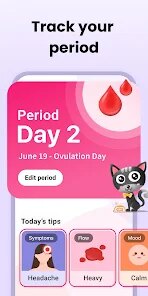
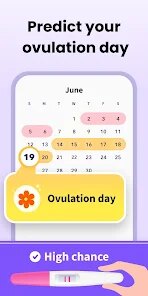
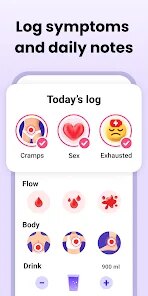
Using the app is straightforward. You just log your period days, and it starts predicting your next cycle and fertile window. I like to also note symptoms like cramps or mood swings; it helps me see patterns over time. A good tip is to enable notifications so the app reminds you when your period is due or when you're in a fertile phase. It makes planning ahead so much easier. The calendar view is clean, and you can add custom tags for anything specific you want to track.
I've tried a few other similar apps before settling on this one. Some, like Clue or Flo, are also popular, but I found Period Calendar's interface to be simpler and less cluttered. While those other apps can feel a bit overwhelming with lots of articles and community features, this app focuses on the core tracking function without extra noise. For me, that's the main reason I stuck with it. It does the job well without complicating things, and the predictions have been pretty accurate for my cycle.
Key Functional Highlights
- 📅 Clean, No-Fuss Interface: The main screen is just a clear calendar. You tap to log your period, symptoms, or notes. Compared to more feature-packed apps like Flo, which can feel busy, this app's simplicity is its biggest feature. It's incredibly easy to use from day one.
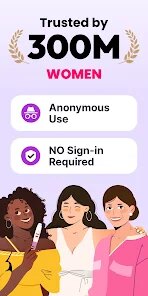
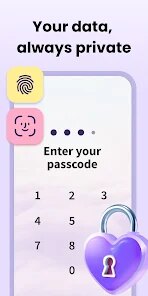
- 🔒 Privacy-First Approach: You can use the app fully without creating an account or logging in. Many other trackers push you to sign up. Here, your data stays locally on your device unless you choose to back it up, which gives me much more peace of mind.
- 📊 Solid Core Tracking: The prediction algorithm for periods and fertility windows is reliable. After a few months of consistent logging, the forecasts become very accurate. It covers all the essential bases you'd expect from a tracker in this genre.
- 🔔 Helpful Custom Reminders: You can set up multiple reminders for different things – period start, ovulation, or even just a daily log prompt. This flexibility is an outstanding feature that helps build a consistent tracking habit.
Advantages & Benefits
- ✨ Simplicity Wins: Its straightforward design is a major strength against competitors. Apps like Clue offer more analysis, but for quick, daily logging and clear predictions, Period Calendar is faster and less distracting.
- 💰 Truly Free Core Features: You can download and use the primary tracking functions without paying. Some other apps lock basic predictions behind a subscription, but here, the free version is fully functional.
- 🚀 Lightweight and Fast: The app installs quickly and doesn't take up much storage or battery. It feels snappier than some heavier alternatives in the Google Play store.
Areas for Improvement
- 📱 Ads in the Free Version: The occasional ad can be a minor annoyance. While less frequent than in some apps, it's a weakness compared to entirely ad-free trackers you might pay for.
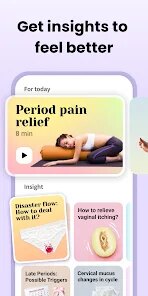
- 📈 Limited Advanced Insights: Compared to an app like Flo, which offers lots of health articles and trend analysis, this app's insights are more basic. If you want deep data diving, it might feel limited.
- 🔄 Sync Requires Setup: Backing up data or syncing across devices isn't as seamless as in apps with built-in accounts. It's an extra step you have to manage yourself.
Recommended Apps
![]()
ZEPETO: Avatar, Connect & Play
Naver Z Corporation4.3
![]()
Reverse Voice: Flip Singing
NindaFuit0![]()
AI Chat Ask Assistant - NowAI
Now Tech4.3![]()
Lie Detector Test: Prank App
DkTech inc.4.3![]()
Peachy - AI Face & Body Editor
InShot Video Editor4.8
![]()
AI Video Art Creator - Livensa
FERASET4.5![]()
Google Voice
Google LLC4.3![]()
Horoscopes & Tarot
Astrolis Horoscopes4.7![]()
eBay online shopping & selling
eBay Mobile4.6![]()
JPay
Jpay Mobile4.1![]()
Stranger Things 5 Challenges
MVH Entertainment Team5![]()
Chat Master: Prank Story
ABI Game Studio4.8![]()
Google Maps
Google LLC4.2![]()
AI Chat・Ask Chatbot Assistant
AI Chat Studio4.5![]()
Name Meanings with Impact
Alif Innovative Solution3.7















You May Like
-
![]()
True Tarot Card Reading
KaApps4.2 -
![]()
LinkedIn: Jobs & Business News
LinkedIn4.2 -
![]()
iControl: Easy Widgets Themes
Fancy keyboard for theme apps4.6 -
![]()
Duolingo: Language & Chess
Duolingo4.7 -
![]()
Flipped:Chat with AI Character
First Group pte ltd4.1 -
![]()
Hearing Age
Mobile Solutions Tech0 -
![]()
TikTok
TikTok Pte. Ltd.4.4 -
![]()
Pretty Makeup - Beauty Camera
Photo Editor Perfect Corp.4.4 -
![]()
PhotoRoom AI Photo Editor
PhotoRoom Background Editor App4.7 -
![]()
Lightleap by Lightricks
Lightricks Ltd.4.3 -
![]()
Name Meaning
Dexati4.1 -
![]()
Truth Social
T Media Tech LLC3.3 -
![]()
Ace Hardware
Ace Hardware Corporation4.7 -
![]()
Kpop Fans Demon Hunter Wallpap
JHNStudio4.3 -
![]()
Artplay - AI Photo & Video
Hideaway Technology Limited4.5











































