

TeraBox: 1TB Cloud & AI Space
Flextech Inc.
Installs
100M+
Developer
Flextech Inc.
-
Category
Productivity
-
Content Rating
Everyone
Developer Email
Privacy Policy
https://www.terabox.com/box-static/disk-system/html/wap_privacy.html
Screenshots




Expert Review
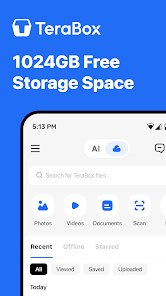
Some apps aim for a massive single purpose, and TeraBox: 1TB Cloud & AI Space from Flextech Inc. falls squarely into that category. Available for free on Google Play, it markets itself around a generous initial offering of 1TB of cloud storage, though this comes with a trade-off: ads and in-app purchases for additional features or more space are part of the package. The core draw is straightforward: you download and install it to back up your photos, videos, and documents without immediately worrying about running out of space.
Navigating the app in practice feels fairly smooth for basic operations, like quickly uploading a batch of recent photos. The interface keeps things simple, with clear tabs for viewing files and managing backups. I found that uploading a few large video files completed in reasonable time over a standard home Wi-Fi connection. The built-in media player also works decently for streaming stored videos directly, which saves the step of having to download them first just to watch something.
Against competitors like Google Drive or Dropbox, TeraBox stands out mainly for its aggressive free storage tier, which towers over the typical 15GB or 2GB offered elsewhere. However, the experience feels more utility-driven than polished; it lacks the seamless integration with desktop operating systems that those competitors provide. It feels like a dedicated backup safety net first, rather than a daily productivity hub, which may suit users who simply want a large overflow space without frequent subscriptions.
Key Functional Highlights
- The headline 1TB of free storage isn't all immediately usable at once; it unlocks gradually as you complete tasks or watch ads. While this feels slightly limiting initially, it does eventually open up to a genuinely useful amount of space for most users without upfront cost.
- File management includes standard options like folders, search, and sorting, but the AI tagging for photos works reasonably well. It automatically groups similar images, which saves time when looking for specific memories, though the accuracy can vary with older snapshots.
- Download speeds for retrieving files are generally consistent, but occasional pauses occur with larger archives. This seems comparable to other free-tier cloud services; you get what you pay for.
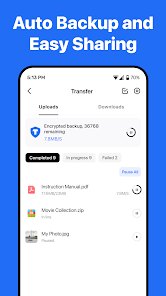
- One helpful touch is the automatic backup for new photos and videos after install, which activates with minimal setup. It operates quietly in the background, similar to Google Photos' older unlimited setup, though you must occasionally manage notifications to avoid clutter.
Advantages & Benefits
- Having abundant free storage removes the pressure to delete old files or purchase extra space immediately, which is a genuine relief for budget-conscious users.
- The backup process is straightforward after the initial install, making it simple to secure new content without daily manual effort.
- Streaming media from the cloud works smoothly on a reliable connection, so I can watch a downloaded show without using device storage.
Areas for Improvement
- The ad frequency can feel intrusive during regular use, especially when navigating or opening files, which slightly disrupts the flow.
- Transfer speeds for uploads and downloads are noticeably slower than premium competitors, so it's not ideal for time-sensitive large file transfers.
- No desktop sync client exists, limiting effortless cross-device access compared to services like OneDrive or iCloud.
- The gradual unlocking of storage space feels misleading; the offer suggests instant access but requires patience to fully utilize.
Recommended Apps
![]()
ZEPETO: Avatar, Connect & Play
Naver Z Corporation4.3
![]()
Reverse Voice: Flip Singing
NindaFuit0![]()
AI Chat Ask Assistant - NowAI
Now Tech4.3![]()
Lie Detector Test: Prank App
DkTech inc.4.3![]()
Peachy - AI Face & Body Editor
InShot Video Editor4.8
![]()
AI Video Art Creator - Livensa
FERASET4.5![]()
Google Voice
Google LLC4.3![]()
Horoscopes & Tarot
Astrolis Horoscopes4.7![]()
eBay online shopping & selling
eBay Mobile4.6![]()
JPay
Jpay Mobile4.1![]()
Stranger Things 5 Challenges
MVH Entertainment Team5![]()
Chat Master: Prank Story
ABI Game Studio4.8![]()
Google Maps
Google LLC4.2![]()
AI Chat・Ask Chatbot Assistant
AI Chat Studio4.5![]()
Name Meanings with Impact
Alif Innovative Solution3.7















You May Like
-
![]()
True Tarot Card Reading
KaApps4.2 -
![]()
LinkedIn: Jobs & Business News
LinkedIn4.2 -
![]()
iControl: Easy Widgets Themes
Fancy keyboard for theme apps4.6 -
![]()
Duolingo: Language & Chess
Duolingo4.7 -
![]()
Flipped:Chat with AI Character
First Group pte ltd4.1 -
![]()
Hearing Age
Mobile Solutions Tech0 -
![]()
TikTok
TikTok Pte. Ltd.4.4 -
![]()
Pretty Makeup - Beauty Camera
Photo Editor Perfect Corp.4.4 -
![]()
PhotoRoom AI Photo Editor
PhotoRoom Background Editor App4.7 -
![]()
Lightleap by Lightricks
Lightricks Ltd.4.3 -
![]()
Name Meaning
Dexati4.1 -
![]()
Truth Social
T Media Tech LLC3.3 -
![]()
Ace Hardware
Ace Hardware Corporation4.7 -
![]()
Kpop Fans Demon Hunter Wallpap
JHNStudio4.3 -
![]()
Artplay - AI Photo & Video
Hideaway Technology Limited4.5











































