

Instagram Lite
Instagram
Installs
100,000,000+
Developer
Instagram
-
Category
Social
-
Content Rating
Rated for 12+
Developer Email
Privacy Policy
http://instagram.com/legal/privacy/
Screenshots


Expert Review
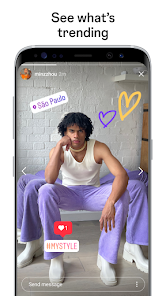
Instagram Lite is a streamlined version of the popular social media app, designed to offer the core Instagram experience with a significantly smaller footprint. You can download it for free from the Google Play store, where it's positioned as a lighter alternative for users with limited data plans or older devices. The app itself is free to install and use, and it operates without video ads, though you may still encounter sponsored photo posts in your feed like in the main app. There are no in-app purchases required for its basic functionality.
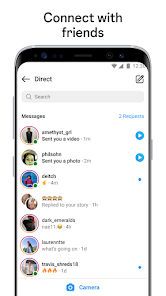
Navigating Instagram Lite feels familiar yet noticeably leaner. The interface is simplified, focusing on the essential tabs: Home for your feed, Search to discover accounts, the camera icon to create new posts, your activity notifications, and your profile. Scrolling through photos and videos is smooth, and the process of posting—selecting an image, adding a caption, and sharing—is straightforward. Direct messaging is fully integrated, allowing you to send texts and photos, though advanced features like video calls or vanish mode aren't present. The overall interaction is purposefully basic, stripping away the visual clutter to prioritize speed and reliability.
When placed alongside the full-fledged Instagram app or other lightweight social platforms like Facebook Lite, the differences are clear. Instagram Lite forgoes features like Reels creation, AR filters, and shopping tabs to maintain its slim profile. This design choice makes it less about immersive, feature-rich content creation and more about efficient consumption and simple sharing. From my use, it feels like a pragmatic tool for staying connected when resources are constrained, rather than a hub for the latest digital trends.
Key Functional Highlights
- The app's most significant aspect is its tiny size, often under 5MB for download. This makes installation quick and storage concerns virtually nonexistent, a stark contrast to the main Instagram app which can consume over a hundred megabytes.
- Data usage is remarkably conservative. Images load in a lower resolution by default, and auto-play for videos is disabled. This conscious optimization means you can browse your feed for longer without worrying about your data cap, a practical benefit the standard app doesn't emphasize as strongly.
- Performance on entry-level or older Android devices is consistently reliable. The simplified codebase avoids the lag or stutter sometimes experienced with the full version, providing a stable and responsive scrolling experience even on less powerful hardware.
- It retains the crucial social graph, seamlessly syncing your followers, feed, and direct messages from your main account. You don't feel cut off from your community, which isn't always the case with some third-party lightweight clients that lack official API support.
Advantages & Benefits
- It allows you to stay updated with friends and interests without draining your phone's storage or monthly data allowance.
- The app is perfect for quick check-ins during commutes or in areas with slower network connections where the full app might struggle.
- Having a reliable, no-frills messaging option within the Instagram ecosystem is handy for basic communication.
- It serves as an excellent backup or secondary app on a device where you might not want to install the full, resource-intensive version.
Areas for Improvement
- You miss out on creating or watching Reels, which are a major part of the platform's current content landscape.
- The absence of AR filters and advanced editing tools makes the posting experience feel quite basic for those who enjoy crafting their content.
- Some interface animations and transitional effects are removed, which can make the app feel slightly less polished or modern.
- Features like IGTV or detailed insights for business accounts are not available, limiting its utility for creators or small businesses.
Recommended Apps
![]()
ZEPETO: Avatar, Connect & Play
Naver Z Corporation4.3
![]()
Reverse Voice: Flip Singing
NindaFuit0![]()
AI Chat Ask Assistant - NowAI
Now Tech4.3![]()
Lie Detector Test: Prank App
DkTech inc.4.3![]()
Peachy - AI Face & Body Editor
InShot Video Editor4.8
![]()
AI Video Art Creator - Livensa
FERASET4.5![]()
Google Voice
Google LLC4.3![]()
Horoscopes & Tarot
Astrolis Horoscopes4.7![]()
eBay online shopping & selling
eBay Mobile4.6![]()
JPay
Jpay Mobile4.1![]()
Stranger Things 5 Challenges
MVH Entertainment Team5![]()
Chat Master: Prank Story
ABI Game Studio4.8![]()
Google Maps
Google LLC4.2![]()
AI Chat・Ask Chatbot Assistant
AI Chat Studio4.5![]()
Name Meanings with Impact
Alif Innovative Solution3.7















You May Like
-
![]()
True Tarot Card Reading
KaApps4.2 -
![]()
LinkedIn: Jobs & Business News
LinkedIn4.2 -
![]()
iControl: Easy Widgets Themes
Fancy keyboard for theme apps4.6 -
![]()
Duolingo: Language & Chess
Duolingo4.7 -
![]()
Flipped:Chat with AI Character
First Group pte ltd4.1 -
![]()
Hearing Age
Mobile Solutions Tech0 -
![]()
TikTok
TikTok Pte. Ltd.4.4 -
![]()
Pretty Makeup - Beauty Camera
Photo Editor Perfect Corp.4.4 -
![]()
PhotoRoom AI Photo Editor
PhotoRoom Background Editor App4.7 -
![]()
Lightleap by Lightricks
Lightricks Ltd.4.3 -
![]()
Name Meaning
Dexati4.1 -
![]()
Truth Social
T Media Tech LLC3.3 -
![]()
Ace Hardware
Ace Hardware Corporation4.7 -
![]()
Kpop Fans Demon Hunter Wallpap
JHNStudio4.3 -
![]()
Artplay - AI Photo & Video
Hideaway Technology Limited4.5











































