
Google Translate
Google LLC
Installs
1,000,000,000+
Developer
Google LLC
-
Category
Books & Reference
-
Content Rating
Rated for 3+
Developer Email
Privacy Policy
http://www.google.com/policies/privacy/
Screenshots
Expert Review
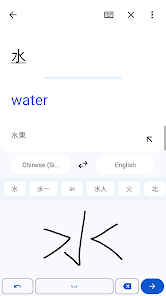
Google Translate is a free translation and language assistance app developed by Google. You can find it on the Google Play Store or the Apple App Store, and it's been downloaded and installed by billions of users worldwide. The core service is completely free, though it does display ads within the app. There are no mandatory in-app purchases, but a subscription called “Google One” offers some enhanced features like offline translation for more languages, which is bundled with other Google services.
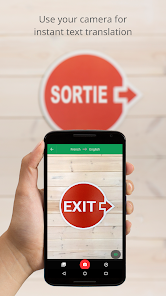
In practice, using the app is straightforward. You type, speak, or point your camera at text, and it provides a translation almost instantly. I often use the camera feature for menus or signs when traveling; it overlays the translated text right on your screen, which feels quite practical. For conversations, the two-way speech translation mode works well enough for basic exchanges, though it sometimes requires a clear signal and a quiet environment.
Compared to other translation tools like Microsoft Translator or DeepL, Google Translate stands out for its sheer breadth of supported languages and the convenience of its camera translation. DeepL is often praised for more nuanced European language translations, but Google's app feels more like a versatile, all-in-one toolkit you'd have on hand for quick, everyday needs rather than a specialized tool for perfect literary translation.
Key Functional Highlights
- The real-time camera translation is incredibly useful in everyday situations. Pointing your phone at a foreign menu or a street sign and seeing the text replaced instantly feels almost like magic. It's not always perfectly accurate with stylized fonts, but for standard print, it gets the job done quickly.
- Voice translation works well for basic phrases. You speak into your phone, and it plays the translation aloud. In my experience, this is handy for asking simple questions or getting directions, though background noise can sometimes trip it up. It's less about having a fluid conversation and more about bridging immediate communication gaps.
- The phrasebook feature is a nice touch for travelers. You can star and save common phrases, which then works offline. It's more organized than just typing each time, and having a quick reference for “Where is the bathroom?” or “How much does this cost?” saved on your phone is genuinely convenient.
- While the text translation is generally reliable, I've noticed it can struggle with idioms or very casual slang. The meaning usually comes across, but the wording might sound a bit off. For comparison, I sometimes cross-check complex sentences with DeepL, which occasionally provides a more natural-sounding alternative for certain language pairs.
Advantages & Benefits
- Having over 100 languages available offline (with a download) is a major plus for travel without constant data.
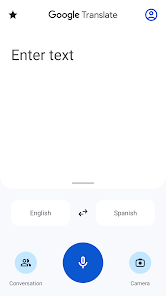
- The interface is clean and the main functions are easy to find, so you're not wasting time figuring out how to use it when you need a translation fast.
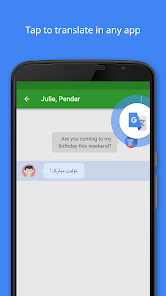
- It integrates smoothly with other Google services; for instance, you can highlight text in Chrome and translate it directly with a tap.
- The conversation mode, while simple, creates a visual split-screen that makes turn-taking in a bilingual chat surprisingly intuitive.
Areas for Improvement
- The ads, while not overly intrusive, can be a slight distraction, especially when you're trying to focus on a translation.
- Offline translation for all features and languages requires a Google One subscription, which might not be ideal for everyone.
- Pronunciation guides for some languages are text-based only (using phonetic spelling) rather than audio, which isn't as helpful for learning to speak.
- Very long paragraphs or complex documents can sometimes result in translations that lose the original structure or flow, making them harder to follow.
Recommended Apps
![]()
ZEPETO: Avatar, Connect & Play
Naver Z Corporation4.3
![]()
Reverse Voice: Flip Singing
NindaFuit0![]()
AI Chat Ask Assistant - NowAI
Now Tech4.3![]()
Lie Detector Test: Prank App
DkTech inc.4.3![]()
Peachy - AI Face & Body Editor
InShot Video Editor4.8
![]()
AI Video Art Creator - Livensa
FERASET4.5![]()
Google Voice
Google LLC4.3![]()
Horoscopes & Tarot
Astrolis Horoscopes4.7![]()
eBay online shopping & selling
eBay Mobile4.6![]()
JPay
Jpay Mobile4.1![]()
Stranger Things 5 Challenges
MVH Entertainment Team5![]()
Chat Master: Prank Story
ABI Game Studio4.8![]()
Google Maps
Google LLC4.2![]()
AI Chat・Ask Chatbot Assistant
AI Chat Studio4.5![]()
Name Meanings with Impact
Alif Innovative Solution3.7















You May Like
-
![]()
True Tarot Card Reading
KaApps4.2 -
![]()
LinkedIn: Jobs & Business News
LinkedIn4.2 -
![]()
iControl: Easy Widgets Themes
Fancy keyboard for theme apps4.6 -
![]()
Duolingo: Language & Chess
Duolingo4.7 -
![]()
Flipped:Chat with AI Character
First Group pte ltd4.1 -
![]()
Hearing Age
Mobile Solutions Tech0 -
![]()
TikTok
TikTok Pte. Ltd.4.4 -
![]()
Pretty Makeup - Beauty Camera
Photo Editor Perfect Corp.4.4 -
![]()
PhotoRoom AI Photo Editor
PhotoRoom Background Editor App4.7 -
![]()
Lightleap by Lightricks
Lightricks Ltd.4.3 -
![]()
Name Meaning
Dexati4.1 -
![]()
Truth Social
T Media Tech LLC3.3 -
![]()
Ace Hardware
Ace Hardware Corporation4.7 -
![]()
Kpop Fans Demon Hunter Wallpap
JHNStudio4.3 -
![]()
Artplay - AI Photo & Video
Hideaway Technology Limited4.5










































