
Microsoft Outlook
Microsoft Corporation
Installs
500,000,000+
Developer
Microsoft Corporation
-
Category
Productivity
-
Content Rating
Rated for 3+
Developer Email
Privacy Policy
http://taps.io/outlookprivacy
Screenshots
Expert Review
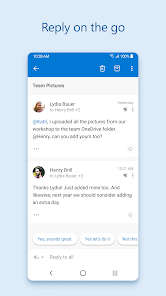
Microsoft Outlook is a personal information manager app from Microsoft, part of the Microsoft 365 suite. It's primarily used for email, but it also integrates your calendar, contacts, and tasks into one place. I've been using it for years to manage both my work and personal accounts. The app first launched a long time ago, but the mobile version really became essential for on-the-go access. You can download it for free from the Google Play Store or the Apple App Store, and it has billions of installs globally. While the core app is free to download and install, you need an email account to use it, like Outlook.com, Hotmail, or even Gmail. For full features with a work or school account, you usually need a Microsoft 365 subscription. There are no disruptive in-app ads, which is a huge plus for a productivity app.
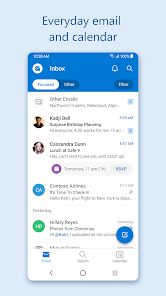
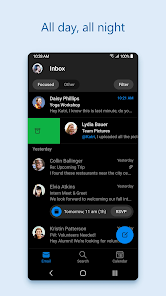
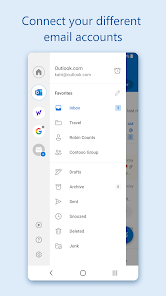
Using the app is pretty straightforward. I have my Gmail, work Exchange, and Outlook.com accounts all set up in one inbox. The 'Focused Inbox' feature is a lifesaver—it automatically sorts important emails from newsletters and promotions. A great tip is to use the swipe gestures; you can customize them to archive, delete, or schedule emails quickly. I also rely heavily on the calendar view right next to my inbox; it makes scheduling meetings from emails a breeze. For power users, the search function is incredibly powerful for finding old emails across all connected accounts.
Compared to other email apps like Gmail or Apple Mail, I stick with Outlook because of its deep integration with the Office ecosystem. If you use Word, Excel, or Teams for work, having everything connected feels seamless. While the Gmail app might have a cleaner interface for just Gmail, Outlook handles multiple account types (Exchange, IMAP, POP) much better in my experience. Apple Mail is simple, but it lacks the advanced organization and scheduling features I get with Outlook. For managing a busy professional life across different platforms, this app is my go-to choice.
Key Functional Highlights
- 📧 Unified Inbox & Smart Organization: The 'Focused Inbox' is its standout feature. Unlike Gmail's tabs, it learns what's important to you and separates it from clutter automatically. You see all your accounts in one list, but it feels organized, not chaotic.
- 📅 Deep Calendar Integration: Your calendar isn't just linked; it's embedded. You can view your schedule while reading emails and propose meeting times with one tap. Compared to other apps where calendar is separate, this integration is what makes planning efficient.
- 📎 Best-in-Class Office Integration: Attaching files is where it shines. It connects directly to OneDrive, SharePoint, and even recent email attachments. Compared to downloading and re-uploading in other apps, editing and sending a Word doc from within Outlook is seamless.
- ✈️ Offline Functionality: You can read, write, and search emails even without a connection. Many apps require a constant connection, but Outlook caches your data reliably, which is perfect for flights or spotty service.
Advantages & Benefits
- ✅ Superior for Multiple Account Types: It handles Exchange/Office 365 work accounts better than Gmail or Apple Mail, making it the standard for corporate environments.
- ✅ Powerful Search: Finding old emails across massive mailboxes is faster and more accurate than in many competing apps.
- ✅ Clean, Ad-Free Experience: Unlike some free email apps, there are no banner or video ads cluttering the interface.
Areas for Improvement
- ⚠️ Can Feel Bloated: For someone who just wants simple email, apps like Spike or Apple Mail offer a lighter, faster experience.
- ⚠️ Free Version Limitations: The best features, like advanced security and custom domains, require a Microsoft 365 subscription, whereas Gmail offers more for free.
- ⚠️ Occasional Sync Delays: Sometimes, notifications for new emails are slower than the native Gmail or Samsung Email app.
Recommended Apps
![]()
ZEPETO: Avatar, Connect & Play
Naver Z Corporation4.3
![]()
Reverse Voice: Flip Singing
NindaFuit0![]()
AI Chat Ask Assistant - NowAI
Now Tech4.3![]()
Lie Detector Test: Prank App
DkTech inc.4.3![]()
Peachy - AI Face & Body Editor
InShot Video Editor4.8
![]()
AI Video Art Creator - Livensa
FERASET4.5![]()
Google Voice
Google LLC4.3![]()
Horoscopes & Tarot
Astrolis Horoscopes4.7![]()
eBay online shopping & selling
eBay Mobile4.6![]()
JPay
Jpay Mobile4.1![]()
Stranger Things 5 Challenges
MVH Entertainment Team5![]()
Chat Master: Prank Story
ABI Game Studio4.8![]()
Google Maps
Google LLC4.2![]()
AI Chat・Ask Chatbot Assistant
AI Chat Studio4.5![]()
Name Meanings with Impact
Alif Innovative Solution3.7















You May Like
-
![]()
True Tarot Card Reading
KaApps4.2 -
![]()
LinkedIn: Jobs & Business News
LinkedIn4.2 -
![]()
iControl: Easy Widgets Themes
Fancy keyboard for theme apps4.6 -
![]()
Duolingo: Language & Chess
Duolingo4.7 -
![]()
Flipped:Chat with AI Character
First Group pte ltd4.1 -
![]()
Hearing Age
Mobile Solutions Tech0 -
![]()
TikTok
TikTok Pte. Ltd.4.4 -
![]()
Pretty Makeup - Beauty Camera
Photo Editor Perfect Corp.4.4 -
![]()
PhotoRoom AI Photo Editor
PhotoRoom Background Editor App4.7 -
![]()
Lightleap by Lightricks
Lightricks Ltd.4.3 -
![]()
Name Meaning
Dexati4.1 -
![]()
Truth Social
T Media Tech LLC3.3 -
![]()
Ace Hardware
Ace Hardware Corporation4.7 -
![]()
Kpop Fans Demon Hunter Wallpap
JHNStudio4.3 -
![]()
Artplay - AI Photo & Video
Hideaway Technology Limited4.5










































