

Firefox Fast & Private Browser
Mozilla
Installs
100,000,000+
Developer
Mozilla
-
Category
Social
-
Content Rating
Rated for 3+
Developer Email
Privacy Policy
https://www.mozilla.org/privacy/firefox/
Screenshots

Expert Review
I've been using the Firefox Fast & Private Browser for years now, and it's my go-to app for surfing the web on my phone. It's a mobile web browser app, and its main job is to let you visit websites just like any other browser, but with a huge focus on speed and protecting your privacy. Mozilla first launched the mobile version of Firefox a long time ago, and you can easily download it from the Google Play Store or the Apple App Store. It has over 100 million installs on Google Play alone, which shows how many people trust it. The best part? It's completely free to download and install. You don't even need to create an account or register to start using it right away. While the app itself is free, it does support Mozilla through optional contributions, and you might see some promoted content in its "Pocket" recommendations section, but regular web browsing is ad-free.
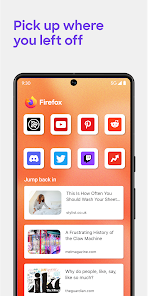
Using the app is pretty straightforward. After you install it, you just open it and type in a website address. I love that it syncs my bookmarks and open tabs with the Firefox on my desktop computer, so I can pick up where I left off. A great tip is to use the tracking protection feature. You can turn it on for every site you visit, which really cuts down on those annoying ads that follow you around. Another handy trick is to add websites to your home screen as shortcuts, which makes them feel like their own little apps.
When I was looking for a browser, I tried a few others like Chrome and Samsung Internet. Chrome is fast and popular, but I chose Firefox because it feels more respectful of my data. It doesn't feel like it's constantly trying to build a profile on me for ads. Compared to other privacy-focused apps, Firefox strikes a perfect balance for me. It's fast enough for daily use, blocks a lot of junk by default, and doesn't get in my way. It just works like a browser should, without any hidden agendas.
Key Functional Highlights
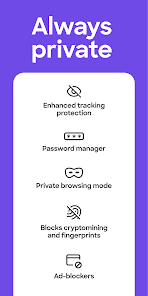
- 🔒 Enhanced Tracking Protection: Right out of the box, this app blocks social media trackers, cross-site cookies, and cryptominers. It's like having a built-in guard that stops websites from secretly watching what you do online.
- 📚 Extensive Add-on Library: Unlike many mobile browsers, Firefox lets you install add-ons from its library. I have an ad-blocker and a dark mode enabler installed, which lets me customize my browsing experience way more than I can on, say, Chrome for mobile.
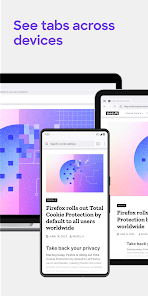
- 🔄 Seamless Sync with Desktop: If you use Firefox on your computer, this app makes switching to your phone effortless. Your bookmarks, history, and even open tabs are instantly available, creating a unified web experience across all your devices.
- 👆 Privacy-Focused Search: The app integrates privacy-respecting search engines like DuckDuckGo by default. Every search you do from the address bar helps keep your queries away from the big data collectors.
Advantages & Benefits
- 👍 Strong Default Privacy: Compared to Chrome or Edge, Firefox has much stricter privacy settings turned on from the moment you install it. You don't have to dig through complicated menus to feel protected.
- 👍 True Extension Support: Most mobile browsers, including Chrome, don't support full extensions. Firefox's ability to use add-ons is a massive advantage for power users who want to block ads or enhance functionality.
- 👍 Independent and Non-Profit Backing: Mozilla isn't a giant ad company. This independence from the major tech giants means the app's goals are more aligned with user benefit than data harvesting, unlike browsers from Google or Microsoft.
Areas for Improvement
- 👎 Occasional Performance Hiccups: On some very complex websites, Firefox can feel a tiny bit slower than the super-optimized Chrome or Safari. It's usually fast, but not always the absolute speed king.
- 👎 Less Deep Google Integration: If you live entirely in Google's ecosystem (Gmail, Drive, etc.), Chrome might offer slightly smoother integration. Signing into Google sites can sometimes prompt an extra step in Firefox.
- 👎 Battery Usage Can Be Higher: With all its privacy features and extensions running, I've noticed the app can use a bit more battery than some lighter browsers, especially if you have many tabs open for a long time.
Recommended Apps
![]()
ZEPETO: Avatar, Connect & Play
Naver Z Corporation4.3
![]()
Reverse Voice: Flip Singing
NindaFuit0![]()
AI Chat Ask Assistant - NowAI
Now Tech4.3![]()
Lie Detector Test: Prank App
DkTech inc.4.3![]()
Peachy - AI Face & Body Editor
InShot Video Editor4.8
![]()
AI Video Art Creator - Livensa
FERASET4.5![]()
Google Voice
Google LLC4.3![]()
Horoscopes & Tarot
Astrolis Horoscopes4.7![]()
eBay online shopping & selling
eBay Mobile4.6![]()
JPay
Jpay Mobile4.1![]()
Stranger Things 5 Challenges
MVH Entertainment Team5![]()
Chat Master: Prank Story
ABI Game Studio4.8![]()
Google Maps
Google LLC4.2![]()
AI Chat・Ask Chatbot Assistant
AI Chat Studio4.5![]()
Name Meanings with Impact
Alif Innovative Solution3.7















You May Like
-
![]()
True Tarot Card Reading
KaApps4.2 -
![]()
LinkedIn: Jobs & Business News
LinkedIn4.2 -
![]()
iControl: Easy Widgets Themes
Fancy keyboard for theme apps4.6 -
![]()
Duolingo: Language & Chess
Duolingo4.7 -
![]()
Flipped:Chat with AI Character
First Group pte ltd4.1 -
![]()
Hearing Age
Mobile Solutions Tech0 -
![]()
TikTok
TikTok Pte. Ltd.4.4 -
![]()
Pretty Makeup - Beauty Camera
Photo Editor Perfect Corp.4.4 -
![]()
PhotoRoom AI Photo Editor
PhotoRoom Background Editor App4.7 -
![]()
Lightleap by Lightricks
Lightricks Ltd.4.3 -
![]()
Name Meaning
Dexati4.1 -
![]()
Truth Social
T Media Tech LLC3.3 -
![]()
Ace Hardware
Ace Hardware Corporation4.7 -
![]()
Kpop Fans Demon Hunter Wallpap
JHNStudio4.3 -
![]()
Artplay - AI Photo & Video
Hideaway Technology Limited4.5









































