

Subway®
SUBWAY Restaurants
Installs
10M+
Developer
SUBWAY Restaurants
-
Category
Food & Drink
-
Content Rating
Everyone
Developer Email
Privacy Policy
https://www.subway.com/en-US/Legal/PrivacyStatement-FWH
Screenshots
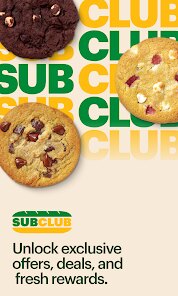
Expert Review
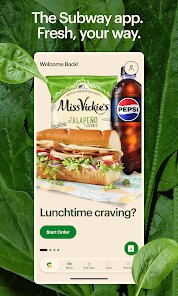
For anyone craving a quick and customizable meal, the official Subway app, simply titled Subway®, offers a digital way to engage with the popular sandwich chain. Available for free on the Google Play Store, this app is designed to streamline the ordering process, allowing users to build their sandwiches from the menu and pick them up without waiting in line. The app includes in-app purchases and some advertising, which is fairly common for restaurant-based applications. With a substantial number of installs reflecting the brand's global reach, it serves as a practical tool for regular customers looking for efficiency in their lunch routine.
The core functionality revolves around the Subway® Rewards program and mobile ordering. After a quick registration, you can browse the full menu, customize ingredients down to the sauce and vegetable level, and pay directly through the app. The interface guides you through each step, from selecting your bread to choosing a pick-up time at your preferred local store. I found the process to be quite straightforward; placing an order for a footlong took only a couple of minutes. The app also stores favorite orders, which makes re-ordering a common meal incredibly fast. It is a system that clearly prioritizes saving time for the user.
When stacked against competitors like the McDonald's or Chick-fil-A apps, the Subway® app holds its own in terms of customization but feels slightly less polished in overall speed and navigation. The McDonald's app, for instance, often feels more responsive and has a more streamlined checkout flow. However, Subway's strength lies in the granularity of its sandwich building, a level of detail that its competitors simply don't need. While the visual design is clean, there is a slight lag when scrolling through extensive ingredient lists, which can feel a bit clunky after using a more optimized experience. It is a solid effort that gets the job done, though it leaves some room for refinement.
Key Functional Highlights
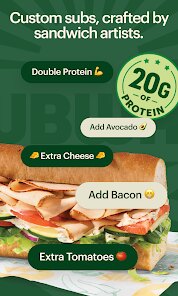
- The most compelling feature is the 'Sandwich Builder', which accurately mirrors the in-store experience. You can select every type of bread, cheese, vegetable, and sauce, seeing the visual choices update on screen. It feels satisfying to have that much control, though the sheer number of options can make the process feel slightly slower than just saying your order aloud.
- The Rewards program is integrated seamlessly. You earn 'Subway® Cash' on purchases, which can be redeemed for menu items. It is a straightforward system that rewards loyalty without requiring complex calculations. Compared to the points system in the Starbucks app, Subway's is simpler, but also less gamified and engaging.
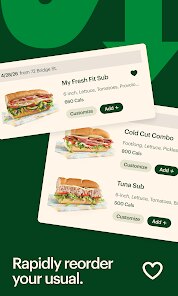
- Order History and 'Favorites' are practical touches. Saving a custom order is effortless, making a repeat purchase a two-tap affair. This is where the app saves the most time, as you bypass the customization entirely for your go-to meal. Other apps have this, but Subway does it without any extra clutter.
Advantages & Benefits
- Skipping the queue is the main advantage. I just walk in, grab my bag from the counter, and leave. It turns a 10-minute wait into a 30-second pickup.
- You can carefully check your order before submitting. It reduces the chance of miscommunication, especially with complex orders involving many ingredients.
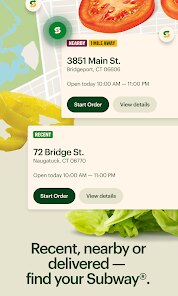
- Finding the nearest store and its hours is built-in. This is handy when traveling, as you don't have to guess which locations are open.
Areas for Improvement
- The app occasionally feels sluggish, particularly during peak hours. The customization screen can stutter when loading ingredient lists.
- The offers and deals section is not always clearly organized. Sometimes finding the current promotion takes a bit of scrolling and tapping.
- Notifications can be a bit frequent. You may receive alerts for every new sandwich promotion, which can feel like noise if you are not interested.
Recommended Apps
![]()
ZEPETO: Avatar, Connect & Play
Naver Z Corporation4.3
![]()
Reverse Voice: Flip Singing
NindaFuit0![]()
AI Chat Ask Assistant - NowAI
Now Tech4.3![]()
Lie Detector Test: Prank App
DkTech inc.4.3![]()
Peachy - AI Face & Body Editor
InShot Video Editor4.8
![]()
AI Video Art Creator - Livensa
FERASET4.5![]()
Google Voice
Google LLC4.3![]()
Horoscopes & Tarot
Astrolis Horoscopes4.7![]()
eBay online shopping & selling
eBay Mobile4.6![]()
JPay
Jpay Mobile4.1![]()
Stranger Things 5 Challenges
MVH Entertainment Team5![]()
Chat Master: Prank Story
ABI Game Studio4.8![]()
Google Maps
Google LLC4.2![]()
AI Chat・Ask Chatbot Assistant
AI Chat Studio4.5![]()
Name Meanings with Impact
Alif Innovative Solution3.7















You May Like
-
![]()
True Tarot Card Reading
KaApps4.2 -
![]()
LinkedIn: Jobs & Business News
LinkedIn4.2 -
![]()
iControl: Easy Widgets Themes
Fancy keyboard for theme apps4.6 -
![]()
Duolingo: Language & Chess
Duolingo4.7 -
![]()
Flipped:Chat with AI Character
First Group pte ltd4.1 -
![]()
Hearing Age
Mobile Solutions Tech0 -
![]()
TikTok
TikTok Pte. Ltd.4.4 -
![]()
Pretty Makeup - Beauty Camera
Photo Editor Perfect Corp.4.4 -
![]()
PhotoRoom AI Photo Editor
PhotoRoom Background Editor App4.7 -
![]()
Lightleap by Lightricks
Lightricks Ltd.4.3 -
![]()
Name Meaning
Dexati4.1 -
![]()
Truth Social
T Media Tech LLC3.3 -
![]()
Ace Hardware
Ace Hardware Corporation4.7 -
![]()
Kpop Fans Demon Hunter Wallpap
JHNStudio4.3 -
![]()
Artplay - AI Photo & Video
Hideaway Technology Limited4.5











































