

Prank Call: Fake Video Prank
MoranJiyounge
Installs
1M+
Developer
MoranJiyounge
-
Category
Video Players & Editors
-
Content Rating
Everyone
Developer Email
Privacy Policy
https://moranjiyoungestudiokr.web.app/privacy-policy
Screenshots



Expert Review
Prank Call: Fake Video Prank brings a different kind of entertainment to mobile devices, combining simulated video calls with prank scenarios. Users can download it directly from Google Play, and the installation process takes only a moment. The app itself is free to use, though occasional ads do appear during certain interactions. In-app purchases exist for those wanting to expand the prank library, but the core experience remains accessible without spending anything. MoranJiyounge has designed this tool for people who enjoy lighthearted mischief with friends or family members.
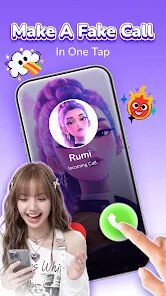
Once installed, the app presents a straightforward interface where users select from various fake call scenarios. You pick a situation, customize the caller name and photo, then trigger the simulated incoming call. The screen displays a video feed that mimics a real connection, complete with audio and visual elements that feel surprisingly authentic. I found myself testing it on a colleague, and the reaction was genuine confusion followed by laughter. The app also offers scheduled calls, so you can set up a prank for a specific time, which adds another layer of flexibility for planning ahead.
Google Play features several similar tools, but this one stands out for its video quality and scenario variety. Some alternatives focus purely on audio calls or static images, whereas this app delivers actual video playback with convincing timing. The interface feels lighter and less cluttered than some rivals I have tried, making navigation quicker. That said, the prank selection, while decent, does not match the sheer volume found in certain dedicated prank apps, though the ones included here tend to be more polished and better executed.
Key Functional Highlights
- The video simulations look remarkably realistic on modern screens. Caller images appear crisp, and the video feed adjusts properly to different aspect ratios. This visual fidelity makes the prank much more convincing; a friend actually asked if I had switched to a new phone when testing it.
- Call scheduling works exceptionally well. Setting a fake call for a specific time means you can orchestrate scenarios without fumbling with the phone at the critical moment. This proves handy during gatherings when you want the prank to occur while you are occupied elsewhere.
- Customization options go beyond basic name and photo changes. You can alter ringtone sounds, adjust video playback speed, and even add background noise effects. These tweaks allow for more personalized experiences, and the variety keeps things fresh across repeated usage sessions.
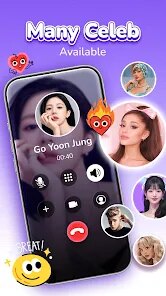
- The app handles multiple prank styles effectively, from serious calls to outright ridiculous ones. Compared to another popular prank app that focuses exclusively on celebrity impersonations, this one offers broader creative control. The balance between funny and believable scenarios gives you room to adapt based on your audience.
Advantages & Benefits
- Breaking the ice in social situations becomes effortless when you can trigger a fake call that grabs attention.
- The scheduling feature lets you set up jokes in advance, which works well for parties or team events.
- Customization makes every prank feel unique, so repeated use does not become stale.
- Video calls appear genuine enough that the prank lands smoothly without needing technical skill from the user.
Areas for Improvement
- Advertisements interrupt the flow quite often, and closing them distracts from the joke timing.
- The free scenario list remains limited; unlocking more options requires purchase, which may disappoint casual users.
- Some video clips play briefly and then loop, which slightly reduces the illusion during longer calls.
- Occasional lag appears on older devices, particularly when switching between customization menus and the call screen.
Recommended Apps
![]()
ZEPETO: Avatar, Connect & Play
Naver Z Corporation4.3
![]()
Reverse Voice: Flip Singing
NindaFuit0![]()
AI Chat Ask Assistant - NowAI
Now Tech4.3![]()
Lie Detector Test: Prank App
DkTech inc.4.3![]()
Peachy - AI Face & Body Editor
InShot Video Editor4.8
![]()
AI Video Art Creator - Livensa
FERASET4.5![]()
Google Voice
Google LLC4.3![]()
Horoscopes & Tarot
Astrolis Horoscopes4.7![]()
eBay online shopping & selling
eBay Mobile4.6![]()
JPay
Jpay Mobile4.1![]()
Stranger Things 5 Challenges
MVH Entertainment Team5![]()
Chat Master: Prank Story
ABI Game Studio4.8![]()
Google Maps
Google LLC4.2![]()
AI Chat・Ask Chatbot Assistant
AI Chat Studio4.5![]()
Name Meanings with Impact
Alif Innovative Solution3.7















You May Like
-
![]()
True Tarot Card Reading
KaApps4.2 -
![]()
LinkedIn: Jobs & Business News
LinkedIn4.2 -
![]()
iControl: Easy Widgets Themes
Fancy keyboard for theme apps4.6 -
![]()
Duolingo: Language & Chess
Duolingo4.7 -
![]()
Flipped:Chat with AI Character
First Group pte ltd4.1 -
![]()
Hearing Age
Mobile Solutions Tech0 -
![]()
TikTok
TikTok Pte. Ltd.4.4 -
![]()
Pretty Makeup - Beauty Camera
Photo Editor Perfect Corp.4.4 -
![]()
PhotoRoom AI Photo Editor
PhotoRoom Background Editor App4.7 -
![]()
Lightleap by Lightricks
Lightricks Ltd.4.3 -
![]()
Name Meaning
Dexati4.1 -
![]()
Truth Social
T Media Tech LLC3.3 -
![]()
Ace Hardware
Ace Hardware Corporation4.7 -
![]()
Kpop Fans Demon Hunter Wallpap
JHNStudio4.3 -
![]()
Artplay - AI Photo & Video
Hideaway Technology Limited4.5










































