

Idol Prank Call - Fake Call
BetterLife Technology
Installs
1M+
Developer
BetterLife Technology
-
Category
Video Players & Editors
-
Content Rating
Everyone
Developer Email
Privacy Policy
https://colordrawfun.com/BetterLifeTechnology.html
Screenshots



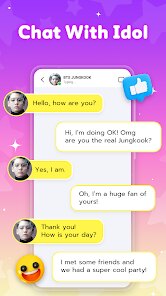

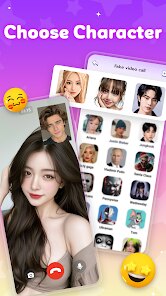
Expert Review
Idol Prank Call - Fake Call, created by BetterLife Technology, offers a playful twist on the classic prank call idea without any of the awkward social risks. This simulation app is designed to generate convincing fake incoming calls from virtual characters, complete with pre-recorded voice lines and interactive chat responses. It's available for free on Google Play, and while it does include advertisements, these are non-intrusive enough not to ruin the experience. The app has seen a steady number of installs, suggesting a decent following among users who enjoy lighthearted tricks on friends or just a bit of solo entertainment.
Once you download and install it, the interface feels straightforward. The main screen presents a list of fictional characters, each with a distinct personality and set of conversation scripts. You pick one, hit the trigger button, and the app takes over, mimicking a real call screen overlay on your device. During the call, you get to choose from a few response options, which nudges the dialogue in different directions. In practice, the timing feels quite natural, and the voice acting is decent for a free app. I found myself exploring different characters just to see how the conversations would branch out, which added a layer of replayability I hadn't expected.
When placed alongside other fake call apps, this one distinguishes itself with its chat simulation rather than just relying on a pre-recorded voice. Many competitors simply play a looped audio clip or a static ringtone, but here the interactive element gives you a semblance of control. The visual design leans toward a polished, modern aesthetic, which is a step up from the cluttered layouts you often see in this niche. That said, the character roster is smaller than some rivals, so if you are after sheer variety, you might find the options a bit limited.
Key Functional Highlights
- The real-time chat simulation is the standout feature. You can steer the conversation by picking from multiple reply choices, and the character responds accordingly, making each call feel less scripted and more spontaneous. It did take me a couple of tries to get the hang of the response timing, but once I did, the flow was quite engaging.
- There is a useful scheduling option that lets you set a fake call for a specific time, which is handy if you want to excuse yourself from a meeting or class discreetly. The phone screen that appears looks convincing enough to fool most people, and you can even adjust the caller ID name and photo.
- Compared to apps like Fake Call - Prank Call Simulator, this one focuses more on dialogue depth than on a huge library of scenarios. While the latter offers more settings and backgrounds, the conversation quality here feels more polished and less repetitive across different characters.
- The offline functionality works without a hiccup. Once the content is downloaded, you can trigger calls without needing a data connection, which is a solid plus if you are in a spot with poor reception or traveling.
Advantages & Benefits
- It is a practical tool for gracefully leaving an awkward situation, like a long-winded conversation or an overextended meeting, without having to fabricate an excuse on the spot.
- The variety of characters and dialogue paths keeps the experience fresh, so you can get a few good laughs from different scenarios each time you use it.
- Since it does not rely on an internet connection for the core feature, it works reliably in most environments, which is reassuring when you are counting on it.
Areas for Improvement
- The number of characters and call scenarios is relatively small, and after a while, you start to notice repeated dialogue lines across different profiles.
- Advertisements appear after nearly every completed call, which can interrupt the flow if you are testing out multiple interactions in a row.
- Some of the voice recordings sound a bit artificial, particularly for the female characters, which slightly diminishes the realism during casual use.
Recommended Apps
![]()
ZEPETO: Avatar, Connect & Play
Naver Z Corporation4.3
![]()
Reverse Voice: Flip Singing
NindaFuit0![]()
AI Chat Ask Assistant - NowAI
Now Tech4.3![]()
Lie Detector Test: Prank App
DkTech inc.4.3![]()
Peachy - AI Face & Body Editor
InShot Video Editor4.8
![]()
AI Video Art Creator - Livensa
FERASET4.5![]()
Google Voice
Google LLC4.3![]()
Horoscopes & Tarot
Astrolis Horoscopes4.7![]()
eBay online shopping & selling
eBay Mobile4.6![]()
JPay
Jpay Mobile4.1![]()
Stranger Things 5 Challenges
MVH Entertainment Team5![]()
Chat Master: Prank Story
ABI Game Studio4.8![]()
Google Maps
Google LLC4.2![]()
AI Chat・Ask Chatbot Assistant
AI Chat Studio4.5![]()
Name Meanings with Impact
Alif Innovative Solution3.7















You May Like
-
![]()
True Tarot Card Reading
KaApps4.2 -
![]()
LinkedIn: Jobs & Business News
LinkedIn4.2 -
![]()
iControl: Easy Widgets Themes
Fancy keyboard for theme apps4.6 -
![]()
Duolingo: Language & Chess
Duolingo4.7 -
![]()
Flipped:Chat with AI Character
First Group pte ltd4.1 -
![]()
Hearing Age
Mobile Solutions Tech0 -
![]()
TikTok
TikTok Pte. Ltd.4.4 -
![]()
Pretty Makeup - Beauty Camera
Photo Editor Perfect Corp.4.4 -
![]()
PhotoRoom AI Photo Editor
PhotoRoom Background Editor App4.7 -
![]()
Lightleap by Lightricks
Lightricks Ltd.4.3 -
![]()
Name Meaning
Dexati4.1 -
![]()
Truth Social
T Media Tech LLC3.3 -
![]()
Ace Hardware
Ace Hardware Corporation4.7 -
![]()
Kpop Fans Demon Hunter Wallpap
JHNStudio4.3 -
![]()
Artplay - AI Photo & Video
Hideaway Technology Limited4.5












































