

Pregnancy Tracker & Baby Diary
Willson Studio
Installs
500K+
Developer
Willson Studio
-
Category
Health & Fitness
-
Content Rating
Everyone
Developer Email
Privacy Policy
https://pregnancy-tracker-premium.netlify.app/privacy
Screenshots
Expert Review
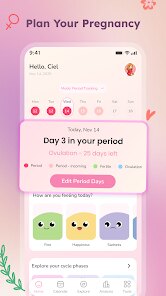
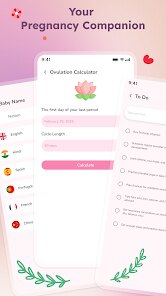
Expecting a child brings a flood of questions, appointments, and changes that are hard to track manually. Pregnancy Tracker & Baby Diary, available on Google Play, serves as a digital companion for this journey, organizing weekly development updates, symptom logs, and appointment reminders in one place. The app is free to install and download, though it does contain advertisements and offers optional in-app purchases for those who want to remove them or access extra features. Its install base suggests a steady following among parents who prefer structured guidance during pregnancy.
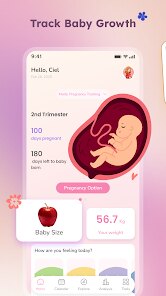
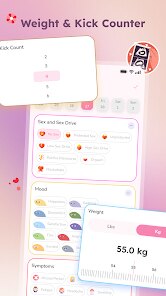
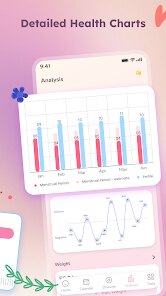
The core experience revolves around logging daily symptoms, weight, and baby kicks, with the app then generating trends that become useful during doctor visits. Users can input their due date, and the interface immediately adapts to show the current week, complete with fetal size comparisons to fruits or vegetables. I found the kick counter particularly straightforward—it requires just a tap to start timing movements and another to stop, which matters when you are distracted or tired. The diary section also lets you attach photos and notes, acting as a private scrapbook that gradually builds into a keepsake of the pregnancy period.
Several similar tools exist on the market, but this one distinguishes itself through its clean layout and lack of overwhelming data. Some competitors, like Ovia or What to Expect, pack in extensive community forums and article libraries, which can feel cluttered. This app strips away much of that noise, focusing instead on personal tracking and essential educational content. While it may not offer the depth of medical articles found elsewhere, its straightforward design feels calmer and more approachable for someone who just wants quick answers without wading through endless posts.
Key Functional Highlights
- The weekly visual guides are informative without being alarming. Each update explains the baby's growth milestones and common maternal symptoms, but keeps the language reassuring. While apps like BabyCenter push a lot of extra reading material, this one stays brief, which I appreciate when I only have a few minutes to check my phone.
- A shared mode allows partners to view progress and enter data from their own devices. This feature feels genuinely useful because my husband could log my blood pressure readings or add notes after a check-up without accessing my personal diary entries. It is a simple idea, but most tracking apps treat pregnancy as a solo activity, so this collaborative angle stands out.
- The appointment reminder system syncs with the phone calendar and sends notifications with enough lead time to prepare questions. I often forget lab result dates, and having those stored in one place with a note about what the test checks has eliminated a lot of last-minute scrambling.
- Exporting the entire history as a PDF file works flawlessly. Whether for sharing with a midwife or keeping for personal records, the generated document is readable and professionally formatted, something several cheaper apps fail at.
Advantages & Benefits
- Keeping all measurements and notes in one organized timeline reduces the mental load of remembering details between appointments.
- Tracking changes in mood and energy levels helps identify patterns that are easy to discuss with healthcare providers.
- The diary serves as a meaningful record of the journey, giving you something personal to look back on after the baby arrives.
Areas for Improvement
- The free version includes frequent banner ads that occasionally interrupt navigation between sections.
- Some advanced tracking categories, like glucose monitoring or medication reminders, are locked behind the paid tier.
- Syncing between devices occasionally lags, requiring a manual refresh to see the most recent entries.
- Third-party integrations, such as connecting to smart scales or fitness bands, are missing entirely.
Recommended Apps
![]()
ZEPETO: Avatar, Connect & Play
Naver Z Corporation4.3
![]()
Reverse Voice: Flip Singing
NindaFuit0![]()
AI Chat Ask Assistant - NowAI
Now Tech4.3![]()
Lie Detector Test: Prank App
DkTech inc.4.3![]()
Peachy - AI Face & Body Editor
InShot Video Editor4.8
![]()
AI Video Art Creator - Livensa
FERASET4.5![]()
Google Voice
Google LLC4.3![]()
Horoscopes & Tarot
Astrolis Horoscopes4.7![]()
eBay online shopping & selling
eBay Mobile4.6![]()
JPay
Jpay Mobile4.1![]()
Stranger Things 5 Challenges
MVH Entertainment Team5![]()
Chat Master: Prank Story
ABI Game Studio4.8![]()
Google Maps
Google LLC4.2![]()
AI Chat・Ask Chatbot Assistant
AI Chat Studio4.5![]()
Name Meanings with Impact
Alif Innovative Solution3.7















You May Like
-
![]()
True Tarot Card Reading
KaApps4.2 -
![]()
LinkedIn: Jobs & Business News
LinkedIn4.2 -
![]()
iControl: Easy Widgets Themes
Fancy keyboard for theme apps4.6 -
![]()
Duolingo: Language & Chess
Duolingo4.7 -
![]()
Flipped:Chat with AI Character
First Group pte ltd4.1 -
![]()
Hearing Age
Mobile Solutions Tech0 -
![]()
TikTok
TikTok Pte. Ltd.4.4 -
![]()
Pretty Makeup - Beauty Camera
Photo Editor Perfect Corp.4.4 -
![]()
PhotoRoom AI Photo Editor
PhotoRoom Background Editor App4.7 -
![]()
Lightleap by Lightricks
Lightricks Ltd.4.3 -
![]()
Name Meaning
Dexati4.1 -
![]()
Truth Social
T Media Tech LLC3.3 -
![]()
Ace Hardware
Ace Hardware Corporation4.7 -
![]()
Kpop Fans Demon Hunter Wallpap
JHNStudio4.3 -
![]()
Artplay - AI Photo & Video
Hideaway Technology Limited4.5










































