

PND AI Photo Enhancer HD
PND AI 360
Installs
100K+
Developer
PND AI 360
-
Category
Generative AI
-
Content Rating
Everyone
Developer Email
Privacy Policy
https://pndai.ai/en/privacy.html
Screenshots



Expert Review
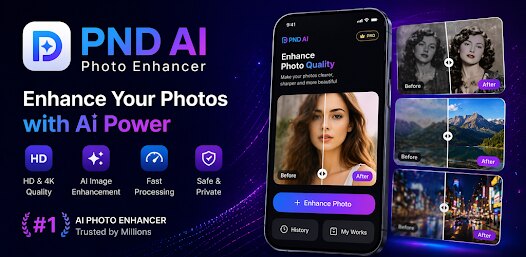
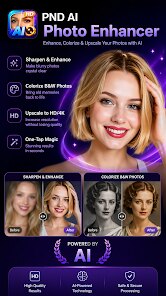
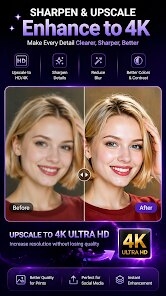
PND AI Photo Enhancer HD is a dedicated image improvement tool created by the developer PND AI 360. It focuses on automatically sharpening and clarifying photos that look blurry, pixelated, or low-resolution. Users can download the app from Google Play, where it has accumulated millions of installs. The basic photo enhancement functionality is free to use, though the app includes advertisements during processing and offers optional in-app purchases for higher-resolution outputs or batch processing. This setup makes it accessible for casual users without requiring an upfront payment.
Using the app is fairly straightforward even for those new to photo editing. After installing the app and opening it, you can either take a new picture using the in-app camera or select an existing photo from your gallery. Then you just tap the "Enhance" button and the app processes the image, increasing sharpness and attempting to bring out hidden details. The results are displayed in a split-screen view for easy comparison between the before and after versions. I found this comparison helpful for deciding whether the generated improvement was worth keeping or if I wanted to try a different original shot instead.
Other apps like Remini or SharpAI also aim to enhance photos, but PND AI Photo Enhancer HD handles the process a bit differently. Remini tends to apply a stronger transformation that often changes facial textures noticeably, while PND's version often feels more subtle and conservative. SharpAI on the other hand focuses heavily on old or damaged photos, while PND works best with images that are already decent but slightly out of focus. Based on my brief use, PND lands somewhere between these two in terms of intensity, making it suitable for general quick fixes rather than major restoration.
Key Functional Highlights
- One notable aspect is the real-time comparison preview. After enhancement, you see the original and new image side by side without toggling. This is more convenient than apps like EnhanceFox, which only show after and require you to manually switch views.
- The processing speed is also worth mentioning. Each enhancement usually finishes within five to eight seconds on my three-year-old phone. That feels faster than Remini, which sometimes takes over fifteen seconds for similar-sized photos. This quicker turnaround makes trying different images less frustrating.
- The app's interface is minimal and without distractions, which is both a strength and a minor weakness. It's easy to navigate, but there are no sliders or manual adjustment options. Some users might prefer more control like that found in Adobe Lightroom's AI enhancement, but the simplicity suits quick jobs.
Advantages & Benefits
- You can fix slightly blurry vacation photos instantly without needing desktop software, making it useful for sharing on social media quickly.
- Since the app is free to install and try, it's risk-free for understanding how much improvement fits your needs before spending any money.
- The split-screen result comparison helps you actually see what changed, which builds trust in the AI's output rather than wondering if anything was modified at all.
Areas for Improvement
- The free version applies heavy watermarks, and removing them requires purchasing the premium upgrade, which feels limiting if you only need one or two enhanced images.
- Occasional results look oversharpened, creating halos around high-contrast edges like hair against a bright sky. This effect sometimes makes the photo appear less natural than the original.
- There are no batch processing options in the free tier, so enhancing multiple photos one by one becomes tedious if you have several images to improve at once.
Recommended Apps
![]()
ZEPETO: Avatar, Connect & Play
Naver Z Corporation4.3
![]()
Reverse Voice: Flip Singing
NindaFuit0![]()
AI Chat Ask Assistant - NowAI
Now Tech4.3![]()
Lie Detector Test: Prank App
DkTech inc.4.3![]()
Peachy - AI Face & Body Editor
InShot Video Editor4.8
![]()
AI Video Art Creator - Livensa
FERASET4.5![]()
Google Voice
Google LLC4.3![]()
Horoscopes & Tarot
Astrolis Horoscopes4.7![]()
eBay online shopping & selling
eBay Mobile4.6![]()
JPay
Jpay Mobile4.1![]()
Stranger Things 5 Challenges
MVH Entertainment Team5![]()
Chat Master: Prank Story
ABI Game Studio4.8![]()
Google Maps
Google LLC4.2![]()
AI Chat・Ask Chatbot Assistant
AI Chat Studio4.5![]()
Name Meanings with Impact
Alif Innovative Solution3.7















You May Like
-
![]()
True Tarot Card Reading
KaApps4.2 -
![]()
LinkedIn: Jobs & Business News
LinkedIn4.2 -
![]()
iControl: Easy Widgets Themes
Fancy keyboard for theme apps4.6 -
![]()
Duolingo: Language & Chess
Duolingo4.7 -
![]()
Flipped:Chat with AI Character
First Group pte ltd4.1 -
![]()
Hearing Age
Mobile Solutions Tech0 -
![]()
TikTok
TikTok Pte. Ltd.4.4 -
![]()
Pretty Makeup - Beauty Camera
Photo Editor Perfect Corp.4.4 -
![]()
PhotoRoom AI Photo Editor
PhotoRoom Background Editor App4.7 -
![]()
Lightleap by Lightricks
Lightricks Ltd.4.3 -
![]()
Name Meaning
Dexati4.1 -
![]()
Truth Social
T Media Tech LLC3.3 -
![]()
Ace Hardware
Ace Hardware Corporation4.7 -
![]()
Kpop Fans Demon Hunter Wallpap
JHNStudio4.3 -
![]()
Artplay - AI Photo & Video
Hideaway Technology Limited4.5












































