
GPS Camera Timestamp & Geotag
Betasoft Mobile
Installs
10K+
Developer
Betasoft Mobile
-
Category
Productivity
-
Content Rating
Everyone
Developer Email
Privacy Policy
https://sites.google.com/betasoftmobile.com/policy-remote-control-for-tv
Screenshots
Expert Review
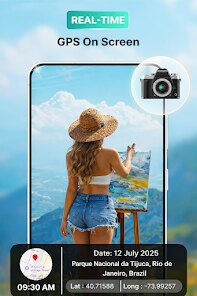
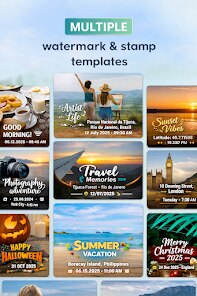
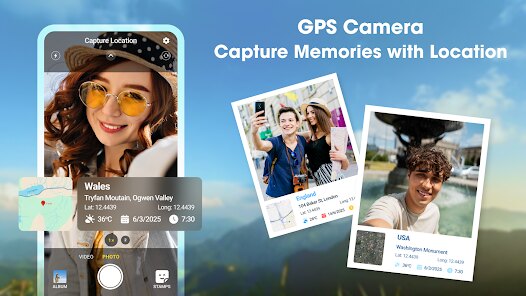
GPS Camera Timestamp & Geotag, created by Betasoft Mobile, is a utility application that overlays location data and timestamps directly onto photographs. Available for download on Google Play, this app focuses on adding precise GPS coordinates, map details, and customizable date stamps to images captured through its built-in camera interface. The app is free to install, though it includes advertisements and offers optional in-app purchases for removing them and unlocking additional formatting features.
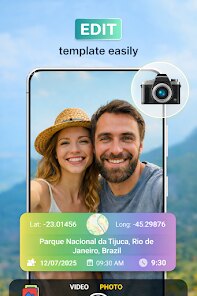
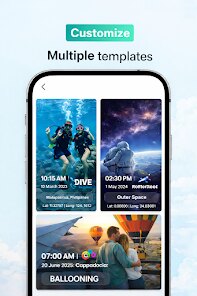
Upon launching the app, users are presented with a straightforward camera viewfinder that includes several overlay options. After taking a photo, the software automatically embeds the selected data—such as latitude and longitude, street address, or a custom time format—into the image file. During my testing, the geotagging felt quite responsive, with location detection taking only a few seconds after granting location permissions. The app also allows users to adjust font size, color, and position of the stamps, which is helpful for matching the output to different use cases.
Compared to other geotagging tools like PhotoMap or GeoTag Photos Pro, this one places more emphasis on real-time capture rather than batch editing existing images. That design choice makes it feel more practical for fieldwork or travel logging, though it does limit flexibility if you prefer editing photos already in your gallery. The interface is noticeably cleaner than some alternatives, but the presence of ads can occasionally interrupt the workflow, especially when navigating between settings and the camera view.
Key Functional Highlights
- The timestamp customization is quite thorough, allowing users to choose from multiple date formats and even add coordinates or altitude. I found this useful when documenting hiking routes, though the font size options could be more granular.
- Location accuracy depends heavily on network availability. In open areas the GPS lock was fast and precise, but indoors or in dense urban canyons, the coordinates sometimes took longer to stabilize or were slightly off.
- Unlike apps such as Timestamp Camera Free, this one does not support watermarking with logos or custom text beyond the pre-set data fields. This keeps it simple but limits branding options for professional users.
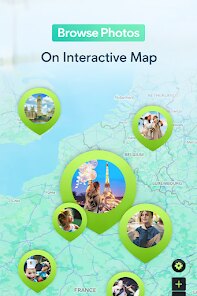
- The map preview feature, which shows the location on a small embedded map, is a nice touch for context, though the map resolution could be sharper on higher-resolution screens.
Advantages & Benefits
- Having accurate timestamps and coordinates embedded directly into photos saved me time when organizing travel logs and field notes later.
- The ability to adjust stamp positioning means the data doesn't always block important parts of the image, which is a practical advantage over default camera timestamps.
- Because the app stores images separately from the main gallery, it helps keep geotagged photos organized without mixing them with casual snapshots.
Areas for Improvement
- The constant banner ads at the bottom of the screen can be distracting, especially when trying to frame a shot quickly.
- Battery drain is noticeable during extended use, as the app keeps GPS active continuously while the camera is open.
- There is no option to batch-process existing photos, so users who want to add stamps to older images will need a separate tool.
- The camera quality is somewhat limited compared to the default phone camera, with less control over exposure and focus settings.
Recommended Apps
![]()
ZEPETO: Avatar, Connect & Play
Naver Z Corporation4.3
![]()
Reverse Voice: Flip Singing
NindaFuit0![]()
AI Chat Ask Assistant - NowAI
Now Tech4.3![]()
Lie Detector Test: Prank App
DkTech inc.4.3![]()
Peachy - AI Face & Body Editor
InShot Video Editor4.8
![]()
AI Video Art Creator - Livensa
FERASET4.5![]()
Google Voice
Google LLC4.3![]()
Horoscopes & Tarot
Astrolis Horoscopes4.7![]()
eBay online shopping & selling
eBay Mobile4.6![]()
JPay
Jpay Mobile4.1![]()
Stranger Things 5 Challenges
MVH Entertainment Team5![]()
Chat Master: Prank Story
ABI Game Studio4.8![]()
Google Maps
Google LLC4.2![]()
AI Chat・Ask Chatbot Assistant
AI Chat Studio4.5![]()
Name Meanings with Impact
Alif Innovative Solution3.7















You May Like
-
![]()
True Tarot Card Reading
KaApps4.2 -
![]()
LinkedIn: Jobs & Business News
LinkedIn4.2 -
![]()
iControl: Easy Widgets Themes
Fancy keyboard for theme apps4.6 -
![]()
Duolingo: Language & Chess
Duolingo4.7 -
![]()
Flipped:Chat with AI Character
First Group pte ltd4.1 -
![]()
Hearing Age
Mobile Solutions Tech0 -
![]()
TikTok
TikTok Pte. Ltd.4.4 -
![]()
Pretty Makeup - Beauty Camera
Photo Editor Perfect Corp.4.4 -
![]()
PhotoRoom AI Photo Editor
PhotoRoom Background Editor App4.7 -
![]()
Lightleap by Lightricks
Lightricks Ltd.4.3 -
![]()
Name Meaning
Dexati4.1 -
![]()
Truth Social
T Media Tech LLC3.3 -
![]()
Ace Hardware
Ace Hardware Corporation4.7 -
![]()
Kpop Fans Demon Hunter Wallpap
JHNStudio4.3 -
![]()
Artplay - AI Photo & Video
Hideaway Technology Limited4.5











































