
Link to Windows
Microsoft Corporation
Installs
1,000,000,000+
Developer
Microsoft Corporation
-
Category
Productivity
-
Content Rating
Rated for 3+
Developer Email
Privacy Policy
http://go.microsoft.com/fwlink/?LinkID=248686
Screenshots
Expert Review
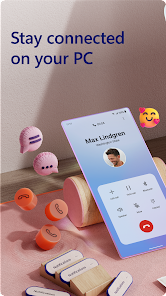
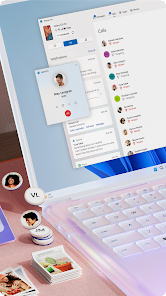
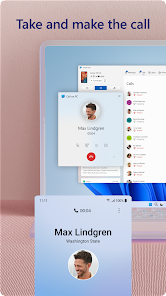
Link to Windows is a super handy app that basically connects your Android phone to your Windows PC. It's made by Microsoft, and its main job is to let you see your phone's notifications, messages, photos, and even use your phone's apps right on your computer screen. I think it first came out a few years back, and you can easily download it for free from the Google Play Store. It's also pre-installed on a lot of newer Samsung phones. The app has over a billion installs on Google Play, which shows how many people are using it. You don't need to pay anything to get the core features, and while there are no annoying in-app ads, you do need to sign in with your Microsoft account to set everything up.
Using the app is pretty straightforward. After you install it on your phone and make sure the 'Link to Windows' feature is turned on your PC (it's built into Windows 10 and 11), they just pair up. I use it all the time to reply to WhatsApp texts without picking up my phone, which is great when I'm working. A good tip is to pin the 'Phone Screen' app to your taskbar for quick access. You can also drag and drop files between the devices super easily, which beats emailing them to myself.
Compared to other apps that do similar things, like Pushbullet or Join, I stick with Link to Windows because it's deeply integrated. Since both the phone app and the PC side are made by Microsoft, they work together seamlessly. Pushbullet feels more like a third-party bridge and has limits unless you pay. For someone like me who's already in the Microsoft ecosystem with a Windows laptop, this app is the most natural choice. It just works without needing extra software or complicated setups.
Key Functional Highlights
- 📱 Phone Screen Mirroring: You can open your phone's entire screen in a window on your PC. This is killer for using mobile-only apps on a bigger display. I can order food or scroll through Instagram without touching my phone.
- 📁 Instant File Transfer: Drag and drop photos, documents, or videos directly between your PC folders and your phone's storage. It's much faster than using cloud storage or a USB cable for quick transfers.
- 📲 Cross-Device App Continuity: Start reading a web article on your phone, then instantly open it on your PC's Edge browser with a single click from the notification. This feature feels like magic and beats manually sending links.
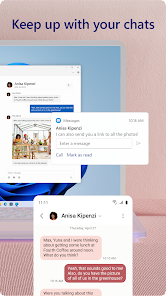
- 🔔 Unified Notifications & Messaging: See and respond to all your Android notifications (SMS, WhatsApp, Signal, etc.) from your PC's action center. You can type replies with a real keyboard, which is a huge time-saver.
Advantages & Benefits
- ✅ Deep Windows Integration: Unlike AirDroid or Pushbullet, it's a native part of Windows 10/11. The connection feels more stable and immediate because it's built into the operating system itself.
- ✅ No Subscription for Core Features: Pushbullet severely limits notification history and file size without a paid plan. Link to Windows gives you all its core linking features for free, forever.
- ✅ Optimized for Samsung: If you have a Samsung Galaxy phone, the integration goes even deeper with features like accessing your recent photos directly from the Windows Photos app, which you don't get with other brands or generic apps.
Areas for Improvement
- ⚠️ Ecosystem Lock-In: It only works with Windows PCs. If you use a Mac or Linux computer, you're completely out of luck. Cross-platform tools like KDE Connect offer more flexibility.
- ⚠️ Requires Microsoft Account: You must have and use a Microsoft account to pair the devices. Some competing apps, like Snapdrop for local file sharing, work without any account at all.
- ⚠️ Feature Parity Issues: Some phone manufacturers' custom Android skins (like Xiaomi's MIUI or Oppo's ColorOS) sometimes put the app to sleep, breaking the connection. It generally works best on Samsung or stock Android phones.
Recommended Apps
![]()
ZEPETO: Avatar, Connect & Play
Naver Z Corporation4.3
![]()
Reverse Voice: Flip Singing
NindaFuit0![]()
AI Chat Ask Assistant - NowAI
Now Tech4.3![]()
Lie Detector Test: Prank App
DkTech inc.4.3![]()
Peachy - AI Face & Body Editor
InShot Video Editor4.8
![]()
AI Video Art Creator - Livensa
FERASET4.5![]()
Google Voice
Google LLC4.3![]()
Horoscopes & Tarot
Astrolis Horoscopes4.7![]()
eBay online shopping & selling
eBay Mobile4.6![]()
JPay
Jpay Mobile4.1![]()
Stranger Things 5 Challenges
MVH Entertainment Team5![]()
Chat Master: Prank Story
ABI Game Studio4.8![]()
Google Maps
Google LLC4.2![]()
AI Chat・Ask Chatbot Assistant
AI Chat Studio4.5![]()
Name Meanings with Impact
Alif Innovative Solution3.7















You May Like
-
![]()
True Tarot Card Reading
KaApps4.2 -
![]()
LinkedIn: Jobs & Business News
LinkedIn4.2 -
![]()
iControl: Easy Widgets Themes
Fancy keyboard for theme apps4.6 -
![]()
Duolingo: Language & Chess
Duolingo4.7 -
![]()
Flipped:Chat with AI Character
First Group pte ltd4.1 -
![]()
Hearing Age
Mobile Solutions Tech0 -
![]()
TikTok
TikTok Pte. Ltd.4.4 -
![]()
Pretty Makeup - Beauty Camera
Photo Editor Perfect Corp.4.4 -
![]()
PhotoRoom AI Photo Editor
PhotoRoom Background Editor App4.7 -
![]()
Lightleap by Lightricks
Lightricks Ltd.4.3 -
![]()
Name Meaning
Dexati4.1 -
![]()
Truth Social
T Media Tech LLC3.3 -
![]()
Ace Hardware
Ace Hardware Corporation4.7 -
![]()
Kpop Fans Demon Hunter Wallpap
JHNStudio4.3 -
![]()
Artplay - AI Photo & Video
Hideaway Technology Limited4.5









































