
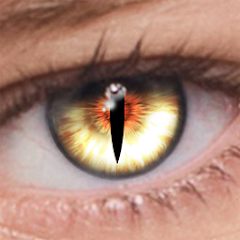
FoxEyes - Change Eye Color
GameSmileStudio
Installs
5M+
Developer
GameSmileStudio
-
Category
Video Players & Editors
-
Content Rating
Rated for 3+
Developer Email
Privacy Policy
https://gamesmilesstudio.blogspot.com/2024/01/privacy-policy-privacy-policy-please.html
Screenshots
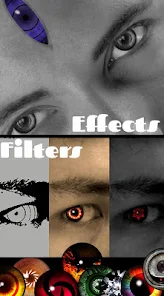
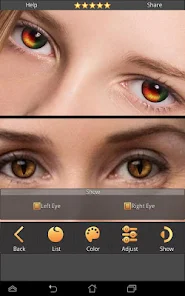
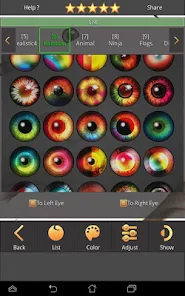
Expert Review
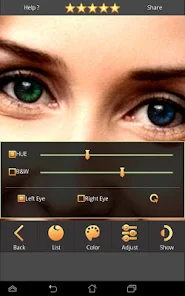
FoxEyes - Change Eye Color is a fun photo editing app that lets you digitally change your eye color in pictures. It's a simple tool for anyone who wants to experiment with different looks without any commitment. The app was first launched a few years back and is available for download on the Google Play Store. It has racked up a solid number of installs, showing it's pretty popular for this niche. You can get the app for free, and you don't even need to register an account to start using it, which is great for quick edits. Once you install it, you'll find it runs smoothly, though there are occasional ads. There are also some in-app purchases if you want to unlock extra color packs or remove the ads for a cleaner experience.
Using the app is straightforward. You just pick a photo from your gallery, and the app usually auto-detects your eyes. If it misses, you can manually adjust the selection. Then, you browse through a wheel of colors—from natural hazels and blues to wild purples and greens—and tap to apply. A good tip is to zoom in really close for precise application, especially if you're wearing glasses or have tricky lighting in the original photo. Playing with the intensity slider is key; a lower setting often looks more believable than going full neon. I find myself using it mostly for social media pics or just for fun with friends' photos.
When you look at similar apps in this genre, like 'Eye Color Studio' or 'Perfect365', FoxEyes stands out for its simplicity. Those other apps are often packed with tons of features for full-face makeup or complex edits, which can be overwhelming if you just want to change your eye color. FoxEyes does that one job really well. It's faster to open, use, and get a result compared to the more bloated alternatives. I chose this app because it does exactly what it says on the tin without unnecessary complications. For a quick, specific edit, it's my go-to over the more general photo editors.
Key Functional Highlights
- 🎯 Precise & Easy Selection: The eye detection is generally accurate, and manual tweaking tools are intuitive if needed. Compared to a popular app like 'YouCam Perfect', which can be laggy with its auto-features, FoxEyes feels snappier for this single task.
- 🌈 Vibrant Color Library: It offers a wide spectrum of shades, including some duo-tone and effect colors you don't always find in basic editors. This variety is its standout feature against more limited competitors.
- ⚙️ Simple, Focused Interface: The app doesn't bury its core function. You're basically three taps away from a changed eye color, whereas other apps make you navigate through menus.
- 💾 Quick Save & Share: Once you're done, exporting the image is instant. It integrates directly with major social platforms, which is smoother than some similar tools that have clunky saving processes.
Advantages & Benefits
- ✅ Lightweight & Fast: It installs and loads much quicker than heavier all-in-one editors like 'PicsArt'.
- ✅ Truly Free to Try: You can access all basic colors without paying, unlike some apps that lock basic palettes behind a paywall.
- ✅ No Login Required: Privacy-friendly. You can use it immediately after download without creating an account.
Areas for Improvement
- ❌ Ad Interruptions: The free version has ads that can pop up between edits, which is more intrusive than in apps like 'Snapseed'.
- ❌ Limited Realism on Low-Quality Photos: On grainy or low-light pictures, the color change can look obviously fake and patchy.
- ❌ Fewer Advanced Tools: If you want to adjust iris size or add reflections like in 'FaceApp', you won't find those features here.
Recommended Apps
![]()
ZEPETO: Avatar, Connect & Play
Naver Z Corporation4.3
![]()
Reverse Voice: Flip Singing
NindaFuit0![]()
AI Chat Ask Assistant - NowAI
Now Tech4.3![]()
Lie Detector Test: Prank App
DkTech inc.4.3![]()
Peachy - AI Face & Body Editor
InShot Video Editor4.8
![]()
AI Video Art Creator - Livensa
FERASET4.5![]()
Google Voice
Google LLC4.3![]()
Horoscopes & Tarot
Astrolis Horoscopes4.7![]()
eBay online shopping & selling
eBay Mobile4.6![]()
JPay
Jpay Mobile4.1![]()
Stranger Things 5 Challenges
MVH Entertainment Team5![]()
Chat Master: Prank Story
ABI Game Studio4.8![]()
Google Maps
Google LLC4.2![]()
AI Chat・Ask Chatbot Assistant
AI Chat Studio4.5![]()
Name Meanings with Impact
Alif Innovative Solution3.7















You May Like
-
![]()
True Tarot Card Reading
KaApps4.2 -
![]()
LinkedIn: Jobs & Business News
LinkedIn4.2 -
![]()
iControl: Easy Widgets Themes
Fancy keyboard for theme apps4.6 -
![]()
Duolingo: Language & Chess
Duolingo4.7 -
![]()
Flipped:Chat with AI Character
First Group pte ltd4.1 -
![]()
Hearing Age
Mobile Solutions Tech0 -
![]()
TikTok
TikTok Pte. Ltd.4.4 -
![]()
Pretty Makeup - Beauty Camera
Photo Editor Perfect Corp.4.4 -
![]()
PhotoRoom AI Photo Editor
PhotoRoom Background Editor App4.7 -
![]()
Lightleap by Lightricks
Lightricks Ltd.4.3 -
![]()
Name Meaning
Dexati4.1 -
![]()
Truth Social
T Media Tech LLC3.3 -
![]()
Ace Hardware
Ace Hardware Corporation4.7 -
![]()
Kpop Fans Demon Hunter Wallpap
JHNStudio4.3 -
![]()
Artplay - AI Photo & Video
Hideaway Technology Limited4.5









































