
Fontmaker - Font Keyboard App
Sociaaal LLC
Installs
5M+
Developer
Sociaaal LLC
-
Category
Productivity
-
Content Rating
Everyone
Developer Email
Privacy Policy
https://link.fontmaker.app/privacy/
Screenshots
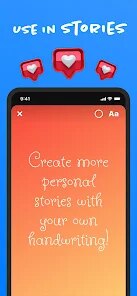
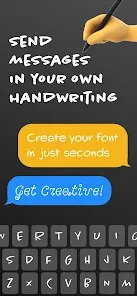
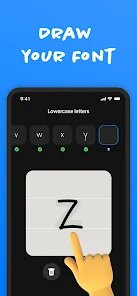
Expert Review
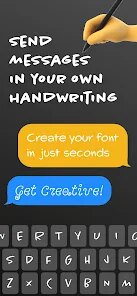
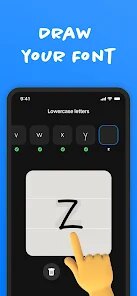
I've been using Fontmaker - Font Keyboard App for a while now, and it's become my go-to for adding some flair to my messages. Basically, it's a keyboard app that lets you type in hundreds of different cool fonts and styles. You download it from the Google Play Store, install it like any other app, and then enable it as a keyboard on your phone. It's completely free to download and use, and you don't even need to register an account to start using all the fonts. I first came across it a couple of years ago, and it's been consistently updated since. With over 10 million installs on Google Play, it's pretty popular in its genre of customization apps. There are some ads in the app, but they're not too intrusive, and there are optional in-app purchases if you want to remove them or unlock some extra fancy styles.
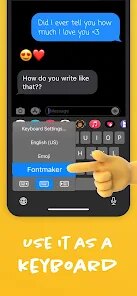
Using the app is straightforward. After you install and enable the keyboard, you just switch to it whenever you're typing somewhere—like in WhatsApp, Instagram, or your notes. A little tip I found useful: you can favorite your most-used fonts so you don't have to scroll through the whole list every time. Also, it works best if you remember to actually select the styled text it generates and then paste it into your chat; sometimes people just type normally and wonder why the font doesn't change in the message box itself.
I've tried a few other similar font keyboard apps from the Play Store, like 'Fonts' and 'Cool Fonts'. A lot of them feel clunky or have way more ads. I stuck with Fontmaker because it just feels smoother. The font preview is instant as you type, and the collection, while huge, is well-organized. Other apps might have a specific style Fontmaker doesn't, but for daily use and reliability, this app has been the most consistent for me. It doesn't try to do too much—it's a font keyboard, and it does that one job really well without slowing down my phone.
Key Functional Highlights
- 🔄 Instant Live Preview: As you type in the app's own composer, the text transforms in real-time using the selected font. This is way better than some other apps where you have to type, hit a 'convert' button, and then copy.
- 📚 Massive, Organized Library: The app boasts '500+ fonts', and they're sorted into clear categories like Fancy, Cool, Cursive, and Special. Compared to a popular app like 'Fancy Fonts', finding the right style here is much quicker.
- ⭐ Favorites & Recent Fonts: You can star your top fonts for quick access. It also remembers your recently used ones. This simple feature saves so much time compared to scrolling through an endless list in other keyboard apps.
- 🎨 Beyond Fonts - Symbols & Emojis: It's not just about letters. The app includes a huge collection of special symbols, dividers, and emoji art, which is a standout feature many basic font apps on Google Play lack.
Advantages & Benefits
- ✅ Smooth Integration: Once set up, switching to this keyboard is seamless. It's more stable and less laggy than competitors like 'Cool Font Keyboard'.
- ✅ Truly Free Core Features: You get access to all hundreds of fonts for free. Some apps, like 'Fonts for Instagram', lock the best styles behind a paywall immediately.
- ✅ Regular Updates: The developers add new font packs and fix bugs often, which keeps the app feeling fresh and reliable compared to some abandoned similar apps.
Areas for Improvement
- ❌ Ad-Supported Model: The free version shows banner and occasional full-screen ads. Apps like 'GBoard' (which has some font features) are ad-free, but they're from giant companies.
- ❌ Keyboard Learning Curve: Like all third-party keyboards, enabling it in your phone's settings can be confusing for first-time users. Simpler apps might have a clearer guide.
- ❌ No System-Wide Magic: The fonts only work in apps that accept text from the keyboard. You can't magically change font in every app's interface, a limitation all apps in this genre share.
Recommended Apps
![]()
ZEPETO: Avatar, Connect & Play
Naver Z Corporation4.3
![]()
Reverse Voice: Flip Singing
NindaFuit0![]()
AI Chat Ask Assistant - NowAI
Now Tech4.3![]()
Lie Detector Test: Prank App
DkTech inc.4.3![]()
Peachy - AI Face & Body Editor
InShot Video Editor4.8
![]()
AI Video Art Creator - Livensa
FERASET4.5![]()
Google Voice
Google LLC4.3![]()
Horoscopes & Tarot
Astrolis Horoscopes4.7![]()
eBay online shopping & selling
eBay Mobile4.6![]()
JPay
Jpay Mobile4.1![]()
Stranger Things 5 Challenges
MVH Entertainment Team5![]()
Chat Master: Prank Story
ABI Game Studio4.8![]()
Google Maps
Google LLC4.2![]()
AI Chat・Ask Chatbot Assistant
AI Chat Studio4.5![]()
Name Meanings with Impact
Alif Innovative Solution3.7















You May Like
-
![]()
True Tarot Card Reading
KaApps4.2 -
![]()
LinkedIn: Jobs & Business News
LinkedIn4.2 -
![]()
iControl: Easy Widgets Themes
Fancy keyboard for theme apps4.6 -
![]()
Duolingo: Language & Chess
Duolingo4.7 -
![]()
Flipped:Chat with AI Character
First Group pte ltd4.1 -
![]()
Hearing Age
Mobile Solutions Tech0 -
![]()
TikTok
TikTok Pte. Ltd.4.4 -
![]()
Pretty Makeup - Beauty Camera
Photo Editor Perfect Corp.4.4 -
![]()
PhotoRoom AI Photo Editor
PhotoRoom Background Editor App4.7 -
![]()
Lightleap by Lightricks
Lightricks Ltd.4.3 -
![]()
Name Meaning
Dexati4.1 -
![]()
Truth Social
T Media Tech LLC3.3 -
![]()
Ace Hardware
Ace Hardware Corporation4.7 -
![]()
Kpop Fans Demon Hunter Wallpap
JHNStudio4.3 -
![]()
Artplay - AI Photo & Video
Hideaway Technology Limited4.5











































