
Draw Glow Comics
ColorJoy
Installs
5M+
Developer
ColorJoy
-
Category
Art & Design
-
Content Rating
Rated for 3+
Developer Email
Privacy Policy
http://coloring.hk/colorjoy_privacy.html
Screenshots
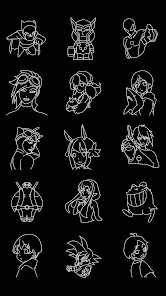
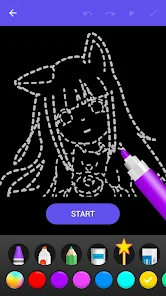
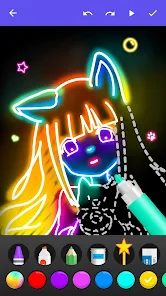
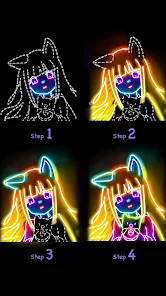
Expert Review
I've been using Draw Glow Comics for a while now, and it's become my go-to app for creating simple, glowing comic strips. It's a drawing and comic creation app that lets you make your own panels with a cool neon glow effect. The app launched a few years back, and you can easily download it for free from the Google Play Store. I remember seeing it had millions of installs when I got it, which gave me some confidence to try it out. You don't need to register or create an account to start using it, which is great for just jumping in. The core download is free, but like many creative apps, it does have in-app purchases for extra brushes, fonts, and assets. You'll also see some ads while using the free version, but they're usually not too intrusive.
Using the app is pretty straightforward. You start by choosing a panel layout, then pick your glowing colors and brushes to draw. My tip is to play with the layer opacity for the glow – it makes the colors blend in a really neat way. I mostly use it for making quick, fun comics to share with friends, not for super detailed artwork. The interface is simple enough that you can figure out most things without a tutorial, though it took me a few tries to get the hang of the text tool for speech bubbles.
When I was looking for a comic app on Google Play, I tried a few others like Comic Strip It and Strip Designer. They're good, but I kept coming back to Draw Glow Comics. The main reason is the unique glow effect. The other apps offer more traditional comic filters and a wider range of stickers, but they don't have that specific neon-drawing feel. For the kind of vibrant, eye-catching silly strips I want to make, this app just fits. It feels more like a focused drawing tool with a comic structure, rather than a photo collage app with comic frames, which is what the others often feel like. So, if you're after that particular glowing aesthetic without a steep learning curve, this is the app to install.
Key Functional Highlights
- ✨ The Signature Glow Engine: This is the app's standout feature. Unlike similar apps that just add a filter, the drawing tools here are built around creating luminous lines and fills. It feels like you're drawing with light, which is perfect for sci-fi or fantasy comic ideas.
- ✨ Streamlined Comic Layouts: It offers a solid selection of pre-set panel layouts (like 4-panel, strip, single page). While apps like 'Comic Strip It' might have more variety, Draw Glow Comics' layouts are optimized for its glow style, making page setup quick and intuitive.
- ✨ Layer-Based Simplicity: For a free app, having a basic layer system is a nice touch. You can separate your background glow from your line art, which gives you more control than in simpler, single-layer comic makers. It's not as advanced as Procreate, but it's powerful enough for comic creation.
Advantages & Benefits
- 👍 Unique Aesthetic: The glow effect is genuinely unique. Apps like 'Canva' or 'Comic Strip It' can't replicate this specific hand-drawn neon style, which makes my comics stand out on social media.
- 👍 No Account Hassle: You can download, install, and start creating immediately without signing up. Many other apps in this genre push for registration, so this frictionless start is a big plus.
- 👍 Perfect for Quick Concepts: Its simplicity is a strength. Compared to more complex suites, this app is fantastic for quickly visualizing a comic idea with a cool visual hook.
Areas for Improvement
- 👎 Limited Asset Library: The free version comes with fewer stickers, fonts, and backgrounds than popular rivals like 'Strip Designer'. You feel the need for in-app purchases sooner.
- 👎 Ads Can Disrupt Flow: The ad frequency in the free version is higher than in some similar apps. It can interrupt your drawing session, which is frustrating when you're in a creative zone.
- 👎 Niche Toolset: The tools are specialized for the glow effect. If you want to create a traditional, non-glowing comic, other apps in the genre offer much more versatility and better results.
Recommended Apps
![]()
ZEPETO: Avatar, Connect & Play
Naver Z Corporation4.3
![]()
Reverse Voice: Flip Singing
NindaFuit0![]()
AI Chat Ask Assistant - NowAI
Now Tech4.3![]()
Lie Detector Test: Prank App
DkTech inc.4.3![]()
Peachy - AI Face & Body Editor
InShot Video Editor4.8
![]()
AI Video Art Creator - Livensa
FERASET4.5![]()
Google Voice
Google LLC4.3![]()
Horoscopes & Tarot
Astrolis Horoscopes4.7![]()
eBay online shopping & selling
eBay Mobile4.6![]()
JPay
Jpay Mobile4.1![]()
Stranger Things 5 Challenges
MVH Entertainment Team5![]()
Chat Master: Prank Story
ABI Game Studio4.8![]()
Google Maps
Google LLC4.2![]()
AI Chat・Ask Chatbot Assistant
AI Chat Studio4.5![]()
Name Meanings with Impact
Alif Innovative Solution3.7















You May Like
-
![]()
True Tarot Card Reading
KaApps4.2 -
![]()
LinkedIn: Jobs & Business News
LinkedIn4.2 -
![]()
iControl: Easy Widgets Themes
Fancy keyboard for theme apps4.6 -
![]()
Duolingo: Language & Chess
Duolingo4.7 -
![]()
Flipped:Chat with AI Character
First Group pte ltd4.1 -
![]()
Hearing Age
Mobile Solutions Tech0 -
![]()
TikTok
TikTok Pte. Ltd.4.4 -
![]()
Pretty Makeup - Beauty Camera
Photo Editor Perfect Corp.4.4 -
![]()
PhotoRoom AI Photo Editor
PhotoRoom Background Editor App4.7 -
![]()
Lightleap by Lightricks
Lightricks Ltd.4.3 -
![]()
Name Meaning
Dexati4.1 -
![]()
Truth Social
T Media Tech LLC3.3 -
![]()
Ace Hardware
Ace Hardware Corporation4.7 -
![]()
Kpop Fans Demon Hunter Wallpap
JHNStudio4.3 -
![]()
Artplay - AI Photo & Video
Hideaway Technology Limited4.5












































