

Pixelup - AI Photo Enhancer
Codeway Dijital
Installs
5M+
Developer
Codeway Dijital
-
Category
Video Players & Editors
-
Content Rating
Rated for 3+
Developer Email
Privacy Policy
https://storage.googleapis.com/codeway.co/pixelup.co/privacy.html
Screenshots
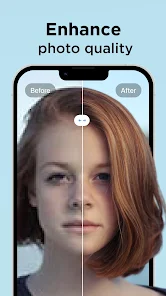

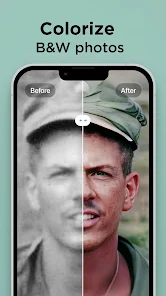
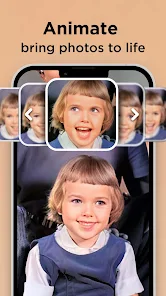
Expert Review
I've been using Pixelup - AI Photo Enhancer for a few months now to touch up old family photos and sharpen pictures from my phone. It's an app that uses artificial intelligence to automatically improve your photos, fixing things like blurriness, low resolution, and poor lighting. The app first launched on the Google Play Store, and you can also find it on the App Store for iOS. It's had millions of downloads, which shows how popular it is. The app itself is free to download and install, which is great for trying it out. You don't need to create an account or register to start using the basic features, making it super quick to get going. However, to unlock the full power of the AI and remove watermarks from your enhanced photos, there are in-app purchases. You'll also see some ads in the free version, but they're not too intrusive.
Using the app is straightforward. You just open it, pick a photo from your gallery, and the AI gets to work. It usually gives you a few enhanced versions to choose from, like 'HD' or 'Color Boost'. My tip is to use the 'Compare' slider to see the before and after side-by-side; the difference can be amazing, especially for grainy old pictures. For the best results, I try to use the original, highest-quality photo I have, even if it looks bad. The AI seems to work better with more data to start with.
I've tried other similar photo enhancer apps like Remini and PhotoDirector. While Remini is fantastic for restoring faces specifically, I often choose Pixelup for general photo enhancement. The reason is its balance of speed and quality. Pixelup processes images faster on my phone than some other apps, and the results look natural, not overly sharpened or artificial. For a quick, all-around fix to make any snapshot look clearer and brighter, this app has become my go-to tool. It just handles the job without needing me to tweak a bunch of complicated settings.
Key Functional Highlights
- 🚀 One-Click AI Magic: The core feature is its simplicity. You don't need to be a photo editing pro. Just select a picture, and the app's AI analyzes and enhances it in seconds, tackling noise, blur, and dull colors automatically. It's much more streamlined for quick fixes compared to something like Adobe Lightroom, which has more power but also a steeper learning curve.
- 🎨 Multiple Enhancement Styles: After processing, Pixelup often gives you different versions. You might get a standard 'Enhanced' shot, a 'Vibrant' one with popped colors, and a 'Denoise' focused option. This variety lets you pick the look you prefer, which is a nice touch over apps that give you just one result.
- 📊 Clear Before/After Comparison: The side-by-side comparison slider is a standout feature. It's incredibly satisfying and useful to drag and see exactly what the AI changed, from sharpened details to corrected exposure. This immediate visual feedback is something not all enhancer apps do as well.
Advantages & Benefits
- ✅ Speed and Ease: It's incredibly fast. The install is quick from Google Play, and processing a photo takes mere seconds, making it perfect for on-the-go edits where other apps might keep you waiting.
- ✅ Free Tier Accessibility: The fact that you can download and use the basic version for free, with no mandatory registration, is a huge strength. It lowers the barrier to entry compared to some competitors that lock core features behind a paywall immediately.
- ✅ Natural-Looking Results: The AI enhancement tends to look realistic. Unlike some aggressive apps that make photos look like plastic, Pixelup's output generally remains believable, which is why I prefer it for enhancing personal memories.
Areas for Improvement
- ❌ Watermarks on Free Version: The most obvious downside is the prominent watermark placed on photos saved with the free version. To remove it, you must purchase the premium upgrade. Other apps, like Snapseed, are completely free with no watermarks.
- ❌ Limited Control for Enthusiasts: If you want manual control over sharpening, contrast, or color grading, you're out of luck. This app is purely AI-driven. For detailed edits, you'd need to use another app in tandem, whereas something like PhotoDirector offers both auto and full manual modes.
- ❌ Ads in the Free Version: The presence of ads, even if not excessive, can interrupt the workflow. Some similar apps offer a completely ad-free experience either for free or after a one-time purchase, which feels cleaner.
Recommended Apps
![]()
ZEPETO: Avatar, Connect & Play
Naver Z Corporation4.3
![]()
Reverse Voice: Flip Singing
NindaFuit0![]()
AI Chat Ask Assistant - NowAI
Now Tech4.3![]()
Lie Detector Test: Prank App
DkTech inc.4.3![]()
Peachy - AI Face & Body Editor
InShot Video Editor4.8
![]()
AI Video Art Creator - Livensa
FERASET4.5![]()
Google Voice
Google LLC4.3![]()
Horoscopes & Tarot
Astrolis Horoscopes4.7![]()
eBay online shopping & selling
eBay Mobile4.6![]()
JPay
Jpay Mobile4.1![]()
Stranger Things 5 Challenges
MVH Entertainment Team5![]()
Chat Master: Prank Story
ABI Game Studio4.8![]()
Google Maps
Google LLC4.2![]()
AI Chat・Ask Chatbot Assistant
AI Chat Studio4.5![]()
Name Meanings with Impact
Alif Innovative Solution3.7















You May Like
-
![]()
True Tarot Card Reading
KaApps4.2 -
![]()
LinkedIn: Jobs & Business News
LinkedIn4.2 -
![]()
iControl: Easy Widgets Themes
Fancy keyboard for theme apps4.6 -
![]()
Duolingo: Language & Chess
Duolingo4.7 -
![]()
Flipped:Chat with AI Character
First Group pte ltd4.1 -
![]()
Hearing Age
Mobile Solutions Tech0 -
![]()
TikTok
TikTok Pte. Ltd.4.4 -
![]()
Pretty Makeup - Beauty Camera
Photo Editor Perfect Corp.4.4 -
![]()
PhotoRoom AI Photo Editor
PhotoRoom Background Editor App4.7 -
![]()
Lightleap by Lightricks
Lightricks Ltd.4.3 -
![]()
Name Meaning
Dexati4.1 -
![]()
Truth Social
T Media Tech LLC3.3 -
![]()
Ace Hardware
Ace Hardware Corporation4.7 -
![]()
Kpop Fans Demon Hunter Wallpap
JHNStudio4.3 -
![]()
Artplay - AI Photo & Video
Hideaway Technology Limited4.5











































