

PhotoLayers-Superimpose,Eraser
handyCloset Inc.
Installs
10M+
Developer
handyCloset Inc.
-
Category
Video Players & Editors
-
Content Rating
Rated for 12+
Developer Email
Privacy Policy
https://privacy.handycloset.com
Screenshots
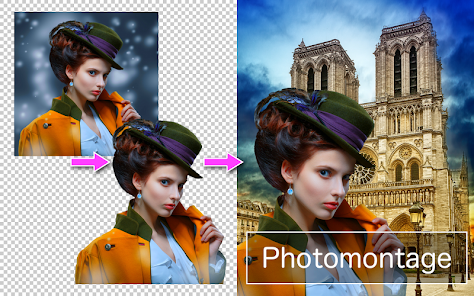

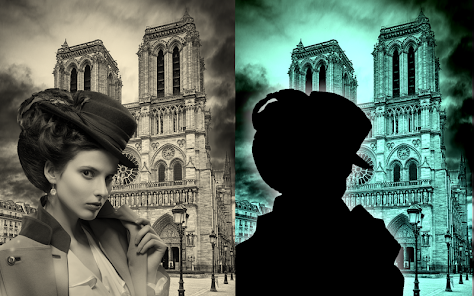
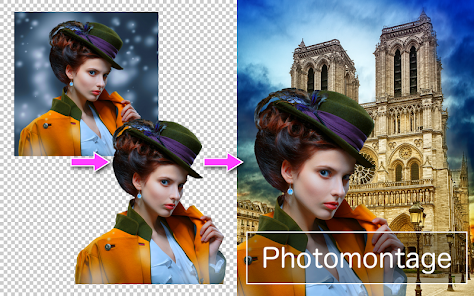
Expert Review
I've been using PhotoLayers - Superimpose, Eraser for a while now, and it's become my go-to app for any kind of photo compositing or background removal. The app is a powerful photo editing tool focused on layering, cutting out objects, and creating complex image collages. It first launched quite a few years ago, and you can download it from the Google Play Store. It's also available on the App Store for iOS users. The app has millions of installs on Google Play, which shows how popular it is. You can install the basic version for free, which gives you access to a lot of its core features. You don't need to register an account to start using it right away, which I really appreciate. Of course, there are in-app purchases to unlock the full professional toolkit and remove ads. You will see some ads in the free version, but they're not overly intrusive.
Using the app is pretty intuitive once you get the hang of it. I mostly use it to remove backgrounds from product photos for my small online store. The automatic and manual eraser tools are fantastic. A great tip is to use the 'Refine Edge' brush after a rough cut-out – it makes hair or fuzzy details look perfectly natural against a new background. For creating collages, I love how you can add multiple layers, adjust their opacity, and blend them with different modes. It feels like using a simplified version of Photoshop right on my phone.
I've tried other similar apps like Background Eraser and Cut Cut, but I always come back to PhotoLayers. The main reason is the level of control. While other apps might be quicker for a simple cut-out, PhotoLayers gives me precision tools for tricky edges, which is crucial for my work. The layering system is also more robust than what you find in most free collage apps. For anyone who needs more than just a basic background remover and wants to create professional-looking composites without a desktop computer, this is the app to choose.
Key Functional Highlights
- 🖼️ Advanced Layering System: Unlike many basic photo editors, this app treats each element as a separate layer. You can add, reorder, blend, and transform multiple images with incredible control, much like desktop software.
- ✂️ Precision Cutting Tools: The eraser and selection tools are top-notch. The 'Refine Edge' feature is a game-changer for detailed cut-outs, letting you clean up hair or complex outlines perfectly, which simpler apps often struggle with.
- 🎨 Professional Blending & Effects: It offers layer blending modes (like Multiply, Screen, Overlay) and adjustment options for hue, saturation, and brightness per layer. This allows for creative and seamless composites that look natural.
- 📁 Non-Destructive Editing: You can save your project in the app's native format, keeping all layers intact for future edits. This is a pro feature rarely found in mobile apps of this genre.
Advantages & Benefits
- ✅ Superior Control for Complex Edges: Compared to 'Background Eraser' or 'Cut Cut', PhotoLayers provides finer manual tools, making it the best choice for removing backgrounds from images with fur, lace, or transparent elements.
- ✅ True Multi-Layer Workflow: Apps like 'PicCollage' or 'Canva' are great for layouts but limit layer manipulation. PhotoLayers offers a dedicated, powerful layer panel for serious compositing.
- ✅ One-Time Purchase Option: Unlike some subscription-based editors, you can often unlock the full, ad-free version of this app with a single payment, which is great value.
Areas for Improvement
- ⚠️ Steeper Learning Curve: Its powerful features mean the interface is more complex than ultra-simple apps like 'Adobe Photoshop Express'. New users might need time to learn all the tools.
- ⚠️ Performance on Older Devices: With many layers or high-resolution images, the app can slow down or crash on phones with less RAM, whereas lighter apps might run more smoothly.
- ⚠️ Ads in Free Version: The presence of ads can interrupt the workflow. Some competing apps offer a completely ad-free experience for a lower one-time fee.
Recommended Apps
![]()
ZEPETO: Avatar, Connect & Play
Naver Z Corporation4.3
![]()
Reverse Voice: Flip Singing
NindaFuit0![]()
AI Chat Ask Assistant - NowAI
Now Tech4.3![]()
Lie Detector Test: Prank App
DkTech inc.4.3![]()
Peachy - AI Face & Body Editor
InShot Video Editor4.8
![]()
AI Video Art Creator - Livensa
FERASET4.5![]()
Google Voice
Google LLC4.3![]()
Horoscopes & Tarot
Astrolis Horoscopes4.7![]()
eBay online shopping & selling
eBay Mobile4.6![]()
JPay
Jpay Mobile4.1![]()
Stranger Things 5 Challenges
MVH Entertainment Team5![]()
Chat Master: Prank Story
ABI Game Studio4.8![]()
Google Maps
Google LLC4.2![]()
AI Chat・Ask Chatbot Assistant
AI Chat Studio4.5![]()
Name Meanings with Impact
Alif Innovative Solution3.7















You May Like
-
![]()
True Tarot Card Reading
KaApps4.2 -
![]()
LinkedIn: Jobs & Business News
LinkedIn4.2 -
![]()
iControl: Easy Widgets Themes
Fancy keyboard for theme apps4.6 -
![]()
Duolingo: Language & Chess
Duolingo4.7 -
![]()
Flipped:Chat with AI Character
First Group pte ltd4.1 -
![]()
Hearing Age
Mobile Solutions Tech0 -
![]()
TikTok
TikTok Pte. Ltd.4.4 -
![]()
Pretty Makeup - Beauty Camera
Photo Editor Perfect Corp.4.4 -
![]()
PhotoRoom AI Photo Editor
PhotoRoom Background Editor App4.7 -
![]()
Lightleap by Lightricks
Lightricks Ltd.4.3 -
![]()
Name Meaning
Dexati4.1 -
![]()
Truth Social
T Media Tech LLC3.3 -
![]()
Ace Hardware
Ace Hardware Corporation4.7 -
![]()
Kpop Fans Demon Hunter Wallpap
JHNStudio4.3 -
![]()
Artplay - AI Photo & Video
Hideaway Technology Limited4.5










































