

Meitu- Photo Editor & AI Art
Meitu (China) Limited
Installs
50M+
Developer
Meitu (China) Limited
-
Category
Video Players & Editors
-
Content Rating
Rated for 12+
Developer Email
Privacy Policy
https://pro.meitu.com/xiuxiu/agreements/gdpr.html?lang=en#en-policy
Screenshots

Expert Review
I've been using Meitu for years now. It's a photo editing and AI art app that basically lives on my phone. You can find it on the Google Play Store and the App Store, and it's got a massive number of downloads, like hundreds of millions. The app itself is free to download and install, which is great. You don't even need to register to start using most of the basic editing tools, which I really appreciate for quick fixes. Of course, if you want to save your creations to their cloud or use some of the fancier AI features, you'll need to sign up. There are in-app purchases for premium filters and tools, and you do see some ads, but they're not too intrusive in my experience.
I use Meitu for everything from touching up selfies to creating fun AI-generated avatars. My go-to move is to take a regular photo, use the one-tap beauty enhancer to smooth things out, then play with the filters. The 'AI Art' section is where I spend a lot of time lately; you can upload a picture and turn it into a painting or an anime character. A good tip is to use the manual editing tools after applying an AI effect to fine-tune the colors and lighting. It gives you way more control over the final look.
Compared to other apps like VSCO or PicsArt, I keep coming back to Meitu. VSCO has a cleaner, more minimalist vibe for sure, but Meitu just has more tools packed into it, especially for portrait editing and those trendy AI transformations. PicsArt is powerful too, but I find its interface a bit cluttered. For me, Meitu strikes the best balance. It's powerful enough for creative projects but still simple enough that I don't feel overwhelmed when I just want to quickly edit a photo before posting it. It feels like it's built for the kind of social media sharing I actually do.
Key Functional Highlights
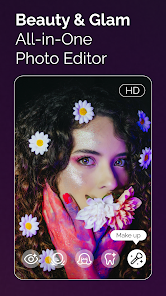
- 🤳 The one-touch beauty and portrait retouching tools are incredibly detailed. You can adjust everything from skin texture and eye size to hair volume, which goes way beyond the basic filters you get in many similar apps.
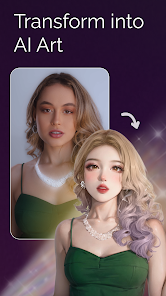
- 🎨 The 'AI Art' modes are its standout feature. It can transform ordinary photos into digital paintings, anime portraits, or cyberpunk styles with a single tap. This creative element sets it apart from more traditional editors like Snapseed.
- 📱 The app is constantly updated with new, trendy filters and frames that match current social media aesthetics. You rarely feel like you're using outdated styles, which keeps the content fresh.
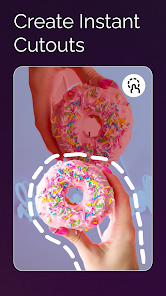
- ✂️ It combines photo editing with collage-making and even short video editing tools in one place. This all-in-one approach means I don't have to jump between multiple apps to finish a project.
Advantages & Benefits
- 👍 The sheer volume of free, high-quality beauty filters and editing tools is unmatched. Apps like FaceApp might have stronger specific AI features, but Meitu offers more variety for free.
- 👍 Its AI avatar generator is faster and produces more stylistically consistent results than similar features I've tried in other apps, making it perfect for creating profile pictures.
- 👍 The user interface, while feature-rich, is more intuitive for beginners than a pro-level app like Adobe Lightroom Mobile, lowering the barrier to great-looking edits.
Areas for Improvement
- 👎 The free version shows ads, and the pop-ups for premium subscriptions can be frequent. A more streamlined app like VSCO offers an ad-free experience upfront (through a purchase).
- 👎 Some of the most advanced AI art styles and beauty filters are locked behind a subscription. You can get a taste for free, but the best stuff requires payment.
- 👎 The app can feel a bit bloated with features over time. It doesn't have the focused, minimalist design of an app like RNI Films, which might appeal more to purists.
Recommended Apps
![]()
ZEPETO: Avatar, Connect & Play
Naver Z Corporation4.3
![]()
Reverse Voice: Flip Singing
NindaFuit0![]()
AI Chat Ask Assistant - NowAI
Now Tech4.3![]()
Lie Detector Test: Prank App
DkTech inc.4.3![]()
Peachy - AI Face & Body Editor
InShot Video Editor4.8
![]()
AI Video Art Creator - Livensa
FERASET4.5![]()
Google Voice
Google LLC4.3![]()
Horoscopes & Tarot
Astrolis Horoscopes4.7![]()
eBay online shopping & selling
eBay Mobile4.6![]()
JPay
Jpay Mobile4.1![]()
Stranger Things 5 Challenges
MVH Entertainment Team5![]()
Chat Master: Prank Story
ABI Game Studio4.8![]()
Google Maps
Google LLC4.2![]()
AI Chat・Ask Chatbot Assistant
AI Chat Studio4.5![]()
Name Meanings with Impact
Alif Innovative Solution3.7















You May Like
-
![]()
True Tarot Card Reading
KaApps4.2 -
![]()
LinkedIn: Jobs & Business News
LinkedIn4.2 -
![]()
iControl: Easy Widgets Themes
Fancy keyboard for theme apps4.6 -
![]()
Duolingo: Language & Chess
Duolingo4.7 -
![]()
Flipped:Chat with AI Character
First Group pte ltd4.1 -
![]()
Hearing Age
Mobile Solutions Tech0 -
![]()
TikTok
TikTok Pte. Ltd.4.4 -
![]()
Pretty Makeup - Beauty Camera
Photo Editor Perfect Corp.4.4 -
![]()
PhotoRoom AI Photo Editor
PhotoRoom Background Editor App4.7 -
![]()
Lightleap by Lightricks
Lightricks Ltd.4.3 -
![]()
Name Meaning
Dexati4.1 -
![]()
Truth Social
T Media Tech LLC3.3 -
![]()
Ace Hardware
Ace Hardware Corporation4.7 -
![]()
Kpop Fans Demon Hunter Wallpap
JHNStudio4.3 -
![]()
Artplay - AI Photo & Video
Hideaway Technology Limited4.5









































