
Instasquare Photo Editor: Neon
Lyrebird Studio
Installs
50M+
Developer
Lyrebird Studio
-
Category
Video Players & Editors
-
Content Rating
Rated for 3+
Developer Email
Privacy Policy
https://lyrebirdstudio.net/privacy_policy.htm
Screenshots
Expert Review
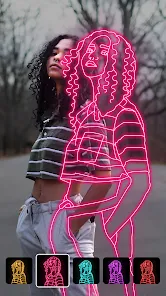
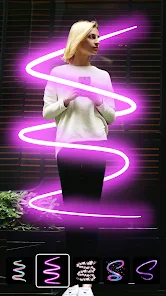
Instasquare Photo Editor: Neon is a photo editing app that focuses on adding cool neon and glow effects to your pictures. It's part of the broader photo editing genre, but it carves out its own niche with its specific style. I first downloaded it from the Google Play Store a while back, and it's been a fun tool to have on my phone. The app has a pretty solid number of installs, which shows a lot of people are into this aesthetic. It's free to download and install, which is always a plus when you just want to try something new. You don't need to register or create an account to start using it, so you can jump right in after the install. There are some in-app purchases if you want to unlock all the premium filters and effects, and you'll also see occasional ads, but they're not too intrusive for a free app.
Using the app is straightforward. You pick a photo from your gallery, and then you can browse through a bunch of neon borders, light leaks, and glowing text options. My tip is to start with a photo that has a darker background; the neon effects really pop that way. You can adjust the intensity of the glow and the color to match your original picture. It's great for creating standout posts for Instagram or just making your casual snaps look more artistic.
Compared to other similar apps like PicsArt or VSCO, Instasquare Photo Editor: Neon is much more specialized. While those bigger apps do everything, this one does neon effects really well and simply. I chose it because sometimes I don't want to sift through hundreds of general editing tools. If I want a specific neon vibe quickly, this app gets me there faster. It's not trying to replace a full editor; it's a perfect companion app for when you need that particular look.
Key Functional Highlights
- ✨ Specialized Neon Library: Unlike general editors, this app has a huge, dedicated collection of neon borders, glows, and light effects. It's all in one place, so you don't have to search through unrelated filters.
- ✨ One-Tap Intensity Control: Adjusting how strong the glow effect is super easy. A simple slider lets you go from a subtle hint to a full-on radioactive vibe instantly, which gives you more creative control than some preset-heavy apps.
- ✨ Standalone Simplicity: The app's main strength is doing one thing very well. You install it for neon effects, and that's exactly what you get without a cluttered interface. It's faster for this specific task than opening a complex app like Adobe Lightroom Mobile.
Advantages & Benefits
- 🎯 Focused Functionality: It beats broader apps like Snapseed for this specific style. You get depth and variety in neon effects that general-purpose apps just don't offer.
- 🎯 Instant Gratification: The workflow is incredibly fast. From opening the app to saving a finished, glowing picture takes less than a minute, which is perfect for social media.
- 🎯 No Learning Curve: Compared to something like PicsArt, there's virtually nothing to learn. The tools are intuitive and immediately usable after download.
Areas for Improvement
- ⚠️ Niche Limitations: Because it's so specialized, it's not an all-in-one editor. You'll likely need another app for basic cropping, color correction, or other edits before using this one.
- ⚠️ Ad Interruptions: As a free app, it shows ads. They can interrupt the flow, especially compared to premium or one-time-purchase apps like Afterlight.
- ⚠️ Effect Overload: It's easy to go overboard. Without the balancing tools of a more comprehensive editor, pictures can sometimes look messy if you add too many glowing elements.
Recommended Apps
![]()
ZEPETO: Avatar, Connect & Play
Naver Z Corporation4.3
![]()
Reverse Voice: Flip Singing
NindaFuit0![]()
AI Chat Ask Assistant - NowAI
Now Tech4.3![]()
Lie Detector Test: Prank App
DkTech inc.4.3![]()
Peachy - AI Face & Body Editor
InShot Video Editor4.8
![]()
AI Video Art Creator - Livensa
FERASET4.5![]()
Google Voice
Google LLC4.3![]()
Horoscopes & Tarot
Astrolis Horoscopes4.7![]()
eBay online shopping & selling
eBay Mobile4.6![]()
JPay
Jpay Mobile4.1![]()
Stranger Things 5 Challenges
MVH Entertainment Team5![]()
Chat Master: Prank Story
ABI Game Studio4.8![]()
Google Maps
Google LLC4.2![]()
AI Chat・Ask Chatbot Assistant
AI Chat Studio4.5![]()
Name Meanings with Impact
Alif Innovative Solution3.7















You May Like
-
![]()
True Tarot Card Reading
KaApps4.2 -
![]()
LinkedIn: Jobs & Business News
LinkedIn4.2 -
![]()
iControl: Easy Widgets Themes
Fancy keyboard for theme apps4.6 -
![]()
Duolingo: Language & Chess
Duolingo4.7 -
![]()
Flipped:Chat with AI Character
First Group pte ltd4.1 -
![]()
Hearing Age
Mobile Solutions Tech0 -
![]()
TikTok
TikTok Pte. Ltd.4.4 -
![]()
Pretty Makeup - Beauty Camera
Photo Editor Perfect Corp.4.4 -
![]()
PhotoRoom AI Photo Editor
PhotoRoom Background Editor App4.7 -
![]()
Lightleap by Lightricks
Lightricks Ltd.4.3 -
![]()
Name Meaning
Dexati4.1 -
![]()
Truth Social
T Media Tech LLC3.3 -
![]()
Ace Hardware
Ace Hardware Corporation4.7 -
![]()
Kpop Fans Demon Hunter Wallpap
JHNStudio4.3 -
![]()
Artplay - AI Photo & Video
Hideaway Technology Limited4.5












































