
Google Calendar
Google LLC
Installs
5,000,000,000+
Developer
Google LLC
-
Category
Productivity
-
Content Rating
Rated for 3+
Developer Email
Privacy Policy
http://www.google.com/policies/privacy
Screenshots
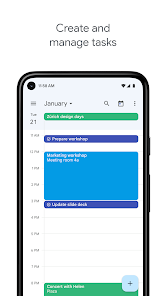
Expert Review
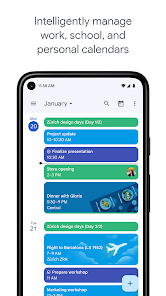
Google Calendar is my go-to app for keeping my life organized. It's a digital calendar app that helps you schedule events, set reminders, and manage your time. Google first launched this app way back, and it's been a staple on my phone ever since. You can easily download it for free from the Google Play Store or the Apple App Store, and it has billions of installs, which shows how many people rely on it. You don't need to pay anything to install the app, but you do need a Google account to use it. While the core app is free, there are no annoying in-app purchases to unlock basic features. You might see some promotional content for other Google services occasionally, but there are no disruptive ads popping up over your schedule.
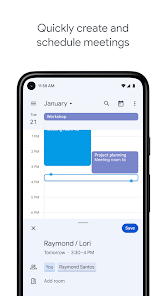
I use this app every single day. I add all my meetings, doctor's appointments, and even personal stuff like dinner plans. The best tip I have is to use the different colored calendars – I have one for work, one for personal, and one for family shared events. It makes glancing at my week so much clearer. Setting up location-based reminders is another game-changer; the app can notify me when I need to leave for an appointment based on current traffic.
I've tried other calendar apps like Apple Calendar or Outlook, but I always come back to Google Calendar. The main reason is how seamlessly it works with everything else. Since I use Gmail, any flight confirmation or event invitation from an email gets added to my calendar automatically. Other apps can do similar things, but the integration here feels effortless and just works. For someone embedded in the Google ecosystem, this app is the obvious choice for staying on top of a busy schedule.
Key Functional Highlights
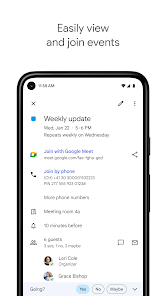
- 📅 Smart Event Creation from Gmail: This is the killer feature for me. When a flight confirmation or restaurant booking email comes into my Gmail, Google Calendar automatically creates a draft event with all the details filled in. I just have to click 'Save'. Compared to manually typing everything in other apps, this saves a ton of time.
- 🗺️ Integrated Maps and Travel Time: When I add a location to an event, the app doesn't just save the address. It can calculate travel time using Google Maps and even suggest when I should leave based on real-time traffic. I haven't found another calendar app that does this as smoothly.
- 👨👩👧👦 Multiple, Shareable Calendars: I can create separate calendars for work, family, and hobbies, each with its own color. More importantly, I can share any of these calendars with specific people. My family's shared calendar is how we all stay synced on events, which is much more intuitive than the sharing in, say, Apple's Calendar app.
- ⏰ Focus Time & Working Hours: A newer feature I love is the ability to mark 'Focus Time' blocks or set my standard working hours. The app can then automatically decline meetings that fall outside those hours or during focus blocks, which helps me protect my time better than the basic availability settings in Microsoft Outlook.
Advantages & Benefits
- ✅ Flawless Ecosystem Integration: Its deep tie-in with Gmail, Google Maps, and Google Assistant is unmatched. Siri and Apple Calendar don't communicate as well, making Google Calendar the winner for Android and cross-platform users.
- ✅ Superior Cross-Platform Sync: Whether I'm on my Android phone, iPad, or Windows laptop, my calendar updates instantly everywhere. Some apps like Samsung Calendar are great on one device but don't sync as reliably across different operating systems.
- ✅ Powerful and Free: The fact that such a powerful, ad-free organizational tool is completely free is a massive strength. Many competitors either have paid tiers for advanced features or include ads.
Areas for Improvement
- ❌ Can Feel Overwhelming: For new users, the sheer number of features and settings can be intimidating. Simpler apps like Apple Calendar or Simple Calendar offer a much cleaner, less cluttered interface for basic needs.
- ❌ Design Could Be More Customizable: While functional, the visual design is somewhat utilitarian. You can't change the overall theme or layout as much as you can in some third-party apps like Business Calendar 2.
- ❌ Occasional Duplicate Events: The powerful Gmail integration sometimes has a downside, creating duplicate events if an email is forwarded or replied to multiple times. I've had to clean this up manually, which is a minor hassle.
Recommended Apps
![]()
ZEPETO: Avatar, Connect & Play
Naver Z Corporation4.3
![]()
Reverse Voice: Flip Singing
NindaFuit0![]()
AI Chat Ask Assistant - NowAI
Now Tech4.3![]()
Lie Detector Test: Prank App
DkTech inc.4.3![]()
Peachy - AI Face & Body Editor
InShot Video Editor4.8
![]()
AI Video Art Creator - Livensa
FERASET4.5![]()
Google Voice
Google LLC4.3![]()
Horoscopes & Tarot
Astrolis Horoscopes4.7![]()
eBay online shopping & selling
eBay Mobile4.6![]()
JPay
Jpay Mobile4.1![]()
Stranger Things 5 Challenges
MVH Entertainment Team5![]()
Chat Master: Prank Story
ABI Game Studio4.8![]()
Google Maps
Google LLC4.2![]()
AI Chat・Ask Chatbot Assistant
AI Chat Studio4.5![]()
Name Meanings with Impact
Alif Innovative Solution3.7















You May Like
-
![]()
True Tarot Card Reading
KaApps4.2 -
![]()
LinkedIn: Jobs & Business News
LinkedIn4.2 -
![]()
iControl: Easy Widgets Themes
Fancy keyboard for theme apps4.6 -
![]()
Duolingo: Language & Chess
Duolingo4.7 -
![]()
Flipped:Chat with AI Character
First Group pte ltd4.1 -
![]()
Hearing Age
Mobile Solutions Tech0 -
![]()
TikTok
TikTok Pte. Ltd.4.4 -
![]()
Pretty Makeup - Beauty Camera
Photo Editor Perfect Corp.4.4 -
![]()
PhotoRoom AI Photo Editor
PhotoRoom Background Editor App4.7 -
![]()
Lightleap by Lightricks
Lightricks Ltd.4.3 -
![]()
Name Meaning
Dexati4.1 -
![]()
Truth Social
T Media Tech LLC3.3 -
![]()
Ace Hardware
Ace Hardware Corporation4.7 -
![]()
Kpop Fans Demon Hunter Wallpap
JHNStudio4.3 -
![]()
Artplay - AI Photo & Video
Hideaway Technology Limited4.5










































