

U-Haul
U-Haul International
Installs
5M+
Developer
U-Haul International
-
Category
Travel & Local
-
Content Rating
Everyone
Developer Email
Privacy Policy
https://www.uhaul.com/Legal/PrivacyPolicy
Screenshots



Expert Review
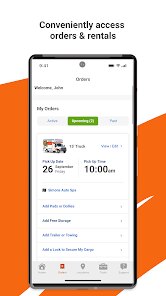
For anyone who frequently moves, stores belongings, or rents trucks and trailers, the U-Haul app from U-Haul International serves as a practical tool for managing reservations and equipment directly from a phone. Available as a free download on Google Play and the App Store, it focuses on streamlining the process of renting moving trucks, cargo vans, pickup trucks, and trailers, as well as booking self-storage units and moving supplies. The app includes advertisements and offers in-app purchases for add-ons like equipment protection or additional mileage. With millions of installations indicating a strong user base, it positions itself as an essential companion for both local moves and cross-country relocations, though its utility depends heavily on real-time availability at physical locations.
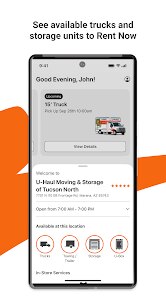
The experience of using the app centers on its booking and management features, which allow you to search for available trucks or storage units by entering a zip code or address. After selecting a location, you can view vehicle sizes, estimated costs, and available time slots, then process the rental through a step-by-step checkout. The app also provides a digital copy of your contract and offers tools like moving checklists or mileage logs, though interaction feels somewhat functional rather than smooth. Real-world usage reveals that while the core rental process works, the interface can feel cluttered with promotional banners, which sometimes distracts from the primary tasks of modifying reservations or finding a nearby drop-off point.
Unlike competitors like Penske or Budget, which offer similar booking apps, U-Haul focuses more heavily on self-storage integration and a wider selection of trailer types, which gives it an edge for complex moves. Penske's app, in contrast, feels more streamlined for one-way truck rentals, but lacks the storage component. From my perspective, U-Haul attempts to cover more ground—trucks, storage, and supplies—which can make the app feel like a broader but less polished tool. This trade-off between comprehensiveness and ease of navigation is a recurring theme when comparing these services.
Key Functional Highlights
- One notable aspect is the real-time equipment availability display. The app shows which truck sizes or trailers are currently available at a specific location, which saves time compared to calling multiple stores. In practice, this feature works reasonably well in urban areas but can be less accurate in rural locations, where inventory updates seem slower—a limitation also seen in similar apps like Budget Truck Rental.
- Another key feature is the digital contract and keyless pickup option. After completing payment through the app, you can bypass the counter and access the truck directly via a Bluetooth lock, which is convenient during early morning or late evening moves. However, the process isn't always seamless; on one occasion, the app failed to sync with the lock, requiring a time-consuming phone call to resolve.
- The moving supplies section integrates directly with the rental process, allowing you to add boxes, tape, or furniture pads to your reservation. This is more cohesive than what I've seen in the Penske app, where supplies are handled separately. Yet, the browsing interface feels dated, with small product images and limited descriptions, making it harder to compare options quickly.
- Finally, the mileage tracker and return process are built into the app, which helps avoid surprise charges. You can log mileage manually or rely on automatic tracking, and submit photos of the returned vehicle for documentation. While useful, the photo upload sometimes encounters lag or crashes on older phones, which undermines the otherwise functional design.
Advantages & Benefits
- Booking a truck or storage unit through the app eliminates the need for phone calls or in-person visits, which is especially helpful for last-minute moves.
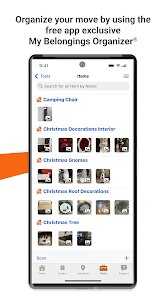
- Having all rental details—contract, mileage logs, and return instructions—in one place reduces paperwork and keeps things organized during a stressful move.
- The ability to modify or cancel reservations without speaking to a representative offers flexibility, which I've used when plans changed unexpectedly.
Areas for Improvement
- The interface occasionally feels cluttered with ads and promotional pop-ups, which can slow down simple tasks like checking reservation details.
- Inventory accuracy varies by location; a few times the app showed availability that didn't match the actual situation upon arrival at the store.
- Customer support options within the app are limited, and reaching a live person often requires navigating away from the digital tools, which can be frustrating during urgent issues.
Recommended Apps
![]()
ZEPETO: Avatar, Connect & Play
Naver Z Corporation4.3
![]()
Reverse Voice: Flip Singing
NindaFuit0![]()
AI Chat Ask Assistant - NowAI
Now Tech4.3![]()
Lie Detector Test: Prank App
DkTech inc.4.3![]()
Peachy - AI Face & Body Editor
InShot Video Editor4.8
![]()
AI Video Art Creator - Livensa
FERASET4.5![]()
Google Voice
Google LLC4.3![]()
Horoscopes & Tarot
Astrolis Horoscopes4.7![]()
eBay online shopping & selling
eBay Mobile4.6![]()
JPay
Jpay Mobile4.1![]()
Stranger Things 5 Challenges
MVH Entertainment Team5![]()
Chat Master: Prank Story
ABI Game Studio4.8![]()
Google Maps
Google LLC4.2![]()
AI Chat・Ask Chatbot Assistant
AI Chat Studio4.5![]()
Name Meanings with Impact
Alif Innovative Solution3.7















You May Like
-
![]()
True Tarot Card Reading
KaApps4.2 -
![]()
LinkedIn: Jobs & Business News
LinkedIn4.2 -
![]()
iControl: Easy Widgets Themes
Fancy keyboard for theme apps4.6 -
![]()
Duolingo: Language & Chess
Duolingo4.7 -
![]()
Flipped:Chat with AI Character
First Group pte ltd4.1 -
![]()
Hearing Age
Mobile Solutions Tech0 -
![]()
TikTok
TikTok Pte. Ltd.4.4 -
![]()
Pretty Makeup - Beauty Camera
Photo Editor Perfect Corp.4.4 -
![]()
PhotoRoom AI Photo Editor
PhotoRoom Background Editor App4.7 -
![]()
Lightleap by Lightricks
Lightricks Ltd.4.3 -
![]()
Name Meaning
Dexati4.1 -
![]()
Truth Social
T Media Tech LLC3.3 -
![]()
Ace Hardware
Ace Hardware Corporation4.7 -
![]()
Kpop Fans Demon Hunter Wallpap
JHNStudio4.3 -
![]()
Artplay - AI Photo & Video
Hideaway Technology Limited4.5










































