

QR & Barcode Reader
TeaCapps
Installs
100,000,000+
Developer
TeaCapps
-
Category
Productivity
-
Content Rating
Rated for 3+
Developer Email
Privacy Policy
https://app.qrbot.net/privacy.html
Screenshots
Expert Review
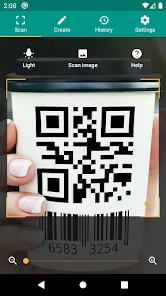
QR & Barcode Reader by TeaCapps is a straightforward app for scanning all sorts of codes. It's a utility app that helps you quickly read QR codes and barcodes you find in everyday life, like on products, posters, or tickets. I first downloaded it from the Google Play Store a couple of years ago, and it's been on my phone ever since. The app has a huge number of installs, which gave me confidence it was reliable. It's completely free to download and install, and you don't need to register an account to start scanning right away. That's a big plus for me. While there are some ads in the app, they're not too intrusive, and I haven't felt the need to make any in-app purchases to use its core features.
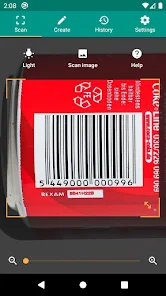
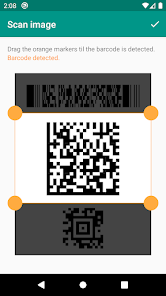
Using the app is super simple. You just open it, point your camera at a code, and it reads it instantly. I use it mostly for checking prices in stores by scanning barcodes or connecting to Wi-Fi networks with QR codes. A handy tip I've learned is to make sure you have good lighting; it makes the scan much faster. The app also keeps a history of your scans, which is useful if you need to go back to a link or a product code you scanned earlier.
I've tried a few other scanner apps from the Google Play Store, but I keep coming back to this one. Some other apps in the same genre, like 'Barcode Scanner' or 'QR Code Reader', often have more complicated interfaces or push their premium versions harder. This app from TeaCapps just feels cleaner and gets the job done without any fuss. For a free utility that I don't use every single day, it's perfect. It does exactly what it says, without trying to be anything more, and that's why I chose it over the others.
Key Functional Highlights
- 📷 Instant, No-Fuss Scanning: The core feature is its speed. You open the app and it's ready to scan immediately, with no lag or need to press a button. It automatically recognizes both QR codes and traditional barcodes, which is faster than some apps that require you to switch modes.
- 📚 Useful Scan History: Unlike many basic readers, this app keeps a local history of everything you've scanned. This is great for finding that Wi-Fi password QR from a cafe again or checking back on a product you were researching.
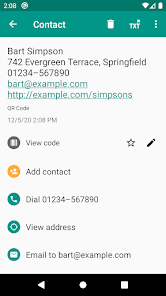
- 🔗 Smart Result Handling: When you scan a URL, it doesn't just show the text; it gives you a clear option to open it directly in your browser. For contact info (vCards) or calendar events, it can create entries directly in your phone's address book or calendar app.
- 💡 Built-in Flashlight: A simple but brilliant feature for low-light conditions. The app can turn on your phone's camera flash with a tap to illuminate a barcode on a dimly lit shelf, something not all free scanner apps include.
Advantages & Benefits
- ✅ Ad Simplicity: Compared to the very popular 'Barcode Scanner' app, the ads in TeaCapps' version are less disruptive. They are usually small banners, not full-screen videos that interrupt your flow.
- ✅ Lightweight Installation: The app installs quickly and doesn't take up much space on your phone. Some other scanners, like 'QR & Barcode Scanner' by Gamma Play, feel heavier and have longer loading times.
- ✅ No Registration Hassle: You can download, install, and use it immediately. Many similar apps now prompt you to sign in or create an account, which is completely unnecessary for a simple scanner tool.
Areas for Improvement
- ❌ Basic Feature Set: If you need to generate or create QR codes, this isn't the app for you. 'QR Code Reader & Scanner' by Kaspersky, for example, includes a generator, while this app is strictly for reading.
- ❌ Persistent Ads: While not the worst, the free version does have permanent banner ads. Apps like 'Scan' (by Scanbot) offer a completely ad-free experience, albeit sometimes at a cost.
- ❌ Limited Customization: You can't change the scan frame color or sound, which some other apps allow. It's a very no-frills, functional interface.
Recommended Apps
![]()
ZEPETO: Avatar, Connect & Play
Naver Z Corporation4.3
![]()
Reverse Voice: Flip Singing
NindaFuit0![]()
AI Chat Ask Assistant - NowAI
Now Tech4.3![]()
Lie Detector Test: Prank App
DkTech inc.4.3![]()
Peachy - AI Face & Body Editor
InShot Video Editor4.8
![]()
AI Video Art Creator - Livensa
FERASET4.5![]()
Google Voice
Google LLC4.3![]()
Horoscopes & Tarot
Astrolis Horoscopes4.7![]()
eBay online shopping & selling
eBay Mobile4.6![]()
JPay
Jpay Mobile4.1![]()
Stranger Things 5 Challenges
MVH Entertainment Team5![]()
Chat Master: Prank Story
ABI Game Studio4.8![]()
Google Maps
Google LLC4.2![]()
AI Chat・Ask Chatbot Assistant
AI Chat Studio4.5![]()
Name Meanings with Impact
Alif Innovative Solution3.7















You May Like
-
![]()
True Tarot Card Reading
KaApps4.2 -
![]()
LinkedIn: Jobs & Business News
LinkedIn4.2 -
![]()
iControl: Easy Widgets Themes
Fancy keyboard for theme apps4.6 -
![]()
Duolingo: Language & Chess
Duolingo4.7 -
![]()
Flipped:Chat with AI Character
First Group pte ltd4.1 -
![]()
Hearing Age
Mobile Solutions Tech0 -
![]()
TikTok
TikTok Pte. Ltd.4.4 -
![]()
Pretty Makeup - Beauty Camera
Photo Editor Perfect Corp.4.4 -
![]()
PhotoRoom AI Photo Editor
PhotoRoom Background Editor App4.7 -
![]()
Lightleap by Lightricks
Lightricks Ltd.4.3 -
![]()
Name Meaning
Dexati4.1 -
![]()
Truth Social
T Media Tech LLC3.3 -
![]()
Ace Hardware
Ace Hardware Corporation4.7 -
![]()
Kpop Fans Demon Hunter Wallpap
JHNStudio4.3 -
![]()
Artplay - AI Photo & Video
Hideaway Technology Limited4.5










































