
Move to iOS
Apple
Installs
100,000,000+
Developer
Apple
-
Category
Productivity
-
Content Rating
Rated for 3+
Developer Email
Privacy Policy
http://www.apple.com/privacy/privacy-policy/
Screenshots

Expert Review
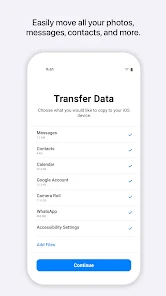
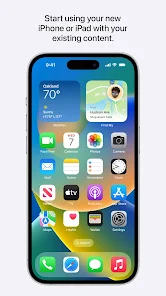
Move to iOS is an official app developed by Apple to help users switch from an Android phone to an iPhone or iPad. Its main job is to transfer your stuff—like contacts, message history, photos, videos, bookmarks, and even your free apps—wirelessly from your old Android device to your new Apple one. The app first launched back in 2015 alongside iOS 9. You can find it for free on the Google Play Store, and it's had tens of millions of downloads. You don't need to register an account to use it, and there are no in-app purchases or annoying ads. It's a straightforward tool with one clear purpose.
Using the app is pretty simple, but you gotta follow the steps. The trick is to start the process during the setup of your brand new iPhone or iPad. When you get to the 'Apps & Data' screen, tap 'Move Data from Android'. That's when your iPhone will create a private Wi-Fi network and show a code. Then, you open the Move to iOS app on your Android phone, enter that code, and choose what you want to transfer. My tip? Make sure both phones are plugged in and have a good Wi-Fi connection. Also, don't use your Android phone for anything else while the transfer is happening—it can mess things up.
I chose Move to iOS over other methods, like manually backing up to a computer or using cloud services, because it's just easier. Sure, you could use Google Drive to back up photos and contacts, but that's piecemeal. This app bundles everything important in one go. Compared to some third-party switch apps I've tried, which often feel clunky or ask for money, Apple's app is free, clean, and gets the core job done without fuss. It's not perfect, but for the specific task of moving to an iPhone, it's the most direct path.
Key Functional Highlights
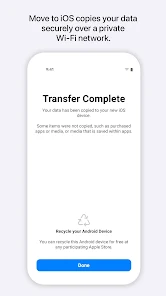
- 🔗 Seamless Wireless Transfer: The app creates a direct, secure connection between your Android and iOS devices. You don't need cables or a computer. Just follow the on-screen prompts during iPhone setup, and it moves your content over Wi-Fi.
- 📱 Transfers Free Apps: A really handy feature is that it finds the free iOS versions of the Android apps you had. After the transfer, your new iPhone will suggest downloading them from the App Store, saving you the hassle of searching for each one.
- 🗂️ Transfers Core Data Types: It doesn't just move media. It can transfer your text messages, email accounts, web bookmarks, and even your calendar events. This helps make your new iPhone feel like home right away.
- 🔒 Private and Secure: The transfer uses a private Wi-Fi network and encrypts your data. Unlike some generic file-sharing apps, this process is designed specifically for this sensitive migration task, so your personal info stays safe.
Advantages & Benefits
- ✅ Official and Free: Being an Apple-made app gives it a big edge. It's completely free with no hidden costs, unlike many third-party transfer tools like 'MobileTrans' which often have paywalls for full features.
- ✅ Integrated Setup Experience: It works as a dedicated step in the iPhone's initial setup. This is much smoother than using a separate app like Samsung Smart Switch, which isn't built into the Apple setup flow.
- ✅ App Matching: The ability to suggest iOS equivalents for your Android apps is unique. Cloud services like Google Drive just move files; they don't help you rebuild your app ecosystem.
Areas for Improvement
- ⚠️ Limited to New Setups: The biggest drawback is you can only use it when setting up a brand new iPhone. If you already finished setup, you have to erase your iPhone and start over, which is a hassle compared to more flexible apps.
- ⚠️ Android-Only Source: It only works for moving from Android. You can't use it to transfer data between two iPhones or from an old iPhone to a new one, unlike Apple's own iCloud backup.
- ⚠️ Transfer Can Be Slow: For people with a lot of photos and videos, the wireless transfer can take a long time. Using a direct cable connection with a computer or a tool like 'Copy My Data' can sometimes be faster.
Recommended Apps
![]()
ZEPETO: Avatar, Connect & Play
Naver Z Corporation4.3
![]()
Reverse Voice: Flip Singing
NindaFuit0![]()
AI Chat Ask Assistant - NowAI
Now Tech4.3![]()
Lie Detector Test: Prank App
DkTech inc.4.3![]()
Peachy - AI Face & Body Editor
InShot Video Editor4.8
![]()
AI Video Art Creator - Livensa
FERASET4.5![]()
Google Voice
Google LLC4.3![]()
Horoscopes & Tarot
Astrolis Horoscopes4.7![]()
eBay online shopping & selling
eBay Mobile4.6![]()
JPay
Jpay Mobile4.1![]()
Stranger Things 5 Challenges
MVH Entertainment Team5![]()
Chat Master: Prank Story
ABI Game Studio4.8![]()
Google Maps
Google LLC4.2![]()
AI Chat・Ask Chatbot Assistant
AI Chat Studio4.5![]()
Name Meanings with Impact
Alif Innovative Solution3.7















You May Like
-
![]()
True Tarot Card Reading
KaApps4.2 -
![]()
LinkedIn: Jobs & Business News
LinkedIn4.2 -
![]()
iControl: Easy Widgets Themes
Fancy keyboard for theme apps4.6 -
![]()
Duolingo: Language & Chess
Duolingo4.7 -
![]()
Flipped:Chat with AI Character
First Group pte ltd4.1 -
![]()
Hearing Age
Mobile Solutions Tech0 -
![]()
TikTok
TikTok Pte. Ltd.4.4 -
![]()
Pretty Makeup - Beauty Camera
Photo Editor Perfect Corp.4.4 -
![]()
PhotoRoom AI Photo Editor
PhotoRoom Background Editor App4.7 -
![]()
Lightleap by Lightricks
Lightricks Ltd.4.3 -
![]()
Name Meaning
Dexati4.1 -
![]()
Truth Social
T Media Tech LLC3.3 -
![]()
Ace Hardware
Ace Hardware Corporation4.7 -
![]()
Kpop Fans Demon Hunter Wallpap
JHNStudio4.3 -
![]()
Artplay - AI Photo & Video
Hideaway Technology Limited4.5











































