

Truecaller: Caller ID & Block
Truecaller
Installs
1,000,000,000+
Developer
Truecaller
-
Category
Social
-
Content Rating
Rated for 3+
Developer Email
Privacy Policy
https://www.truecaller.com/privacy-policy
Screenshots
Expert Review
I've been using the Truecaller app for years now, and it's become one of those essential tools on my phone. Basically, it's a caller ID and spam blocking app. You download it, and it helps you see who's calling even if the number isn't saved in your contacts. It launched way back in 2009 and is super popular, available on both the Google Play Store and the App Store. The install numbers are massive, in the hundreds of millions. The core app is free to download and use, which is great. You don't strictly need to register to use the basic caller ID, but signing up with your phone number unlocks more features, like being part of the community-based spam list. There is a premium version with in-app purchases for extra features, and the free version does show some ads.
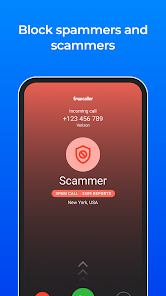
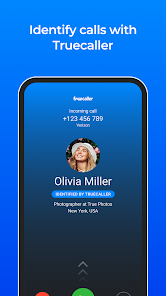
Using it is straightforward. Once you install the app and grant it permissions, it just works in the background. Every time you get a call, a little pop-up shows the caller's name if Truecaller has it in its database. For spam calls, it often shows a red warning like 'Spam' or 'Telemarketer,' and you can just swipe to reject. A good tip is to regularly check the 'Block' list in the app's settings to review and manage the numbers you've blocked. Also, contributing by reporting spam calls you receive helps make the database better for everyone.
I've tried other similar apps like Hiya or even the built-in spam protection from my carrier. The reason I stick with Truecaller is its massive, crowd-sourced database. Because so many people use it globally, the chance of an unknown number being identified is much higher. Other apps might be good regionally, but Truecaller's strength is its sheer scale. It just feels more comprehensive. While some people worry about privacy, for me, the convenience of knowing who's calling and blocking pesky telemarketers outweighs those concerns. It's the most effective app I've found for this specific job.
Key Functional Highlights
- 🔍 Live Caller ID: The core feature. As soon as a call comes in, the app displays the caller's name and spam rating right on your screen, even for numbers not in your contacts. It taps into a huge global database built by users.
- ⛔ Smart Blocking: It automatically identifies and lets you block spam calls, telemarketers, fraudsters, and even specific categories like 'Insurance' or 'Scam.' You can also manually block any number with one tap.
- 📞 Call Recording (Premium): A standout feature in the premium version is the ability to record phone calls directly within the app. This isn't commonly found in other basic caller ID apps and is super useful for important conversations.
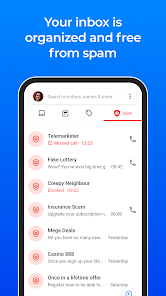
- 👁️ SMS Filtering & Organizing: The app also filters your SMS inbox, sorting out promotional messages and spam from your personal texts, which helps keep your messaging app clean.
Advantages & Benefits
- ✅ Unmatched Database Size: Compared to apps like Hiya or built-in carrier services, Truecaller's community-powered database is vastly larger and more frequently updated, leading to higher identification rates.
- ✅ Deep SMS Integration: Unlike many competitors that focus only on calls, Truecaller also intelligently filters SMS spam, which is a common pain point that other apps often ignore.
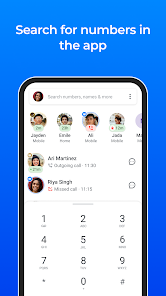
- ✅ Advanced Search: You can search for any phone number globally to see who it belongs to, a feature that goes beyond simple incoming call identification.
Areas for Improvement
- ⚠️ Privacy Considerations: To work, the app requires access to your contacts and call log. This data-sharing model is more intrusive than simpler, local-only blockers like Should I Answer?.
- ⚠️ Ad-Supported Free Tier: The free version displays banner and video ads, which can be annoying. Competitors like Hiya sometimes offer a cleaner, ad-free basic experience.
- ⚠️ Battery & Performance: Running constantly in the background, some users report it can have a slight impact on battery life compared to lighter alternatives.
Recommended Apps
![]()
ZEPETO: Avatar, Connect & Play
Naver Z Corporation4.3
![]()
Reverse Voice: Flip Singing
NindaFuit0![]()
AI Chat Ask Assistant - NowAI
Now Tech4.3![]()
Lie Detector Test: Prank App
DkTech inc.4.3![]()
Peachy - AI Face & Body Editor
InShot Video Editor4.8
![]()
AI Video Art Creator - Livensa
FERASET4.5![]()
Google Voice
Google LLC4.3![]()
Horoscopes & Tarot
Astrolis Horoscopes4.7![]()
eBay online shopping & selling
eBay Mobile4.6![]()
JPay
Jpay Mobile4.1![]()
Stranger Things 5 Challenges
MVH Entertainment Team5![]()
Chat Master: Prank Story
ABI Game Studio4.8![]()
Google Maps
Google LLC4.2![]()
AI Chat・Ask Chatbot Assistant
AI Chat Studio4.5![]()
Name Meanings with Impact
Alif Innovative Solution3.7















You May Like
-
![]()
True Tarot Card Reading
KaApps4.2 -
![]()
LinkedIn: Jobs & Business News
LinkedIn4.2 -
![]()
iControl: Easy Widgets Themes
Fancy keyboard for theme apps4.6 -
![]()
Duolingo: Language & Chess
Duolingo4.7 -
![]()
Flipped:Chat with AI Character
First Group pte ltd4.1 -
![]()
Hearing Age
Mobile Solutions Tech0 -
![]()
TikTok
TikTok Pte. Ltd.4.4 -
![]()
Pretty Makeup - Beauty Camera
Photo Editor Perfect Corp.4.4 -
![]()
PhotoRoom AI Photo Editor
PhotoRoom Background Editor App4.7 -
![]()
Lightleap by Lightricks
Lightricks Ltd.4.3 -
![]()
Name Meaning
Dexati4.1 -
![]()
Truth Social
T Media Tech LLC3.3 -
![]()
Ace Hardware
Ace Hardware Corporation4.7 -
![]()
Kpop Fans Demon Hunter Wallpap
JHNStudio4.3 -
![]()
Artplay - AI Photo & Video
Hideaway Technology Limited4.5











































