
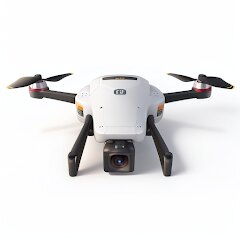
Drone App: Forecast for UAV
Go Dreams
Installs
1M+
Developer
Go Dreams
-
Category
Finance
-
Content Rating
Everyone
Developer Email
Privacy Policy
https://gardenofdreams.games/privacy-policy-3
Screenshots
Expert Review
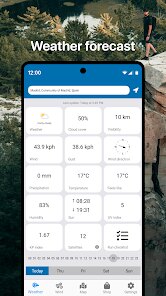
Not long ago, I started looking for a reliable weather tool specifically designed for drone flying. Forecast for UAV from Go Dreams popped up frequently in discussions among hobbyist groups and on Google Play. It's a specialized weather application tailored for drone pilots, available as a free download with optional in-app purchases. The app focuses on providing hyper-local wind, precipitation, and visibility data, which sets it apart from general weather apps that often miss the nuances needed for safe drone operations.
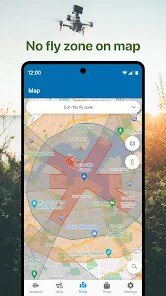
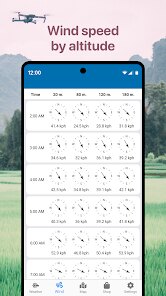
Opening the app gives you a clean interface that immediately displays key metrics like wind speed at different altitudes and an hourly forecast. You can quickly check gust predictions and look at a map overlay showing no-fly zones or restricted areas. Interacting with the main dashboard feels intuitive, as the layout prioritizes the most critical data first. I found myself swiping between tabs to view satellite imagery and radar, which added a layer of detail that helped me decide if conditions were suitable for a flight later in the day.
Comparing it with something like UAV Forecast, another popular choice, I noticed this app feels slightly more polished in the visual department. The graphs and charts are easier to read at a glance, though the data sets are comparable. Go Dreams seems to have paid more attention to the user interface, making it feel less cluttered. On the other hand, I missed some of the more granular settings present in other apps, like custom wind speed thresholds for different drone models. Still, for most recreational pilots, this balance between simplicity and depth works well.
Key Functional Highlights
- The wind layer is one of the strongest features. It shows both surface and upper-level wind data, which is critical for drone stability. I have used it to spot sudden gusts that general weather apps miss, giving me a clear reason to postpone a flight. In comparison, built-in phone weather apps only show broad conditions, making this much more reliable.
- Real-time radar integration sets a new standard. You can see precipitation moving in your area with decent accuracy, which helps avoid unexpected rain or snow. While flying, I kept an eye on the radar loop to ensure I had enough time to land before a passing shower. It feels more responsive than similar tools in other drone apps.
- Another notable aspect is the clear visual design. The color-coded risk levels make it easy to understand conditions at a glance. Red zones for high wind or rain pop out immediately, reducing the need to analyze raw numbers. This is something that some competitor apps fail to deliver, often burying data under dense menus.
Advantages & Benefits
- Planning flights becomes much simpler when you can check wind conditions for the exact location you intend to fly, not just a nearby city.
- The alert system sends notifications when conditions change significantly, which can be a lifesaver during longer sessions away from the phone.
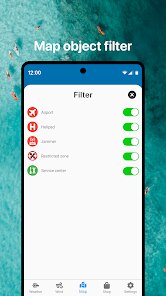
- Having no-fly zone overlays built right into the forecast saves time, as I no longer need to toggle between separate mapping apps.
Areas for Improvement
- Some advanced features, like detailed historical data or custom model profiles, are locked behind in-app purchases, which can feel limiting for serious users.
- The app occasionally refreshes slowly when loading high-resolution radar images over cellular data, which can be frustrating in the field.
- Battery drain is noticeable if you leave the live radar running for extended periods, though closing the app between checks helps mitigate this.
Recommended Apps
![]()
ZEPETO: Avatar, Connect & Play
Naver Z Corporation4.3
![]()
Reverse Voice: Flip Singing
NindaFuit0![]()
AI Chat Ask Assistant - NowAI
Now Tech4.3![]()
Lie Detector Test: Prank App
DkTech inc.4.3![]()
Peachy - AI Face & Body Editor
InShot Video Editor4.8
![]()
AI Video Art Creator - Livensa
FERASET4.5![]()
Google Voice
Google LLC4.3![]()
Horoscopes & Tarot
Astrolis Horoscopes4.7![]()
eBay online shopping & selling
eBay Mobile4.6![]()
JPay
Jpay Mobile4.1![]()
Stranger Things 5 Challenges
MVH Entertainment Team5![]()
Chat Master: Prank Story
ABI Game Studio4.8![]()
Google Maps
Google LLC4.2![]()
AI Chat・Ask Chatbot Assistant
AI Chat Studio4.5![]()
Name Meanings with Impact
Alif Innovative Solution3.7















You May Like
-
![]()
True Tarot Card Reading
KaApps4.2 -
![]()
LinkedIn: Jobs & Business News
LinkedIn4.2 -
![]()
iControl: Easy Widgets Themes
Fancy keyboard for theme apps4.6 -
![]()
Duolingo: Language & Chess
Duolingo4.7 -
![]()
Flipped:Chat with AI Character
First Group pte ltd4.1 -
![]()
Hearing Age
Mobile Solutions Tech0 -
![]()
TikTok
TikTok Pte. Ltd.4.4 -
![]()
Pretty Makeup - Beauty Camera
Photo Editor Perfect Corp.4.4 -
![]()
PhotoRoom AI Photo Editor
PhotoRoom Background Editor App4.7 -
![]()
Lightleap by Lightricks
Lightricks Ltd.4.3 -
![]()
Name Meaning
Dexati4.1 -
![]()
Truth Social
T Media Tech LLC3.3 -
![]()
Ace Hardware
Ace Hardware Corporation4.7 -
![]()
Kpop Fans Demon Hunter Wallpap
JHNStudio4.3 -
![]()
Artplay - AI Photo & Video
Hideaway Technology Limited4.5












































