

LINE Sticker Maker
LINE (LY Corporation)
Installs
5M+
Developer
LINE (LY Corporation)
-
Category
Video Players & Editors
-
Content Rating
Rated for 3+
Developer Email
Privacy Policy
https://line.me/terms/policy/
Screenshots

Expert Review
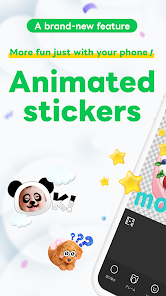
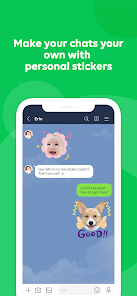
LINE Sticker Maker is a free mobile app from LINE that lets you create custom stickers for use in LINE chats. It's basically a mini design studio for your conversations. The app launched back in 2014 and is available for both Android on Google Play and iOS on the App Store. It's been downloaded over 50 million times from Google Play alone. You can download and install it for free, and you don't even need to register a separate account if you already have LINE. The app itself is free to use, but the stickers you create can only be sent to friends if you purchase them as a set from LINE's official store. There are no annoying in-app ads cluttering up the creative process.
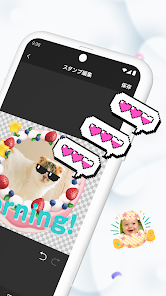
Using the app is pretty straightforward. You take a photo or choose one from your gallery, then use the tools to cut out the subject and add text or simple decorations. My top tip is to use a photo with a clear, solid background—it makes the automatic cut-out tool work much better. You can also draw your own stickers from scratch if you're feeling artistic. Once you're happy with a design, you save it to your 'My Stickers' list. The real fun starts when you compile 8 or 16 of them into a set and submit it for sale. It's a cool way to add a personal touch to your chats or even try to make a little side income.
Compared to other sticker maker apps out there, like 'Sticker Maker' by InShot or 'Sticker Studio', I keep coming back to LINE's official one. The biggest reason is the direct integration. Stickers made here are meant for LINE, so the upload and publishing process is built right in. Other apps might give you more fancy editing features, but then you're stuck figuring out how to get those stickers into your messaging app. With LINE Sticker Maker, the path from idea to using the sticker in a chat is seamless. It's designed for one purpose and does it without any fuss, which is why I prefer it over the more generic alternatives.
Key Functional Highlights
- 🎨 Seamless LINE Integration: This is the app's killer feature. You design, submit, and—once approved—your stickers are instantly available for purchase and use within the LINE app itself. Other generic makers leave you exporting files and manually adding them to other platforms.
- ✂️ Simple Cut-Out Tools: The automatic background removal tool is surprisingly effective for quick sticker creation. While not as powerful as a full Photoshop suite, it's perfectly tuned for the app's purpose, making it easy for anyone to start making stickers in minutes.
- 📤 Official Publishing Pipeline: For aspiring creators, the app provides a direct route to LINE's massive sticker market. You can create a full set and submit it for review right from the app, a feature most similar apps completely lack.
- 🆓 Truly Free to Create: Unlike some apps that watermark your creations or lock basic tools behind a paywall, you can design as many stickers as you want here without any cost. You only pay (or earn) when a set is officially published and purchased.
Advantages & Benefits
- ✅ Official and Reliable: Being made by LINE themselves, it's the most trusted and stable way to create stickers for their platform. Updates are consistent, and compatibility is guaranteed.
- ✅ Streamlined User Journey: The experience from download to publishing is incredibly smooth. Apps like 'Sticker Studio' have more features but feel clunkier when you actually want to use the stickers in LINE.
- ✅ Large Built-in Audience: By publishing through this app, your stickers reach LINE's entire user base. With other maker apps, you're often just creating for yourself or a small group.
Areas for Improvement
- ❌ Limited Editing Features: Compared to a powerhouse like 'Sticker Maker' by InShot, the drawing and editing tools here are quite basic. Don't expect advanced layers, filters, or elaborate effects.
- ❌ Platform Lock-In: Stickers created are exclusively for LINE. You can't easily export them for use on WhatsApp, Telegram, or other platforms, which multi-platform apps sometimes allow.
- ❌ Strict Submission Rules: The requirement for sets of 8 or 16 stickers with specific themes can feel restrictive for casual users who just want to make a few fun stickers quickly.
Recommended Apps
![]()
ZEPETO: Avatar, Connect & Play
Naver Z Corporation4.3
![]()
Reverse Voice: Flip Singing
NindaFuit0![]()
AI Chat Ask Assistant - NowAI
Now Tech4.3![]()
Lie Detector Test: Prank App
DkTech inc.4.3![]()
Peachy - AI Face & Body Editor
InShot Video Editor4.8
![]()
AI Video Art Creator - Livensa
FERASET4.5![]()
Google Voice
Google LLC4.3![]()
Horoscopes & Tarot
Astrolis Horoscopes4.7![]()
eBay online shopping & selling
eBay Mobile4.6![]()
JPay
Jpay Mobile4.1![]()
Stranger Things 5 Challenges
MVH Entertainment Team5![]()
Chat Master: Prank Story
ABI Game Studio4.8![]()
Google Maps
Google LLC4.2![]()
AI Chat・Ask Chatbot Assistant
AI Chat Studio4.5![]()
Name Meanings with Impact
Alif Innovative Solution3.7















You May Like
-
![]()
True Tarot Card Reading
KaApps4.2 -
![]()
LinkedIn: Jobs & Business News
LinkedIn4.2 -
![]()
iControl: Easy Widgets Themes
Fancy keyboard for theme apps4.6 -
![]()
Duolingo: Language & Chess
Duolingo4.7 -
![]()
Flipped:Chat with AI Character
First Group pte ltd4.1 -
![]()
Hearing Age
Mobile Solutions Tech0 -
![]()
TikTok
TikTok Pte. Ltd.4.4 -
![]()
Pretty Makeup - Beauty Camera
Photo Editor Perfect Corp.4.4 -
![]()
PhotoRoom AI Photo Editor
PhotoRoom Background Editor App4.7 -
![]()
Lightleap by Lightricks
Lightricks Ltd.4.3 -
![]()
Name Meaning
Dexati4.1 -
![]()
Truth Social
T Media Tech LLC3.3 -
![]()
Ace Hardware
Ace Hardware Corporation4.7 -
![]()
Kpop Fans Demon Hunter Wallpap
JHNStudio4.3 -
![]()
Artplay - AI Photo & Video
Hideaway Technology Limited4.5











































