
Fake video call - Prank call
HiddenScreen.NET
Installs
1M+
Developer
HiddenScreen.NET
-
Category
Entertainment
-
Content Rating
Rated for 12+
Developer Email
Privacy Policy
https://s3-us-west-2.amazonaws.com/faketim/privacypolicy.html
Screenshots
Expert Review
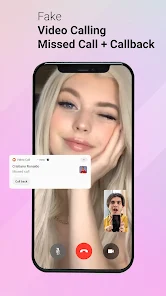
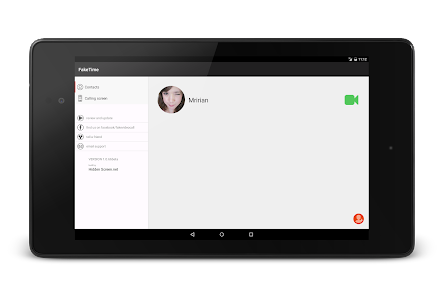
Fake Video Call - Prank Call is a fun app I've had on my phone for a while now. It's exactly what the name says: an app that lets you simulate a video call on your screen. You can download it for free from the Google Play Store. I remember installing it a couple of years ago, and it's been a reliable tool for a good laugh ever since. The app doesn't require you to register or create an account, which is great for getting straight to the prank. It's a free download, though there are some optional in-app purchases if you want to unlock extra features or characters. You'll also see some ads while using the app, but they're not too intrusive.
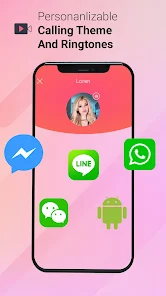
Using the app is super simple. You just open it, pick a caller (they have a bunch of funny characters and even some celebrity lookalikes), set a timer, and then let it run. The fake call will pop up on your screen with a ringing sound and a video feed, looking just like a real incoming call. My favorite tip is to use it in a crowded place, like a cafe, and pretend to have a very dramatic conversation. It always gets a reaction. You can also customize the caller name and picture to make it even more believable for your friends.
There are a few other prank call apps out there, like 'Fake Call - Prank Call' or 'PrankDial', but I keep coming back to this one. The main reason is the video element. A lot of similar apps are just audio pranks, but having a full-screen, realistic-looking video call makes the prank so much more convincing. The video quality in this app is surprisingly good, and the characters are animated well enough to sell the illusion. For pulling off a visual gag or getting out of an awkward situation with a bit of theatrical flair, this app is my go-to choice over the purely audio-based alternatives.
Key Functional Highlights
- 🎭 Realistic Video Interface: The core of this app is its spot-on imitation of a real video call screen. The incoming call notification, the accept/decline buttons, and the live video feed look incredibly authentic, which is crucial for selling the prank.
- ⏱️ Customizable Timer & Scenarios: You can set a precise delay before the fake call happens, letting you set up the perfect moment. Some scenarios even include pre-recorded audio from the "caller" to make your side of the "conversation" more believable.
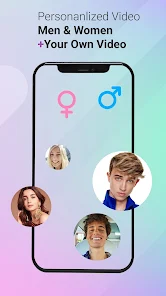
- 👥 Diverse Caller Library: The app offers a wide range of characters to call you, from generic contacts to more outlandish options. This variety means you can use the app repeatedly without the prank becoming predictable.
- 🔕 Quick Exit Feature: After the prank is over, you can end the fake call with a single tap. The app then closes cleanly, leaving no trace on your recent apps screen, which helps maintain the illusion.
Advantages & Benefits
- ✅ Superior Visual Prank: Compared to audio-only apps like PrankDial, the video component adds a whole new layer of believability and humor. It's a more immersive prank tool.
- ✅ No Registration Needed: Unlike some social or messaging apps, you can download, install, and use this prank app immediately without any sign-up process, which is perfect for a quick, spontaneous joke.
- ✅ Wide Device Compatibility: I've installed this app on a few different Android phones over the years, and it has always worked smoothly. It's well-optimized for the Google Play ecosystem.
Areas for Improvement
- ❌ Ad-Supported Model: The presence of ads can sometimes interrupt the flow when you're browsing for the perfect caller or setting up the prank. Some competing apps offer a cleaner, ad-free experience for a one-time fee.
- ❌ Limited Free Content: While the free download gets you started, many of the more amusing or realistic callers are locked behind in-app purchases. Apps like 'Fake Call & Chat' might offer more initially for free.
- ❌ Niche Use Case: This is purely a novelty app. Unlike a multi-functional social or utility app, its use is very specific, so it might just sit on your phone unused for long periods between pranks.
Recommended Apps
![]()
ZEPETO: Avatar, Connect & Play
Naver Z Corporation4.3
![]()
Reverse Voice: Flip Singing
NindaFuit0![]()
AI Chat Ask Assistant - NowAI
Now Tech4.3![]()
Lie Detector Test: Prank App
DkTech inc.4.3![]()
Peachy - AI Face & Body Editor
InShot Video Editor4.8
![]()
AI Video Art Creator - Livensa
FERASET4.5![]()
Google Voice
Google LLC4.3![]()
Horoscopes & Tarot
Astrolis Horoscopes4.7![]()
eBay online shopping & selling
eBay Mobile4.6![]()
JPay
Jpay Mobile4.1![]()
Stranger Things 5 Challenges
MVH Entertainment Team5![]()
Chat Master: Prank Story
ABI Game Studio4.8![]()
Google Maps
Google LLC4.2![]()
AI Chat・Ask Chatbot Assistant
AI Chat Studio4.5![]()
Name Meanings with Impact
Alif Innovative Solution3.7















You May Like
-
![]()
True Tarot Card Reading
KaApps4.2 -
![]()
LinkedIn: Jobs & Business News
LinkedIn4.2 -
![]()
iControl: Easy Widgets Themes
Fancy keyboard for theme apps4.6 -
![]()
Duolingo: Language & Chess
Duolingo4.7 -
![]()
Flipped:Chat with AI Character
First Group pte ltd4.1 -
![]()
Hearing Age
Mobile Solutions Tech0 -
![]()
TikTok
TikTok Pte. Ltd.4.4 -
![]()
Pretty Makeup - Beauty Camera
Photo Editor Perfect Corp.4.4 -
![]()
PhotoRoom AI Photo Editor
PhotoRoom Background Editor App4.7 -
![]()
Lightleap by Lightricks
Lightricks Ltd.4.3 -
![]()
Name Meaning
Dexati4.1 -
![]()
Truth Social
T Media Tech LLC3.3 -
![]()
Ace Hardware
Ace Hardware Corporation4.7 -
![]()
Kpop Fans Demon Hunter Wallpap
JHNStudio4.3 -
![]()
Artplay - AI Photo & Video
Hideaway Technology Limited4.5











































