
DeepArtEffects AI Photo Editor
Deep Art AI GmbH
Installs
1M+
Developer
Deep Art AI GmbH
-
Category
Video Players & Editors
-
Content Rating
Rated for 3+
Developer Email
Privacy Policy
https://www.deeparteffects.com/dataprivacy
Screenshots
Expert Review
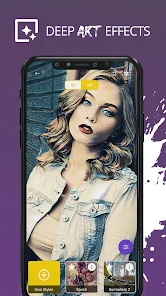
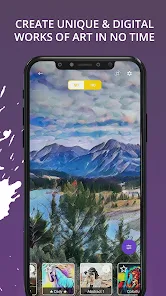
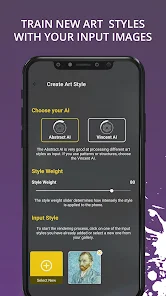
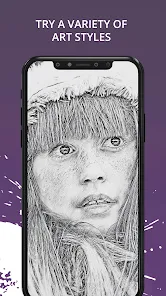
DeepArtEffects AI Photo Editor is a really cool app for turning your photos into artistic masterpieces. It uses artificial intelligence to apply different art styles to your pictures, making them look like paintings or sketches. I first heard about this app a few years ago when it launched, and it's been a fun tool to play with ever since. You can find it easily on Google Play and the App Store. It's had millions of downloads, which shows how popular it is. The app itself is free to download and install, which is great for trying it out. You don't need to register an account right away to use the basic features, which I appreciate. Of course, like many free apps, it has some in-app purchases if you want to unlock all the styles and remove watermarks, and you'll see some ads in the free version.
Using the app is pretty straightforward. You just pick a photo from your gallery, choose an art style you like—there are tons, from classic oil painting to modern pop art—and let the AI do its magic. It only takes a few seconds. A good tip is to start with a high-quality, well-lit photo for the best results. The AI seems to work better with clear images. I also found that experimenting with different styles on the same photo can give you surprisingly different and cool outcomes. It's become my go-to when I want to make a regular vacation snap look more interesting for social media.
When I was looking for a photo editor in this genre, I also tried apps like Prisma and PicsArt. They're good too, but I kept coming back to DeepArtEffects. For me, the main reason is the sheer variety and quality of the AI art filters. Some other apps have a handful of styles, but DeepArtEffects feels like it has a whole library. The results often look more like a real painting and less like a simple filter slapped on. It just feels more specialized for this one creative task. While PicsArt is more of an all-in-one editor, I prefer having a dedicated app that does this artistic transformation really well. That's why I chose to keep this app installed on my phone.
Key Functional Highlights
- 🎨 Massive Style Library: Unlike many basic photo editors, DeepArtEffects offers an enormous collection of AI art styles. You can find everything from Van Gogh and Picasso imitations to abstract and contemporary designs, giving you way more creative options than standard filter apps.
- ⚡ Fast AI Processing: The core feature is its speed. After you select a style, the AI processes your photo in just a few seconds. Compared to waiting for cloud-based processing in some older similar apps, this local(on-device) speed makes experimenting with different looks quick and seamless.
- 🖼️ High-Resolution Output: A standout feature for me is the ability to get high-quality results. Even with the free version, the artistic renderings are detailed. This is a step above some competitors where the output can look pixelated or overly compressed.
- 🔧 Simple, Focused Tools: The app doesn't overwhelm you with complicated editing sliders. It's focused on the AI art transformation, with just a few tweaks available for intensity and framing. This makes it much easier to use than a full suite like Adobe Lightroom when you just want instant art.
Advantages & Benefits
- 👍 Superior AI Art Quality: The artistic effects from DeepArtEffects often look more refined and authentic compared to similar apps like Prisma. The brushstroke and texture details are simply better, making photos look like genuine paintings.
- 👍 Offline Functionality: Once styles are downloaded, you can use them without an internet connection. This is a huge plus over some apps that require a constant online connection for processing, giving you more flexibility.
- 👍 User-Friendly for Beginners: The interface is very intuitive. You don't need any photo editing knowledge. This ease of use gives it an edge over more complex editors like PicsArt for someone who just wants quick, beautiful art from their photos.
Areas for Improvement
- 👎 Aggressive Monetization in Free Version: The free version heavily pushes you towards purchases with frequent ads and prominent watermarks on saved images. Apps like Snapseed offer powerful editing completely free with no such interruptions.
- 👎 Limited Basic Editing: This is purely an art style app. If you need to crop, adjust brightness, or remove red-eye first, you'll have to use another app. All-in-one editors like Google Photos or PicsArt have a clear advantage here for basic fixes.
- 👎 Can Be Resource Heavy: Processing high-resolution photos with complex styles can sometimes slow down older phones or drain the battery faster than simpler filter apps, which is something to keep in mind.
Recommended Apps
![]()
ZEPETO: Avatar, Connect & Play
Naver Z Corporation4.3
![]()
Reverse Voice: Flip Singing
NindaFuit0![]()
AI Chat Ask Assistant - NowAI
Now Tech4.3![]()
Lie Detector Test: Prank App
DkTech inc.4.3![]()
Peachy - AI Face & Body Editor
InShot Video Editor4.8
![]()
AI Video Art Creator - Livensa
FERASET4.5![]()
Google Voice
Google LLC4.3![]()
Horoscopes & Tarot
Astrolis Horoscopes4.7![]()
eBay online shopping & selling
eBay Mobile4.6![]()
JPay
Jpay Mobile4.1![]()
Stranger Things 5 Challenges
MVH Entertainment Team5![]()
Chat Master: Prank Story
ABI Game Studio4.8![]()
Google Maps
Google LLC4.2![]()
AI Chat・Ask Chatbot Assistant
AI Chat Studio4.5![]()
Name Meanings with Impact
Alif Innovative Solution3.7















You May Like
-
![]()
True Tarot Card Reading
KaApps4.2 -
![]()
LinkedIn: Jobs & Business News
LinkedIn4.2 -
![]()
iControl: Easy Widgets Themes
Fancy keyboard for theme apps4.6 -
![]()
Duolingo: Language & Chess
Duolingo4.7 -
![]()
Flipped:Chat with AI Character
First Group pte ltd4.1 -
![]()
Hearing Age
Mobile Solutions Tech0 -
![]()
TikTok
TikTok Pte. Ltd.4.4 -
![]()
Pretty Makeup - Beauty Camera
Photo Editor Perfect Corp.4.4 -
![]()
PhotoRoom AI Photo Editor
PhotoRoom Background Editor App4.7 -
![]()
Lightleap by Lightricks
Lightricks Ltd.4.3 -
![]()
Name Meaning
Dexati4.1 -
![]()
Truth Social
T Media Tech LLC3.3 -
![]()
Ace Hardware
Ace Hardware Corporation4.7 -
![]()
Kpop Fans Demon Hunter Wallpap
JHNStudio4.3 -
![]()
Artplay - AI Photo & Video
Hideaway Technology Limited4.5











































