
Anime Avatar Creator
Beauty Mania Apps and Games
Installs
1M+
Developer
Beauty Mania Apps and Games
-
Category
Social
-
Content Rating
Rated for 3+
Developer Email
Privacy Policy
https://beautymaniaapps.wixsite.com/bmaag/privacy-policy
Screenshots
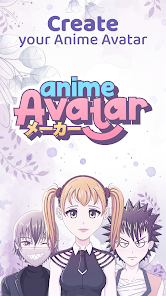
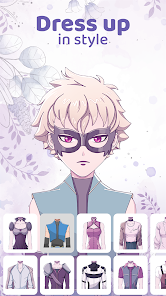
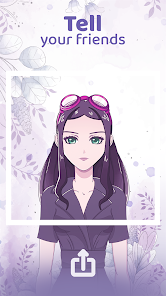
Expert Review
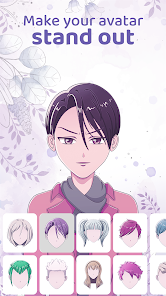
I've been using the Anime Avatar Creator app for a while now, and it's become my go-to for making custom anime-style characters. Basically, it's a character creation tool where you can mix and match hundreds of different facial features, hairstyles, outfits, and accessories to build your own unique anime persona. The app first launched a few years back, and you can easily find and download it for free from the Google Play Store. It has a solid number of installs, which shows it's pretty popular. You don't need to register or sign up to start using it, which is great for just jumping right in. The core app is free, but there are some in-app purchases for extra item packs, and you'll see occasional ads while using it.
Using the app is super straightforward. You start with a base face and then just tap through categories like eyes, nose, mouth, and hair to swap parts. A good tip is to use the color palette tools for each item – you can change hair color, eye color, and even skin tone to get exactly the look you want. I spend a lot of time playing with the layering, putting on glasses over a specific hairstyle or adding background elements. It's really intuitive, and you can save your creations directly to your phone's gallery.
Compared to other similar avatar makers I've tried, like some of the more generic ones or even other anime-focused apps, I keep coming back to this one. The main reason is the sheer volume of art assets. While some apps might have a cleaner interface or slightly different art styles, the Anime Avatar Creator app just has more stuff to play with. The items feel more varied and detailed, which lets me make characters that don't all look the same. For a free download from Google Play, it offers a lot of creative freedom without immediately pushing you to pay, which is why I chose to install it over others.
Key Functional Highlights
- 🎨 Massive Customization Library: The app's standout feature is its enormous collection of assets. Unlike many similar apps that recycle a few dozen items, this one offers hundreds of unique eyes, hairstyles, and outfits. You can spend ages mixing and matching without running out of combinations.
- 🔄 Intuitive Layer-Based Editing: The interface lets you work on different layers (like face, then hair, then accessories), similar to a simple Photoshop for avatars. This is much more powerful than apps that treat the avatar as a single, un-editable image after creation.
- 🎯 Precise Color Control: Every single element, from the iris of an eye to the stripes on a shirt, can be recolored with a full-spectrum color picker. This level of detail is rare in free avatar apps and is a huge step up from competitors that only offer a few preset color options.
- 💾 High-Resolution Export: You can save your creations in really high quality, which is perfect for using them as profile pictures across different platforms. Some other apps in this genre compress the image heavily, but this one keeps the artwork crisp.
Advantages & Benefits
- ✅ Sheer Quantity of Content: Compared to apps like 'Anime Avatar Maker' or 'Gacha Life', this app simply has more free items available from the start, reducing the immediate pressure to make in-app purchases.
- ✅ User-Friendly for Beginners: The drag-and-drop and category-based system is less overwhelming than the studio modes in some similar apps, making it easier for new users to dive right in.
- ✅ Frequent Content Updates: The developers add new item sets regularly, which keeps the app feeling fresh compared to some competitors that haven't been updated in years.
Areas for Improvement
- ❌ Persistent Advertisements: The free version shows full-screen video ads quite frequently, which can interrupt the creative flow. Some similar apps offer a one-time payment to remove ads, which this app lacks.
- ❌ Art Style Consistency: Because items are added in packs, sometimes the art style between new and old items can feel slightly inconsistent, unlike the uniform art in apps like 'Picrew' where everything is made by one artist.
- ❌ Limited Pose Variety: The avatars are mostly in a standard front-facing pose. Apps like 'IMVU' or more advanced creators offer dynamic poses, which this app doesn't have.
Recommended Apps
![]()
ZEPETO: Avatar, Connect & Play
Naver Z Corporation4.3
![]()
Reverse Voice: Flip Singing
NindaFuit0![]()
AI Chat Ask Assistant - NowAI
Now Tech4.3![]()
Lie Detector Test: Prank App
DkTech inc.4.3![]()
Peachy - AI Face & Body Editor
InShot Video Editor4.8
![]()
AI Video Art Creator - Livensa
FERASET4.5![]()
Google Voice
Google LLC4.3![]()
Horoscopes & Tarot
Astrolis Horoscopes4.7![]()
eBay online shopping & selling
eBay Mobile4.6![]()
JPay
Jpay Mobile4.1![]()
Stranger Things 5 Challenges
MVH Entertainment Team5![]()
Chat Master: Prank Story
ABI Game Studio4.8![]()
Google Maps
Google LLC4.2![]()
AI Chat・Ask Chatbot Assistant
AI Chat Studio4.5![]()
Name Meanings with Impact
Alif Innovative Solution3.7















You May Like
-
![]()
True Tarot Card Reading
KaApps4.2 -
![]()
LinkedIn: Jobs & Business News
LinkedIn4.2 -
![]()
iControl: Easy Widgets Themes
Fancy keyboard for theme apps4.6 -
![]()
Duolingo: Language & Chess
Duolingo4.7 -
![]()
Flipped:Chat with AI Character
First Group pte ltd4.1 -
![]()
Hearing Age
Mobile Solutions Tech0 -
![]()
TikTok
TikTok Pte. Ltd.4.4 -
![]()
Pretty Makeup - Beauty Camera
Photo Editor Perfect Corp.4.4 -
![]()
PhotoRoom AI Photo Editor
PhotoRoom Background Editor App4.7 -
![]()
Lightleap by Lightricks
Lightricks Ltd.4.3 -
![]()
Name Meaning
Dexati4.1 -
![]()
Truth Social
T Media Tech LLC3.3 -
![]()
Ace Hardware
Ace Hardware Corporation4.7 -
![]()
Kpop Fans Demon Hunter Wallpap
JHNStudio4.3 -
![]()
Artplay - AI Photo & Video
Hideaway Technology Limited4.5











































