
Pedometer - Step Counter
Simple Design Ltd.
Installs
50M+
Developer
Simple Design Ltd.
-
Category
Health & Fitness
-
Content Rating
Rated for 3+
Developer Email
Privacy Policy
https://simpledesign.ltd/privacypolicy.html?pkg=pedometer.stepcounter.calorieburner.pedometerforwalking
Screenshots
Expert Review
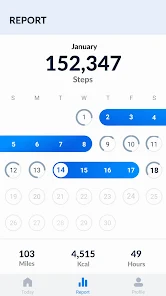
I've been using the Pedometer - Step Counter app for a while now, and it's exactly what it says on the tin. It's a straightforward fitness and health tracking app designed to count your daily steps. I first downloaded it from the Google Play Store a couple of years ago, and it's been on my phone ever since. The app is completely free to install and use, which is a huge plus. You don't need to register or create an account to start tracking, which makes getting started super quick. I just opened it after the download, gave it the necessary permissions, and it was ready to go. It has a massive number of installs on Google Play, which gave me some confidence in trying it out. While the core app is free, there are some optional in-app purchases for extra themes or to remove ads. I do see occasional banner ads, but they're not too intrusive and don't really get in the way of checking my step count.
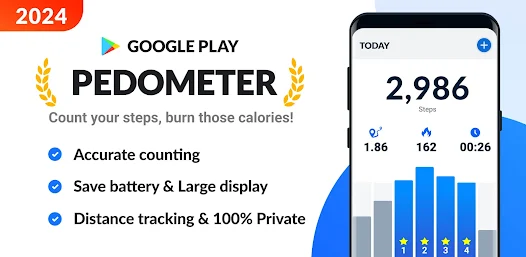
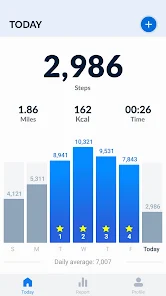
Using the app is incredibly simple. It runs in the background, so I just carry my phone with me, and it automatically tracks my steps throughout the day. I open it a few times to check my progress against my daily goal. A good tip is to make sure you've granted it permission to run in the background and access physical activity; otherwise, it won't count steps correctly. I also like to set a realistic daily goal—something that pushes me to move a bit more but is still achievable. The interface is clean, showing my current steps, distance walked, and calories burned right on the main screen.
I've tried a few other step counter apps before, like Google Fit and Samsung Health, which come pre-installed on many phones. While those are powerful, they can feel a bit bloated with features I don't always use. I chose this Pedometer app because it does one job really well without any fuss. It's lighter, uses less battery, and gives me the information I want at a glance. For someone who just wants a reliable, no-nonsense step counter without the complexity of a full fitness suite, this app from Simple Design Ltd. is a perfect fit. It's become my go-to for daily motivation.
Key Functional Highlights
- 🎯 Pure Step Counting Focus: Unlike comprehensive platforms like Google Fit, this app excels in its singular purpose. It provides a clear, always-on display of your step count, distance, and calories without cluttering the screen with unrelated health metrics or social features.
- ⚡ Extremely Lightweight & Efficient: After you download and install it, you'll notice it has a tiny footprint. It runs very efficiently in the background, which means minimal battery drain compared to some heavier fitness apps that track every possible sensor.
- 🔧 Zero-Friction Setup: There's no lengthy registration process. You install the app, grant permissions, and you're done. This instant usability is a standout feature that gets you tracking your activity within seconds, unlike apps that require account creation first.
Advantages & Benefits
- ✅ Simplicity is Key: Its clean, intuitive interface is its biggest strength. You get your daily stats immediately without navigating menus, making it more user-friendly for quick checks than something like Samsung Health.
- ✅ Truly Free Core: The essential step-tracking functionality is completely free with no trial periods or paywalls, which isn't always the case with similar utilities in this genre.
- ✅ Reliable Background Operation: Once set up, it just works. I've found it to be consistently accurate and reliable in counting steps throughout the day without needing to be reopened.
Areas for Improvement
- ⚠️ Basic Feature Set: It lacks advanced analytics, detailed weekly/monthly charts, or integration with other health apps/wearables that you might find in competitors like Fitbit or Apple Health.
- ⚠️ Presence of Ads: The free version displays banner ads. While not overly intrusive, an ad-free experience requires a purchase, whereas some other step counter apps are completely ad-free.
- ⚠️ Limited Customization: Options for changing goals, units, or the visual theme are somewhat limited compared to more feature-rich apps in the same category on Google Play.
Recommended Apps
![]()
ZEPETO: Avatar, Connect & Play
Naver Z Corporation4.3
![]()
Reverse Voice: Flip Singing
NindaFuit0![]()
AI Chat Ask Assistant - NowAI
Now Tech4.3![]()
Lie Detector Test: Prank App
DkTech inc.4.3![]()
Peachy - AI Face & Body Editor
InShot Video Editor4.8
![]()
AI Video Art Creator - Livensa
FERASET4.5![]()
Google Voice
Google LLC4.3![]()
Horoscopes & Tarot
Astrolis Horoscopes4.7![]()
eBay online shopping & selling
eBay Mobile4.6![]()
JPay
Jpay Mobile4.1![]()
Stranger Things 5 Challenges
MVH Entertainment Team5![]()
Chat Master: Prank Story
ABI Game Studio4.8![]()
Google Maps
Google LLC4.2![]()
AI Chat・Ask Chatbot Assistant
AI Chat Studio4.5![]()
Name Meanings with Impact
Alif Innovative Solution3.7















You May Like
-
![]()
True Tarot Card Reading
KaApps4.2 -
![]()
LinkedIn: Jobs & Business News
LinkedIn4.2 -
![]()
iControl: Easy Widgets Themes
Fancy keyboard for theme apps4.6 -
![]()
Duolingo: Language & Chess
Duolingo4.7 -
![]()
Flipped:Chat with AI Character
First Group pte ltd4.1 -
![]()
Hearing Age
Mobile Solutions Tech0 -
![]()
TikTok
TikTok Pte. Ltd.4.4 -
![]()
Pretty Makeup - Beauty Camera
Photo Editor Perfect Corp.4.4 -
![]()
PhotoRoom AI Photo Editor
PhotoRoom Background Editor App4.7 -
![]()
Lightleap by Lightricks
Lightricks Ltd.4.3 -
![]()
Name Meaning
Dexati4.1 -
![]()
Truth Social
T Media Tech LLC3.3 -
![]()
Ace Hardware
Ace Hardware Corporation4.7 -
![]()
Kpop Fans Demon Hunter Wallpap
JHNStudio4.3 -
![]()
Artplay - AI Photo & Video
Hideaway Technology Limited4.5










































