
Cut Paste Photo Seamless Edit
Peml Art FZC LLC
Installs
50M+
Developer
Peml Art FZC LLC
-
Category
Video Players & Editors
-
Content Rating
Rated for 3+
Developer Email
Privacy Policy
https://peml.art/privacy-policy.html
Screenshots

Expert Review
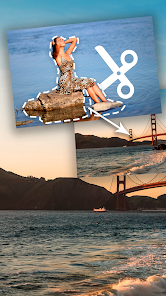
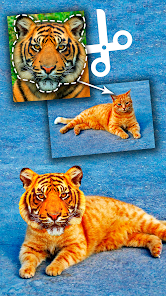
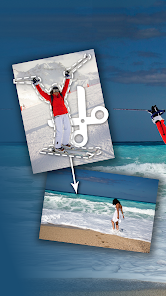
I've been using the Cut Paste Photo app for a few months now, and it's become my go-to tool for quick, fun photo edits. The app, available for free on the Google Play Store, is a photo editing application focused on letting you seamlessly cut out parts of one image and paste them onto another. It's perfect for creating those hilarious or surreal memes, or just for removing an unwanted photobomber from a great shot. Since I downloaded it, I've seen it rack up millions of installs, which isn't surprising given how easy it is to pick up. You don't even need to register an account to start using it, which I really appreciate for privacy and speed. The core download is free, though you'll see some ads and there are optional in-app purchases if you want to unlock extra tools or remove the ads.
Using the app is straightforward. You just pick a background photo and then select the object or person you want to cut from another picture. The automatic selection tool does a decent job, but for tricky edges like hair, I always switch to the manual brush for more control. My top tip is to play with the feather and smoothing options after pasting; it makes the pasted object blend in much better with the new background. I use it all the time to put my dog in ridiculous places, like on top of a mountain or floating in space. It's a blast for creating unique social media posts without needing professional software.
I've tried a few other cut-and-paste apps from the Google Play Store, like Photo Layers and Cut & Paste Studio. While they do similar things, I keep coming back to Cut Paste Photo. The main reason is its balance of simplicity and effectiveness. Some apps have too many confusing buttons, and others make the cutting process a real chore. This app gets me from idea to finished edit the fastest. For the kind of quick, seamless edits I want to do on my phone, it just feels more intuitive. It might not have all the bells and whistles of a premium desktop app, but for a free mobile tool, it's incredibly capable and fun to use.
Key Functional Highlights
- 🖼️ Intuitive Cutting Tools: The selection tools, especially the automatic background remover, are surprisingly accurate for a mobile app. It handles clean edges well, and the manual refine brush is there for when you need pixel-perfect control, making the whole 'cut' part of the process much less frustrating than in some other editors.
- 🎨 Seamless Blending Options: Once you paste your cut-out, the app offers sliders for edge feathering, shadow, and perspective adjustment. This is where the 'seamless' in the app's name really shows. You can make a pasted object look like it naturally belongs in the new scene, which is a step above simpler paste apps that just drop a sharp cut-out on top.
- 📱 Lightweight and Fast: Compared to a bulky all-in-one editor like PicsArt, this app is focused. It launches quickly and doesn't bog down your phone. The interface is clean, so you're not overwhelmed with a hundred different filters and effects you don't need for this specific task.
- ✨ Fun Effects and Overlays: Beyond just pasting, you can add stickers, text, and even simple light effects to your composite image. It turns a basic cut-paste job into a more creative project without having to leave the app.
Advantages & Benefits
- ✅ Ease of Use: It's much simpler to jump into than something like Adobe Photoshop Mix. For a quick edit, I don't want a complex tutorial; this app lets me start creating immediately after I install it.
- ✅ Quality of Auto-Cut: The automatic background removal often works better than the one in similar free apps like 'Background Eraser', saving me a lot of manual work on simple images.
- ✅ No Forced Account: Unlike some apps that pester you to sign up, you can use this one completely anonymously, which is a big plus for a simple utility app.
Areas for Improvement
- ⚠️ Ad Interruptions: The free version shows full-screen ads quite frequently, which can break your creative flow. Apps like 'Photo Layers' have a less intrusive ad model.
- ⚠️ Limited Export Resolution: For very large prints or detailed work, the export resolution can feel a bit limited compared to what you might get from a paid desktop application.
- ⚠️ Advanced Features Locked: Some of the more advanced blending tools and premium stickers are behind a paywall. If you do a lot of editing, you might feel pressured to make an in-app purchase, whereas an app like 'PicsArt' offers a wider range of free tools.
Recommended Apps
![]()
ZEPETO: Avatar, Connect & Play
Naver Z Corporation4.3
![]()
Reverse Voice: Flip Singing
NindaFuit0![]()
AI Chat Ask Assistant - NowAI
Now Tech4.3![]()
Lie Detector Test: Prank App
DkTech inc.4.3![]()
Peachy - AI Face & Body Editor
InShot Video Editor4.8
![]()
AI Video Art Creator - Livensa
FERASET4.5![]()
Google Voice
Google LLC4.3![]()
Horoscopes & Tarot
Astrolis Horoscopes4.7![]()
eBay online shopping & selling
eBay Mobile4.6![]()
JPay
Jpay Mobile4.1![]()
Stranger Things 5 Challenges
MVH Entertainment Team5![]()
Chat Master: Prank Story
ABI Game Studio4.8![]()
Google Maps
Google LLC4.2![]()
AI Chat・Ask Chatbot Assistant
AI Chat Studio4.5![]()
Name Meanings with Impact
Alif Innovative Solution3.7















You May Like
-
![]()
True Tarot Card Reading
KaApps4.2 -
![]()
LinkedIn: Jobs & Business News
LinkedIn4.2 -
![]()
iControl: Easy Widgets Themes
Fancy keyboard for theme apps4.6 -
![]()
Duolingo: Language & Chess
Duolingo4.7 -
![]()
Flipped:Chat with AI Character
First Group pte ltd4.1 -
![]()
Hearing Age
Mobile Solutions Tech0 -
![]()
TikTok
TikTok Pte. Ltd.4.4 -
![]()
Pretty Makeup - Beauty Camera
Photo Editor Perfect Corp.4.4 -
![]()
PhotoRoom AI Photo Editor
PhotoRoom Background Editor App4.7 -
![]()
Lightleap by Lightricks
Lightricks Ltd.4.3 -
![]()
Name Meaning
Dexati4.1 -
![]()
Truth Social
T Media Tech LLC3.3 -
![]()
Ace Hardware
Ace Hardware Corporation4.7 -
![]()
Kpop Fans Demon Hunter Wallpap
JHNStudio4.3 -
![]()
Artplay - AI Photo & Video
Hideaway Technology Limited4.5











































