
Neon LED Keyboard: RGB & Emoji
AZ Mobile Software
Installs
50M+
Developer
AZ Mobile Software
-
Category
Productivity
-
Content Rating
Rated for 3+
Developer Email
Privacy Policy
https://sites.google.com/view/cutewallpapersstudio
Screenshots
Expert Review
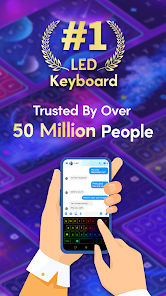
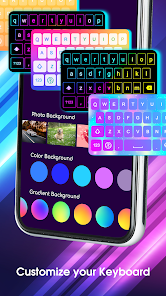
Neon LED Keyboard: RGB & Emoji is a super fun customization app for your Android phone. It lets you completely change how your phone's keyboard looks and feels. The main draw is the awesome neon and RGB lighting effects you can apply to your keys, making typing feel like you're in a cyberpunk movie. You can also add tons of emojis and GIFs right from the keyboard, which is great for spicing up chats. I found this app on the Google Play Store a while back. It's been around for several years, and it's racked up millions of downloads, which shows how popular it is. The best part? You can download and install it for free. You don't even need to create an account to start using it, which I really appreciate for quick setup. Once installed, you just enable it in your phone's settings, and you're good to go. Of course, being a free app, it does show ads, and there are some premium themes and features locked behind in-app purchases if you want the full neon experience without interruptions.
Using the app is pretty straightforward. After you install it, you go into your phone's language & input settings to switch your default keyboard to the Neon LED one. The app itself has a theme store where you can browse and apply different neon designs. My tip is to play with the 'live effects' settings – you can make the keys glow, pulse, or even have a wave effect as you type. It's a bit of a battery drainer with all the lights on full blast, so I usually tone it down a bit. Also, remember to grant it the necessary permissions for features like emoji search and GIF integration for a smoother experience.
I've tried a few similar keyboard apps like Gboard and SwiftKey before settling on this one. While Gboard is fantastic for accuracy and SwiftKey has great prediction, they just don't have the same visual flair. Neon LED Keyboard is all about personal expression. I chose it because I wanted my keyboard to be more than just a tool; I wanted it to be a cool accessory. If you're someone who loves customizing every part of your phone's look and doesn't mind trading a little bit of predictive typing power for stunning visuals, this is the app for you. It turns the mundane act of typing into something much more entertaining.
Key Functional Highlights
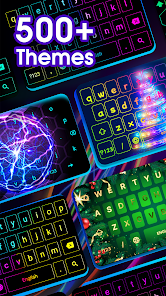
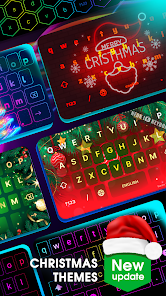
- 🎨 Endless Neon & RGB Themes: Unlike many basic keyboard apps, this one is a paradise for customization. You're not stuck with a few color options. The app offers a huge library of dynamic themes with glowing neon borders, rainbow wave effects, and reactive key presses that light up with every tap. It's a visual experience most standard keyboards completely lack.
- 😎 Built-in Emoji & GIF Hub: While apps like Gboard also have this, Neon LED Keyboard integrates it with its aesthetic. You get a dedicated button for a massive emoji panel and a GIF search engine (powered by Tenor) that lets you find and send animated reactions without ever leaving your chat window, keeping the fun flow going.
- ⚡ Live Typing Effects: This is the standout feature for me. As you type, you can enable effects like a rippling wave across the keys, a trail of light following your finger, or a popping animation for each letter. It's purely for cool factor and makes typing feel incredibly responsive and satisfying, something most utilitarian keyboard apps don't focus on.
- 🔧 Deep Customization Tools: Beyond just themes, you can tweak almost everything. Adjust key size, font style, vibration intensity, and even the sound of the keypress. You can create a keyboard layout and feel that is uniquely yours, which offers more granular control over the typing experience compared to the more streamlined settings in bigger apps.
Advantages & Benefits
- 🌟 Unique Visual Appeal: Its core strength is unmatched aesthetics. Compared to minimalist keyboards or even colorful ones like Kika Keyboard, the neon and RGB effects here are more vibrant, dynamic, and "gamified," offering a truly unique look you won't find elsewhere.
- 💰 Completely Free to Start: You can download, install, and use a solid variety of themes and features without paying upfront, unlike some theme-heavy apps that immediately lock the best looks behind a paywall. The free version is very functional.
- 😊 Emoji/GIF Integration: The access is seamless and fast. While similar to Gboard, having it wrapped in a flashy neon interface makes the process feel more fun and integrated into the app's overall party vibe.
- 🛠️ Surprisingly Lightweight: For an app with so many visual effects, it runs relatively smoothly without major lag on most modern phones, which is a big plus compared to some heavier customization apps that can feel sluggish.
Areas for Improvement
- 📝 Weaker Text Prediction: When stacked against AI-powered giants like Gboard or SwiftKey, its word prediction and autocorrect can feel basic and less accurate. It's serviceable, but not its strong suit.
- 📢 Persistent Ads: The free experience is interrupted by banner and occasional interstitial ads. To remove them, you need an in-app purchase. Apps like Microsoft SwiftKey offer an ad-free experience for free, which is a notable difference.
- 🔋 Battery Consumption: All those glowing lights and animations come at a cost. With heavy use, especially with brightness maxed out, it can have a more noticeable impact on battery life compared to a plain, dark-mode keyboard.
- ⚙️ Setup Complexity: Enabling a third-party keyboard in Android settings can be confusing for less tech-savvy users. The app guides you, but it's still an extra step that simpler, pre-installed apps don't require.
Recommended Apps
![]()
ZEPETO: Avatar, Connect & Play
Naver Z Corporation4.3
![]()
Reverse Voice: Flip Singing
NindaFuit0![]()
AI Chat Ask Assistant - NowAI
Now Tech4.3![]()
Lie Detector Test: Prank App
DkTech inc.4.3![]()
Peachy - AI Face & Body Editor
InShot Video Editor4.8
![]()
AI Video Art Creator - Livensa
FERASET4.5![]()
Google Voice
Google LLC4.3![]()
Horoscopes & Tarot
Astrolis Horoscopes4.7![]()
eBay online shopping & selling
eBay Mobile4.6![]()
JPay
Jpay Mobile4.1![]()
Stranger Things 5 Challenges
MVH Entertainment Team5![]()
Chat Master: Prank Story
ABI Game Studio4.8![]()
Google Maps
Google LLC4.2![]()
AI Chat・Ask Chatbot Assistant
AI Chat Studio4.5![]()
Name Meanings with Impact
Alif Innovative Solution3.7















You May Like
-
![]()
True Tarot Card Reading
KaApps4.2 -
![]()
LinkedIn: Jobs & Business News
LinkedIn4.2 -
![]()
iControl: Easy Widgets Themes
Fancy keyboard for theme apps4.6 -
![]()
Duolingo: Language & Chess
Duolingo4.7 -
![]()
Flipped:Chat with AI Character
First Group pte ltd4.1 -
![]()
Hearing Age
Mobile Solutions Tech0 -
![]()
TikTok
TikTok Pte. Ltd.4.4 -
![]()
Pretty Makeup - Beauty Camera
Photo Editor Perfect Corp.4.4 -
![]()
PhotoRoom AI Photo Editor
PhotoRoom Background Editor App4.7 -
![]()
Lightleap by Lightricks
Lightricks Ltd.4.3 -
![]()
Name Meaning
Dexati4.1 -
![]()
Truth Social
T Media Tech LLC3.3 -
![]()
Ace Hardware
Ace Hardware Corporation4.7 -
![]()
Kpop Fans Demon Hunter Wallpap
JHNStudio4.3 -
![]()
Artplay - AI Photo & Video
Hideaway Technology Limited4.5









































