
Pic Stitch: Collage Maker
Maple Media
Installs
5M+
Developer
Maple Media
-
Category
Video Players & Editors
-
Content Rating
Rated for 12+
Developer Email
Privacy Policy
https://maplemedia.io/privacy/
Screenshots

Expert Review
Pic Stitch: Collage Maker is a photo editing app that lets you combine multiple pictures into a single, stylish collage. It's perfect for anyone who wants to share memories from a trip, create a fun birthday post, or just organize their photos in a more creative way. The app first launched a while back and has become super popular, especially on Android. You can easily find it on the Google Play Store, where it has over 100 million downloads. It's free to download and install, which is a big plus. You don't need to register an account to start using it right away, making it really quick to get into. However, like many free apps, it does show you some ads while you're using it. There are also in-app purchases if you want to unlock extra features or remove the ads.
Using the app is pretty straightforward. After you download it, you just pick the photos from your gallery, choose a layout from tons of options, and then you can edit each photo individually or add filters to the whole collage. A good tip is to play around with the border sizes and colors to make your collage look more polished. You can also add text or stickers before saving or sharing your creation. It's become my go-to for making quick posts for Instagram or Facebook.
When I looked for a collage maker, I tried a few others like Canva and PhotoGrid. While those are great too, I ended up sticking with Pic Stitch. The main reason is its simplicity. For just slapping a few photos together quickly, Pic Stitch feels faster and less cluttered. Canva has more design tools, which is awesome for posters, but it can be overkill for a simple photo grid. PhotoGrid is similar, but I found Pic Stitch's layout library to be more varied for everyday use. So, for a no-fuss, reliable collage app that gets the job done without a steep learning curve, this one is my pick.
Key Functional Highlights
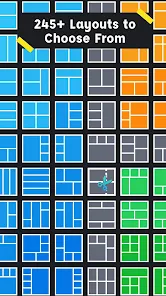
- 🖼️ Massive Layout Library: This app's standout feature is its huge collection of grid and freestyle layouts. Whether you need a classic side-by-side, a fancy multi-photo mosaic, or something for Instagram stories, it's got a template ready. It offers way more specific and fun layouts than the basic options in Google Photos' built-in collage tool.
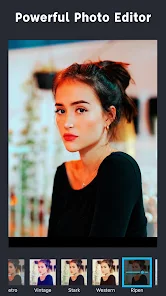
- ✂️ Intuitive Editing Per Photo: Once your photos are in a layout, you can tap on any single picture to adjust its zoom, rotation, or apply a filter just to that one. This level of control is super handy and something simpler apps often lack, letting you perfect each part of the collage.
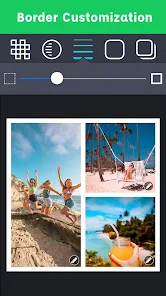
- 🎨 Quick Decoration Tools: Adding final touches is easy with built-in borders (adjustable in size and color), a selection of stickers, and text fonts. This makes your collage look finished and share-worthy in seconds, which is a step up from very bare-bones collage makers.
- 📤 Optimized Sharing: The app saves your collage in high quality and has direct sharing buttons for all major social media platforms. It's faster and more integrated for posting compared to making a collage in an app like Instagram itself, which has very limited layout options.
Advantages & Benefits
- ✅ Sheer Variety of Templates: Compared to similar apps like Layout from Instagram or even PhotoGrid, Pic Stitch simply has a larger and more creative selection of frames and grids, which keeps collage-making fresh.
- ✅ No Account Hassle: You can install and use it immediately without signing up, unlike Canva which requires an account for full functionality. This lowers the barrier to entry.
- ✅ Perfect for Quick Projects: Its interface is streamlined for the core task—making a photo collage fast. It doesn't overwhelm you with advanced graphic design features you might not need.
Areas for Improvement
- ❌ Persistent Ads: The free version displays banner and occasional full-screen ads, which can be intrusive. Apps like Layout by Instagram are completely ad-free.
- ❌ Some Features Locked: Premium templates and the ability to remove ads require a purchase. Other free apps, like Google Photos' collage feature, have no paywalls at all.
- ❌ Can Feel Cluttered: With so many layout options and menu buttons, the interface can feel a bit busy compared to the minimalist design of an app like Instagram's Layout.
Recommended Apps
![]()
ZEPETO: Avatar, Connect & Play
Naver Z Corporation4.3
![]()
Reverse Voice: Flip Singing
NindaFuit0![]()
AI Chat Ask Assistant - NowAI
Now Tech4.3![]()
Lie Detector Test: Prank App
DkTech inc.4.3![]()
Peachy - AI Face & Body Editor
InShot Video Editor4.8
![]()
AI Video Art Creator - Livensa
FERASET4.5![]()
Google Voice
Google LLC4.3![]()
Horoscopes & Tarot
Astrolis Horoscopes4.7![]()
eBay online shopping & selling
eBay Mobile4.6![]()
JPay
Jpay Mobile4.1![]()
Stranger Things 5 Challenges
MVH Entertainment Team5![]()
Chat Master: Prank Story
ABI Game Studio4.8![]()
Google Maps
Google LLC4.2![]()
AI Chat・Ask Chatbot Assistant
AI Chat Studio4.5![]()
Name Meanings with Impact
Alif Innovative Solution3.7















You May Like
-
![]()
True Tarot Card Reading
KaApps4.2 -
![]()
LinkedIn: Jobs & Business News
LinkedIn4.2 -
![]()
iControl: Easy Widgets Themes
Fancy keyboard for theme apps4.6 -
![]()
Duolingo: Language & Chess
Duolingo4.7 -
![]()
Flipped:Chat with AI Character
First Group pte ltd4.1 -
![]()
Hearing Age
Mobile Solutions Tech0 -
![]()
TikTok
TikTok Pte. Ltd.4.4 -
![]()
Pretty Makeup - Beauty Camera
Photo Editor Perfect Corp.4.4 -
![]()
PhotoRoom AI Photo Editor
PhotoRoom Background Editor App4.7 -
![]()
Lightleap by Lightricks
Lightricks Ltd.4.3 -
![]()
Name Meaning
Dexati4.1 -
![]()
Truth Social
T Media Tech LLC3.3 -
![]()
Ace Hardware
Ace Hardware Corporation4.7 -
![]()
Kpop Fans Demon Hunter Wallpap
JHNStudio4.3 -
![]()
Artplay - AI Photo & Video
Hideaway Technology Limited4.5











































