

FaceArt: Filters for Pictures
Lyrebird Studio
Installs
50M+
Developer
Lyrebird Studio
-
Category
Video Players & Editors
-
Content Rating
Rated for 3+
Developer Email
Privacy Policy
https://lyrebirdstudio.net/privacy_policy.htm
Screenshots
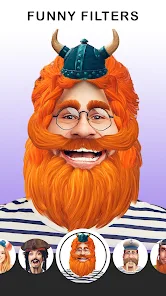
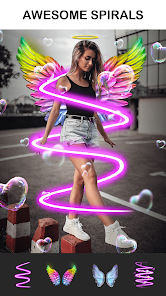
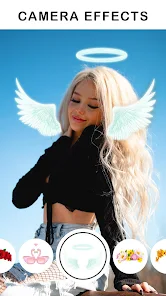

Expert Review
FaceArt: Filters for Pictures is a photo editing app that focuses on adding artistic filters and effects to your pictures. It's designed to transform ordinary photos into something more creative, like turning a portrait into a sketch or a painting. The app first launched a few years back and is available for download on the Google Play Store. It has a solid number of installs, showing it's pretty popular among users looking for a quick artistic touch. You can download and install the app for free. You don't need to register an account to start using it, which is great for jumping right in. While the core app is free, there are some in-app purchases to unlock more premium filters or remove ads. Yes, you will see ads in the free version, but they're usually not too intrusive.
Using the app is straightforward. You just open it, pick a photo from your gallery, and then swipe through the huge collection of filters. My tip is to try the 'Artistic' category first – it has some really cool effects that make photos look like watercolors or oil paintings. You can adjust the intensity of each filter, which is key to getting a natural-looking result instead of something too over-the-top. Another handy feature is you can apply different filters to different parts of the photo, like just the background or just a person's face.
Compared to other apps in the same genre, like Prisma or PicsArt, I find myself choosing FaceArt more often for a specific reason. While Prisma is famous for its neural network styles, it can sometimes feel a bit slow to process. FaceArt feels faster for quick edits. PicsArt is a powerhouse with tons of tools, but it can be overwhelming if you just want to apply a nice filter quickly. FaceArt keeps it simple and focused on the filters, which is exactly what I need most of the time. It's not trying to be a full-blown editor; it's just really good at the one thing it does.
Key Functional Highlights
- 🎨 Massive, Well-Organized Filter Library: The app boasts a huge variety of filters sorted into clear categories like 'Portrait', 'Art', 'Vintage', and 'Food'. This makes it super easy to find the right look for any type of photo without endless scrolling.
- ⚡ Fast Processing and Real-Time Preview: Unlike some similar apps that make you wait for processing, FaceArt applies most filters in real-time as you swipe. This instant feedback lets you experiment quickly and find the perfect effect without any lag.
- ✏️ Selective Editing Brush: This is a standout feature I haven't seen as easily in other filter apps. You can 'paint' a filter onto only specific areas of your photo. Want just the sky to have a dramatic effect or just your eyes to pop? This brush gives you that precise control.
- 📤 One-Tap Social Sharing: Once you're done, exporting and sharing your creation is seamless. The app optimizes the image size for platforms like Instagram or Facebook, so you can post your artistic edit directly without leaving the app.
Advantages & Benefits
- 👍 Focused and Uncluttered Interface: Compared to a behemoth like Adobe Lightroom or even PicsArt, FaceArt's interface is clean and dedicated to filters. You're not distracted by a hundred other editing tools, making the experience faster and more enjoyable for its core purpose.
- 👍 Truly Free Core Experience: Many apps in this genre lock their best filters behind a paywall immediately. FaceArt gives you a generous collection of high-quality filters for free, which is more than enough for casual users. Apps like Prisma feel more restrictive without a subscription.
- 👍 Lower Device Resource Usage: I've noticed FaceArt doesn't drain my phone's battery or heat it up as much as some other intensive photo editors (like VSCO with its complex presets). It's a lightweight app that performs its main job very efficiently.
Areas for Improvement
- 👎 Ad Frequency in Free Version: The trade-off for the free filters is ad frequency. You'll see a full-screen ad after every few edits or filter applications. It can interrupt the creative flow, more so than in apps like Snapseed, which integrates ads more subtly.
- 👎 Limited Advanced Editing Tools: If you need to fix lighting, color balance, or blemishes before applying a filter, you'll need another app. FaceArt lacks basic correction tools that are standard in apps like Google Photos or even Instagram's built-in editor.
- 👎 Filter Quality Can Be Inconsistent: While many filters are great, some can look a bit cheap or overly processed compared to the more refined, algorithm-driven styles in an app like Prisma. The 'painterly' effects sometimes lack the nuanced texture of its premium competitor.
Recommended Apps
![]()
ZEPETO: Avatar, Connect & Play
Naver Z Corporation4.3
![]()
Reverse Voice: Flip Singing
NindaFuit0![]()
AI Chat Ask Assistant - NowAI
Now Tech4.3![]()
Lie Detector Test: Prank App
DkTech inc.4.3![]()
Peachy - AI Face & Body Editor
InShot Video Editor4.8
![]()
AI Video Art Creator - Livensa
FERASET4.5![]()
Google Voice
Google LLC4.3![]()
Horoscopes & Tarot
Astrolis Horoscopes4.7![]()
eBay online shopping & selling
eBay Mobile4.6![]()
JPay
Jpay Mobile4.1![]()
Stranger Things 5 Challenges
MVH Entertainment Team5![]()
Chat Master: Prank Story
ABI Game Studio4.8![]()
Google Maps
Google LLC4.2![]()
AI Chat・Ask Chatbot Assistant
AI Chat Studio4.5![]()
Name Meanings with Impact
Alif Innovative Solution3.7















You May Like
-
![]()
True Tarot Card Reading
KaApps4.2 -
![]()
LinkedIn: Jobs & Business News
LinkedIn4.2 -
![]()
iControl: Easy Widgets Themes
Fancy keyboard for theme apps4.6 -
![]()
Duolingo: Language & Chess
Duolingo4.7 -
![]()
Flipped:Chat with AI Character
First Group pte ltd4.1 -
![]()
Hearing Age
Mobile Solutions Tech0 -
![]()
TikTok
TikTok Pte. Ltd.4.4 -
![]()
Pretty Makeup - Beauty Camera
Photo Editor Perfect Corp.4.4 -
![]()
PhotoRoom AI Photo Editor
PhotoRoom Background Editor App4.7 -
![]()
Lightleap by Lightricks
Lightricks Ltd.4.3 -
![]()
Name Meaning
Dexati4.1 -
![]()
Truth Social
T Media Tech LLC3.3 -
![]()
Ace Hardware
Ace Hardware Corporation4.7 -
![]()
Kpop Fans Demon Hunter Wallpap
JHNStudio4.3 -
![]()
Artplay - AI Photo & Video
Hideaway Technology Limited4.5












































