

Autolist: Used Car Marketplace
Autolist
Installs
5M+
Developer
Autolist
-
Category
Auto & Vehicles
-
Content Rating
Everyone
Developer Email
Privacy Policy
http://www.autolist.com/pages/privacy
Screenshots





Expert Review
Autolist is a used car marketplace app that focuses on helping shoppers find vehicles from dealerships and private sellers across the United States. It is available for download on Google Play and the App Store, and installation is free. The app generates revenue through dealer partnerships and featured listings, so users will see some promotional placements, but there are no in-app purchases required to access the core search tools.
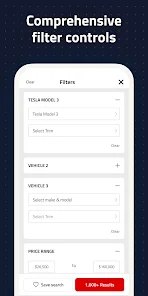
Searching for a vehicle starts with entering a make, model, or body style, along with a zip code and price range. Results appear as a scrollable list with photos, mileage, and dealer ratings. Tapping a listing opens a detail page where you can save the car, contact the seller, or check an estimated price based on similar vehicles in the area. I found the saved search function particularly handy because it sends alerts when new matching listings appear, which cuts down on repetitive manual checking. The interface responds quickly, and filters for transmission, fuel type, and drivetrain are easy to reach without digging through menus.
What separates Autolist from other car search platforms is its emphasis on price transparency rather than sheer inventory volume. Apps like CarGurus and Cars.com cast a wider net, but Autolist often surfaces a cleaner set of local results with fewer duplicate listings. The design feels more utilitarian than flashy, which suits someone who wants to compare prices quickly instead of browsing endless photo galleries. I noticed that some rural areas have thinner inventory, but for metro areas the coverage is solid. The overall experience leans toward efficiency over entertainment, and that seems intentional.
Key Functional Highlights
- Price analysis tools show whether a listing is priced above or below similar vehicles, which adds useful context before contacting a seller.
- Saved searches with push alerts work reliably and reduce the need to open the app multiple times a day.
- Dealer ratings and vehicle history summaries appear directly on listing pages, saving a step compared to apps that require opening a separate tab.
- Compared with CarGurus, the layout feels less cluttered, though the inventory is smaller in some regions.
Advantages & Benefits
- Finding a reasonably priced used car takes less time because listings are sorted with pricing context built in.
- Contacting sellers through the app keeps messages organized in one place.
- Price drop notifications help users act quickly when a saved vehicle becomes more affordable.
- The free version offers enough functionality for most casual car shoppers.
Areas for Improvement
- Some listings are sponsored and appear at the top regardless of how well they match the search filters.
- Inventory in smaller towns can be limited, making the app less useful outside major metro areas.
- The app occasionally shows outdated listings that have already been sold.
- There is no built-in financing calculator, so users need a separate tool for loan estimates.
Recommended Apps
![]()
ZEPETO: Avatar, Connect & Play
Naver Z Corporation4.3
![]()
Reverse Voice: Flip Singing
NindaFuit0![]()
AI Chat Ask Assistant - NowAI
Now Tech4.3![]()
Lie Detector Test: Prank App
DkTech inc.4.3![]()
Peachy - AI Face & Body Editor
InShot Video Editor4.8
![]()
AI Video Art Creator - Livensa
FERASET4.5![]()
Google Voice
Google LLC4.3![]()
Horoscopes & Tarot
Astrolis Horoscopes4.7![]()
eBay online shopping & selling
eBay Mobile4.6![]()
JPay
Jpay Mobile4.1![]()
Stranger Things 5 Challenges
MVH Entertainment Team5![]()
Chat Master: Prank Story
ABI Game Studio4.8![]()
Google Maps
Google LLC4.2![]()
AI Chat・Ask Chatbot Assistant
AI Chat Studio4.5![]()
Name Meanings with Impact
Alif Innovative Solution3.7















You May Like
-
![]()
True Tarot Card Reading
KaApps4.2 -
![]()
LinkedIn: Jobs & Business News
LinkedIn4.2 -
![]()
iControl: Easy Widgets Themes
Fancy keyboard for theme apps4.6 -
![]()
Duolingo: Language & Chess
Duolingo4.7 -
![]()
Flipped:Chat with AI Character
First Group pte ltd4.1 -
![]()
Hearing Age
Mobile Solutions Tech0 -
![]()
TikTok
TikTok Pte. Ltd.4.4 -
![]()
Pretty Makeup - Beauty Camera
Photo Editor Perfect Corp.4.4 -
![]()
PhotoRoom AI Photo Editor
PhotoRoom Background Editor App4.7 -
![]()
Lightleap by Lightricks
Lightricks Ltd.4.3 -
![]()
Name Meaning
Dexati4.1 -
![]()
Truth Social
T Media Tech LLC3.3 -
![]()
Ace Hardware
Ace Hardware Corporation4.7 -
![]()
Kpop Fans Demon Hunter Wallpap
JHNStudio4.3 -
![]()
Artplay - AI Photo & Video
Hideaway Technology Limited4.5












































