
GPS Map Camera - Timestamp
Sliver AI Photo Editor
Installs
5M+
Developer
Sliver AI Photo Editor
-
Category
Productivity
-
Content Rating
Everyone
Developer Email
Privacy Policy
https://docs.google.com/document/d/e/2PACX-1vQ7Y9FW4r7ixX1mzXahMPH2gEliZwbNP9lmCBaryzyflmmX83TJ96Q8h7VOcuhPtFSOe4g0RuXxk8-l/pub
Screenshots


Expert Review
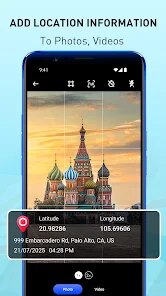
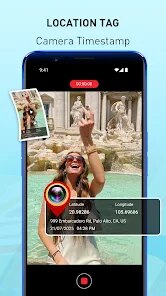
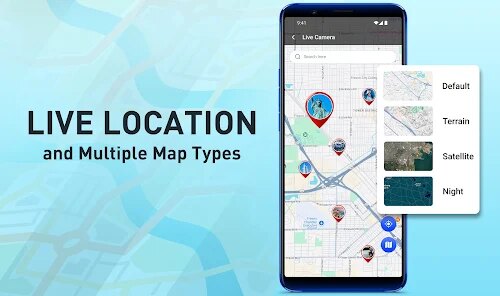
GPS Map Camera - Timestamp developed by Sliver AI Photo Editor is a utility app that overlays location data, date, time, and weather information onto photos taken with a smartphone. Available for free on Google Play, the app has accumulated over ten million downloads and includes both ads and optional in-app purchases for removing watermarks and accessing additional features. It primarily serves travelers, surveyors, real estate agents, and anyone needing photographic evidence with verifiable context.
Upon opening the app, users are presented with a viewfinder that mirrors the phone's camera feed, with customizable overlays at the bottom of the screen. These overlays can include GPS coordinates, street addresses, altitude, compass direction, and even temperature. Users can toggle individual elements on or off, adjust their position within the frame, and choose from several font styles and colors. After capturing an image, the app automatically stamps the selected information onto the photo, which can then be saved or shared directly. The flow feels intuitive enough for first-time users, though some option labels could be more descriptive.
Other timestamp camera apps like Timestamp Camera or GPS Log typically focus on either extreme customization or absolute simplicity. GPS Map Camera - Timestamp sits somewhere in the middle, offering a wider set of data fields than the minimalists but fewer design presets than the more complex alternatives. Where it stands out is the automatic address detection using reverse geocoding, which works reasonably well even offline once a map area has been cached. It is not the most polished option, but it gets the job done without overwhelming the user with unnecessary menus.
Key Functional Highlights
- The reverse geocoding feature is arguably the most useful. Instead of displaying raw coordinates, the app converts them into a readable street address or landmark name. This is particularly helpful for property documentation or travel logs. However, it occasionally misidentifies locations in less populated areas, requiring manual correction.
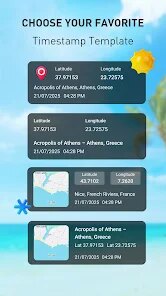
- Customization options cover most practical needs. Users can choose which data fields appear, set their order, change text color and size, and even adjust the background opacity for better readability. Compared to similar apps, GPS Map Camera - Timestamp offers more flexibility here, though the font selection is somewhat limited.
- The batch mode works well for processing multiple photos at once. Users can select images from their gallery, apply the same timestamp format, and export them all in one go. This saves considerable time for field workers who need to stamp hundreds of images daily.
- Weather data integration is a nice extra, pulling temperature and conditions from nearby stations. It adds context for outdoor photography but can be slightly delayed in areas with poor connectivity, sometimes showing outdated information by an hour or more.
Advantages & Benefits
- It provides reliable photographic evidence for work-related documentation, reducing disputes about when and where a photo was taken.
- The offline address feature works after initial caching, which is helpful in remote areas with no mobile signal.
- Batch processing saves time when handling large sets of images for reports or social media posts.
- Customizable overlays help maintain a consistent look across all images in a project, which improves professionalism.
Areas for Improvement
- The free version includes a small watermark that can be distracting, and removing it requires a purchase that some may find expensive for occasional use.
- Occasional address errors in rural areas mean users should always double-check the accuracy before using photos officially.
- The camera interface sometimes lags on older phone models, making it slower to capture spontaneous shots compared to the default camera app.
- Weather updates can be stale in weak signal zones, which might mislead viewers about actual conditions if not noticed.
Recommended Apps
![]()
ZEPETO: Avatar, Connect & Play
Naver Z Corporation4.3
![]()
Reverse Voice: Flip Singing
NindaFuit0![]()
AI Chat Ask Assistant - NowAI
Now Tech4.3![]()
Lie Detector Test: Prank App
DkTech inc.4.3![]()
Peachy - AI Face & Body Editor
InShot Video Editor4.8
![]()
AI Video Art Creator - Livensa
FERASET4.5![]()
Google Voice
Google LLC4.3![]()
Horoscopes & Tarot
Astrolis Horoscopes4.7![]()
eBay online shopping & selling
eBay Mobile4.6![]()
JPay
Jpay Mobile4.1![]()
Stranger Things 5 Challenges
MVH Entertainment Team5![]()
Chat Master: Prank Story
ABI Game Studio4.8![]()
Google Maps
Google LLC4.2![]()
AI Chat・Ask Chatbot Assistant
AI Chat Studio4.5![]()
Name Meanings with Impact
Alif Innovative Solution3.7















You May Like
-
![]()
True Tarot Card Reading
KaApps4.2 -
![]()
LinkedIn: Jobs & Business News
LinkedIn4.2 -
![]()
iControl: Easy Widgets Themes
Fancy keyboard for theme apps4.6 -
![]()
Duolingo: Language & Chess
Duolingo4.7 -
![]()
Flipped:Chat with AI Character
First Group pte ltd4.1 -
![]()
Hearing Age
Mobile Solutions Tech0 -
![]()
TikTok
TikTok Pte. Ltd.4.4 -
![]()
Pretty Makeup - Beauty Camera
Photo Editor Perfect Corp.4.4 -
![]()
PhotoRoom AI Photo Editor
PhotoRoom Background Editor App4.7 -
![]()
Lightleap by Lightricks
Lightricks Ltd.4.3 -
![]()
Name Meaning
Dexati4.1 -
![]()
Truth Social
T Media Tech LLC3.3 -
![]()
Ace Hardware
Ace Hardware Corporation4.7 -
![]()
Kpop Fans Demon Hunter Wallpap
JHNStudio4.3 -
![]()
Artplay - AI Photo & Video
Hideaway Technology Limited4.5












































