
AI Art Photo Editor, AI Filter
Smart AI DEV
Installs
5M+
Developer
Smart AI DEV
-
Category
Generative AI
-
Content Rating
Rated for 3+
Developer Email
Privacy Policy
https://coolsummerdev.com/avatar-privacy-policy
Screenshots

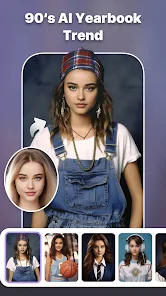
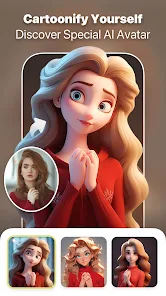
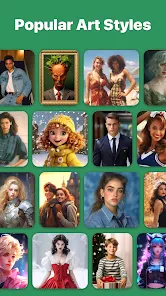
Expert Review
I've been using this AI Art Photo Editor app for a few months now, and it's become my go-to for turning regular photos into something really creative. It's an AI-powered photo editing app, and its main thing is applying artistic filters and effects to your pictures. You can download it for free from the Google Play Store. I'm not sure exactly when it first launched, but it's been around for a while and has a solid number of installs. You don't need to register an account to start using it, which I really appreciate for a quick edit. The core download and install are free, and you can use a bunch of filters right away. There are in-app purchases if you want to unlock all the premium filters and remove ads, and yeah, you will see some ads in the free version.
Using the app is pretty straightforward. You just open it, pick a photo from your gallery, and then browse through the different AI filter categories. My tip is to try the 'Artistic' and 'Painting' styles first – they give the most dramatic transformations. Sometimes the app takes a few seconds to process the image, but the results are usually worth the wait. I also like that you can adjust the intensity of the filter after applying it, so you don't lose all the original details.
I've tried other similar apps like Prisma and PicsArt, but I keep coming back to this one. Prisma has great styles too, but I find this AI Art Photo Editor to be faster on my phone and the filters feel a bit more varied. PicsArt is more of a full editing suite, which is great, but sometimes I just want to apply a cool AI effect quickly without all the other tools. This app is perfect for that specific job. It's lightweight, simple, and gets the creative part done without any fuss.
Key Functional Highlights
- 🎨 Diverse AI Filter Library: The app boasts a huge collection of AI-powered filters, from turning photos into Van Gogh-style paintings to sleek digital art and anime styles. It has more niche categories than many competitors, so you're more likely to find a unique look.
- ⚡ One-Tap Processing: Compared to a popular app like Prisma, which can sometimes have a longer processing time, this app often applies complex filters surprisingly fast after the initial download and install, making quick edits a breeze.
- 🔧 Post-Filter Adjustments: A standout feature is the ability to fine-tune effects after applying them. You can dial the intensity up or down, which gives you more control over the final look compared to apps that just give you a static filter.
- 📱 Lightweight and Simple: The app's interface is clean and focused purely on AI art transformation. Unlike bloated editors, it doesn't overwhelm you with tools you don't need for this specific genre of creative editing.
Advantages & Benefits
- ✅ Completely Free to Start: You can download, install, and use a wide range of filters without paying a cent, which is more generous than some similar apps that lock basic features behind a paywall.
- ✅ No Mandatory Account: You don't need to sign up or log in to use the app, offering more privacy and immediate access compared to apps like PicsArt which require registration.
- ✅ Unique Filter Styles: It has some artistic filters I haven't found in other apps like Prisma or Dream by WOMBO, especially in its abstract and comic book categories.
- ✅ Frequent Updates: The developers add new filter packs regularly, keeping the app fresh and expanding its creative possibilities over time.
Areas for Improvement
- ❌ Persistent Ads in Free Version: The ads can be quite intrusive between edits, more so than in the free tiers of some competing apps, which can disrupt the creative flow.
- ❌ Limited Free Exports: Some similar apps offer unlimited saves, but this one sometimes applies a watermark or limits resolution on free exports, pushing you towards the premium version.
- ❌ Occasional Processing Bugs: Every now and then, a filter might not apply correctly or the app could crash, an issue I've encountered less often with more established apps in this genre.
- ❌ Basic Editing Tools: If you need to crop or adjust brightness before applying a filter, you'll need another app. It lacks the basic toolkit that comes built into apps like PicsArt.
Recommended Apps
![]()
ZEPETO: Avatar, Connect & Play
Naver Z Corporation4.3
![]()
Reverse Voice: Flip Singing
NindaFuit0![]()
AI Chat Ask Assistant - NowAI
Now Tech4.3![]()
Lie Detector Test: Prank App
DkTech inc.4.3![]()
Peachy - AI Face & Body Editor
InShot Video Editor4.8
![]()
AI Video Art Creator - Livensa
FERASET4.5![]()
Google Voice
Google LLC4.3![]()
Horoscopes & Tarot
Astrolis Horoscopes4.7![]()
eBay online shopping & selling
eBay Mobile4.6![]()
JPay
Jpay Mobile4.1![]()
Stranger Things 5 Challenges
MVH Entertainment Team5![]()
Chat Master: Prank Story
ABI Game Studio4.8![]()
Google Maps
Google LLC4.2![]()
AI Chat・Ask Chatbot Assistant
AI Chat Studio4.5![]()
Name Meanings with Impact
Alif Innovative Solution3.7















You May Like
-
![]()
True Tarot Card Reading
KaApps4.2 -
![]()
LinkedIn: Jobs & Business News
LinkedIn4.2 -
![]()
iControl: Easy Widgets Themes
Fancy keyboard for theme apps4.6 -
![]()
Duolingo: Language & Chess
Duolingo4.7 -
![]()
Flipped:Chat with AI Character
First Group pte ltd4.1 -
![]()
Hearing Age
Mobile Solutions Tech0 -
![]()
TikTok
TikTok Pte. Ltd.4.4 -
![]()
Pretty Makeup - Beauty Camera
Photo Editor Perfect Corp.4.4 -
![]()
PhotoRoom AI Photo Editor
PhotoRoom Background Editor App4.7 -
![]()
Lightleap by Lightricks
Lightricks Ltd.4.3 -
![]()
Name Meaning
Dexati4.1 -
![]()
Truth Social
T Media Tech LLC3.3 -
![]()
Ace Hardware
Ace Hardware Corporation4.7 -
![]()
Kpop Fans Demon Hunter Wallpap
JHNStudio4.3 -
![]()
Artplay - AI Photo & Video
Hideaway Technology Limited4.5











































