
MagicWidgets: Themepack & Icon
One Office Premium
Installs
5M+
Developer
One Office Premium
-
Category
Productivity
-
Content Rating
Rated for 3+
Developer Email
Privacy Policy
https://sites.google.com/view/privacypolicyidletyccon
Screenshots
Expert Review
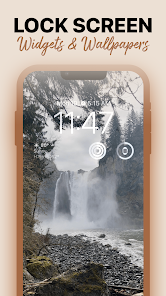
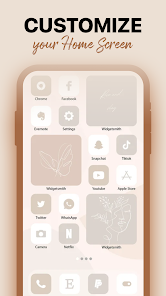
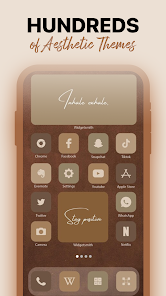
MagicWidgets: Themepack & Icon is a customization app that lets you change the look of your Android phone's home screen with widgets and icon packs. It's basically a tool for personalizing your device without needing any technical skills. The app first launched a few years back, and you can find it on the Google Play Store. It's racked up a decent number of downloads, well into the millions. The app itself is free to download and install, which is always a good start. You don't need to register an account to start using it, which I appreciate for simplicity. Once you have it installed, you'll find there are in-app purchases to unlock more themes and icon packs, and you might also see some ads while browsing the collections.
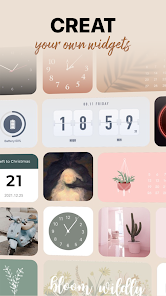
Using the app is pretty straightforward. After you install it, you just pick a theme or icon pack you like from the gallery. The app then guides you through applying it, usually involving a separate launcher app. A good tip is to make sure you have a launcher like Nova or Lawnchair installed first, as it makes the whole process smoother. I spend a lot of time just browsing the different styles—they have everything from minimalist designs to really colorful, detailed ones. It's fun to mix and match widgets with new icon sets to create a completely unique home screen look.
When I compare it to other similar apps in the customization genre, like KWGT or Icon Pack Studio, I keep coming back to MagicWidgets. The main reason is its focus on complete 'themepacks'. While other apps might make you build widgets from scratch or just change icons, this app bundles matching widgets and icons together. It saves so much time. For someone who isn't a design pro, having a coordinated set ready to go is a huge plus. Other apps can feel a bit fragmented, but MagicWidgets delivers a more polished, one-stop result, which is why I chose it for my daily driver.
Key Functional Highlights
- 🎯 Complete Theme Packages: Unlike many widget or icon-only apps, MagicWidgets bundles coordinated widgets, wallpapers, and icons into single themepacks. This means you get a unified look instantly without the hassle of manually matching elements from different sources.
- 🎯 User-Friendly Application: The app includes clear, step-by-step guides for applying themes. It often integrates directly with popular third-party launchers, making the install and apply process much simpler than manually configuring complex widgets in apps like KWGT.
- 🎯 Vast and Varied Library: The available collection on Google Play is massive and frequently updated. Whether you're into neon aesthetics, natural landscapes, or abstract art, there's likely a themepack for it, offering more immediate variety than creating everything yourself.
Advantages & Benefits
- ✨ Cohesive Design Out-of-the-Box: The pre-bundled themepacks ensure everything matches perfectly, a strength over piecing together icons from one app and widgets from another.
- ✨ Lower Barrier to Entry: It's far easier for beginners to use than powerful but complex competitors like KWGT Kustom Widget Maker.
- ✨ Regular New Content: The developers consistently release new packs, keeping the app fresh compared to some static icon pack apps.
Areas for Improvement
- ⚠️ Reliance on In-App Purchases: To access the best and most unique themepacks, you almost always need to pay. The free selection can feel limited next to a completely free app like Icon Pack Studio (which uses AI generation).
- ⚠️ Ads in the Free Version: Browsing the catalog is interrupted by ads, which can be annoying. Some direct competitors offer a cleaner, ad-free browsing experience.
- ⚠️ Requires a Compatible Launcher: To fully use the icon packs, you must install and set up a third-party launcher, which adds an extra step not required by all customization apps.
Recommended Apps
![]()
ZEPETO: Avatar, Connect & Play
Naver Z Corporation4.3
![]()
Reverse Voice: Flip Singing
NindaFuit0![]()
AI Chat Ask Assistant - NowAI
Now Tech4.3![]()
Lie Detector Test: Prank App
DkTech inc.4.3![]()
Peachy - AI Face & Body Editor
InShot Video Editor4.8
![]()
AI Video Art Creator - Livensa
FERASET4.5![]()
Google Voice
Google LLC4.3![]()
Horoscopes & Tarot
Astrolis Horoscopes4.7![]()
eBay online shopping & selling
eBay Mobile4.6![]()
JPay
Jpay Mobile4.1![]()
Stranger Things 5 Challenges
MVH Entertainment Team5![]()
Chat Master: Prank Story
ABI Game Studio4.8![]()
Google Maps
Google LLC4.2![]()
AI Chat・Ask Chatbot Assistant
AI Chat Studio4.5![]()
Name Meanings with Impact
Alif Innovative Solution3.7















You May Like
-
![]()
True Tarot Card Reading
KaApps4.2 -
![]()
LinkedIn: Jobs & Business News
LinkedIn4.2 -
![]()
iControl: Easy Widgets Themes
Fancy keyboard for theme apps4.6 -
![]()
Duolingo: Language & Chess
Duolingo4.7 -
![]()
Flipped:Chat with AI Character
First Group pte ltd4.1 -
![]()
Hearing Age
Mobile Solutions Tech0 -
![]()
TikTok
TikTok Pte. Ltd.4.4 -
![]()
Pretty Makeup - Beauty Camera
Photo Editor Perfect Corp.4.4 -
![]()
PhotoRoom AI Photo Editor
PhotoRoom Background Editor App4.7 -
![]()
Lightleap by Lightricks
Lightricks Ltd.4.3 -
![]()
Name Meaning
Dexati4.1 -
![]()
Truth Social
T Media Tech LLC3.3 -
![]()
Ace Hardware
Ace Hardware Corporation4.7 -
![]()
Kpop Fans Demon Hunter Wallpap
JHNStudio4.3 -
![]()
Artplay - AI Photo & Video
Hideaway Technology Limited4.5










































