

Aura Frames
Aura Home, Inc.
Installs
500,000+
Developer
Aura Home, Inc.
-
Category
Productivity
-
Content Rating
Rated for 3+
Developer Email
Privacy Policy
https://auraframes.com/privacy
Screenshots


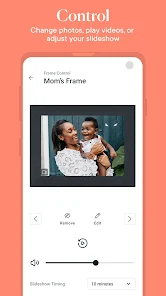
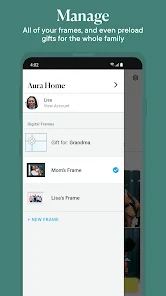
Expert Review
Aura Frames is a digital photo frame app that works with the Aura physical frames. It's designed to let you easily send photos from your phone to a loved one's frame, no matter where they are. The app itself is free to download and install from both the Google Play Store and the Apple App Store. It launched a few years back to support the hardware frames, and it's become a popular way for families to stay connected visually. You don't need to pay to get the app, but you do need to register an account to use it, as that's how it links you to specific frames. While the app is free, the whole system is built around the Aura frame product. There aren't intrusive ads popping up, but there are prompts within the app about frame offers or subscriptions for additional cloud storage. The core service of sending photos to a frame you own or manage is included.
Using the Aura Frames app is pretty straightforward. Once you set up an account and connect to a frame (which involves a simple code), your main screen becomes a curated gallery. You can select photos from your phone's library and send them directly to the frame with a tap. A neat tip is that you can invite other family members to the same frame, so everyone can contribute pictures—it turns into a collaborative family album. The app also lets you create playlists or set schedules for when certain photos appear, which is great for surprises. I mostly use it to send daily snaps of my kids to my parents' frame; they love seeing new pictures pop up without having to check their phones.
Compared to other digital frame apps or services, like the one for Nixplay frames, I chose Aura Frames for its simplicity and focus. The Aura app feels less cluttered. Its whole purpose is sending pictures to that one place, and it does that job without extra social features or complicated menus. Some similar apps try to do too much or have interfaces that aren't as intuitive for older relatives who might be on the receiving end. With Aura, once it's set up, it just works. You pick a photo, hit send, and it's on the frame. For a dedicated digital frame experience, this app nails the essential task without fuss.
Key Functional Highlights
- 🖼️ Seamless Frame Connection: The core feature is its flawless pairing with the Aura hardware. Unlike generic gallery apps, this app is built specifically for the frame, making setup and daily use incredibly smooth. You're not just uploading to a cloud album; you're sending directly to a dedicated display.
- 👨👩👧👦 Multi-User Collaboration: You can invite multiple people to contribute to a single frame. This is a standout feature compared to many solo-operated frame systems. It turns the frame into a live, shared family hub where grandparents, parents, and kids can all add memories.
- 🎞️ Smart Playlists & Scheduling: The app lets you organize photos into playlists and schedule them. Want only vacation photos to show in the evening? Or a birthday surprise at a specific time? This level of control is more advanced than the basic slideshow modes in many competing frame apps.
- 📱 Dedicated Mobile Experience: As a mobile-first app, it leverages your phone's camera roll perfectly. The process to select and send is optimized for quick, on-the-go sharing, which feels more immediate than using a web portal or a less focused companion app.
Advantages & Benefits
- ✅ Superior Ease of Use: The interface is cleaner and more intuitive than apps for frames like Nixplay. For less tech-savvy users receiving the photos, the simplicity is a huge strength.
- ✅ Reliable Delivery: Photos sent via the app appear on the frame quickly and reliably. I've had fewer sync issues compared to some other frame ecosystems I've tried.
- ✅ Focused Purpose: It doesn't try to be a social media app or a generic cloud storage. This focus means it performs its primary job—sending pictures to a frame—exceptionally well.
Areas for Improvement
- ❌ Hardware Lock-In: The app is useless without an Aura frame. This is a weakness compared to more platform-agnostic services that might work with various frames or smart TVs.
- ❌ Limited Free Cloud Storage: While the app is free, full-resolution storage and extensive history rely on a subscription. Some competitors offer more generous permanent cloud storage with their frame purchase.
- ❌ Basic Photo Editing: The in-app editing tools are very minimal. If you want to crop or filter a photo before sending, you'll need to use another app first.
Recommended Apps
![]()
ZEPETO: Avatar, Connect & Play
Naver Z Corporation4.3
![]()
Reverse Voice: Flip Singing
NindaFuit0![]()
AI Chat Ask Assistant - NowAI
Now Tech4.3![]()
Lie Detector Test: Prank App
DkTech inc.4.3![]()
Peachy - AI Face & Body Editor
InShot Video Editor4.8
![]()
AI Video Art Creator - Livensa
FERASET4.5![]()
Google Voice
Google LLC4.3![]()
Horoscopes & Tarot
Astrolis Horoscopes4.7![]()
eBay online shopping & selling
eBay Mobile4.6![]()
JPay
Jpay Mobile4.1![]()
Stranger Things 5 Challenges
MVH Entertainment Team5![]()
Chat Master: Prank Story
ABI Game Studio4.8![]()
Google Maps
Google LLC4.2![]()
AI Chat・Ask Chatbot Assistant
AI Chat Studio4.5![]()
Name Meanings with Impact
Alif Innovative Solution3.7















You May Like
-
![]()
True Tarot Card Reading
KaApps4.2 -
![]()
LinkedIn: Jobs & Business News
LinkedIn4.2 -
![]()
iControl: Easy Widgets Themes
Fancy keyboard for theme apps4.6 -
![]()
Duolingo: Language & Chess
Duolingo4.7 -
![]()
Flipped:Chat with AI Character
First Group pte ltd4.1 -
![]()
Hearing Age
Mobile Solutions Tech0 -
![]()
TikTok
TikTok Pte. Ltd.4.4 -
![]()
Pretty Makeup - Beauty Camera
Photo Editor Perfect Corp.4.4 -
![]()
PhotoRoom AI Photo Editor
PhotoRoom Background Editor App4.7 -
![]()
Lightleap by Lightricks
Lightricks Ltd.4.3 -
![]()
Name Meaning
Dexati4.1 -
![]()
Truth Social
T Media Tech LLC3.3 -
![]()
Ace Hardware
Ace Hardware Corporation4.7 -
![]()
Kpop Fans Demon Hunter Wallpap
JHNStudio4.3 -
![]()
Artplay - AI Photo & Video
Hideaway Technology Limited4.5










































